

Close Menu
AI News TodayAI News Today

    Subscribe to Updates

    Get the latest creative news from FooBar about art, design and business.

    What's Hot

    Microsoft Copilot Ease of Use Review: What 12 Real Users Taught Me

    DeepMind’s AGI Timeline: The Dates, the Doubts and the Signals That Matter

    ChatGPT Certification: What the Certificate Actually Proves

    Facebook X (Twitter) Instagram
    • About Us
    • Contact Us
    Facebook X (Twitter) Instagram Pinterest Vimeo
    AI News TodayAI News Today
    • Home
    • AI News
    • AI Reviews
    • AI Tools
    • AI Tutorials
    • Chatbots
    • AGI
    • Artificial Intelligence
    AI News TodayAI News Today
    Home»AI Tutorials»Markdown SVG upgrades
    AI Tutorials

    Markdown SVG upgrades

    By Updated:No Comments2 Mins Read
    Share Facebook Twitter Pinterest LinkedIn Tumblr Reddit Telegram Email
    The same text, but now the code block has been replaced by a tabbed panel. The selected tab reads "Rendered" and shows the rendered PNG. The other tabs are PNG, JPEG, MP4, and Code
    Share
    Facebook Twitter LinkedIn Pinterest Email

    16th August 2026

    I started building my markdown-svg-renderer tool in May, but I’ve since added enough features to it that it’s worth talking about here again.

    It’s evolved into my ideal tool for sharing Markdown transcripts that include SVG documents. Given my proclivity for drawing pelicans riding bicycles this is a problem that I needed to solve!

    The tool is very simple. Navigate to markdown-svg-renderer in your browser and paste in some Markdown to see it rendered… or save that Markdown to a CORS-friendly URL or a GitHub Gist and paste in a URL to that document.

    The URL option will give you a bookmarkable page, for example https://tools.simonwillison.net/markdown-svg-renderer#url=https%3A%2F%2Fgist.github.com%2Fsimonw%2F6f9e48293be5c916652d29f0dc0b0657 – which bakes in the URL to this Gist.

    If you visit the Gist you’ll see raw SVG:

    In the rendered tool that looks like this instead:
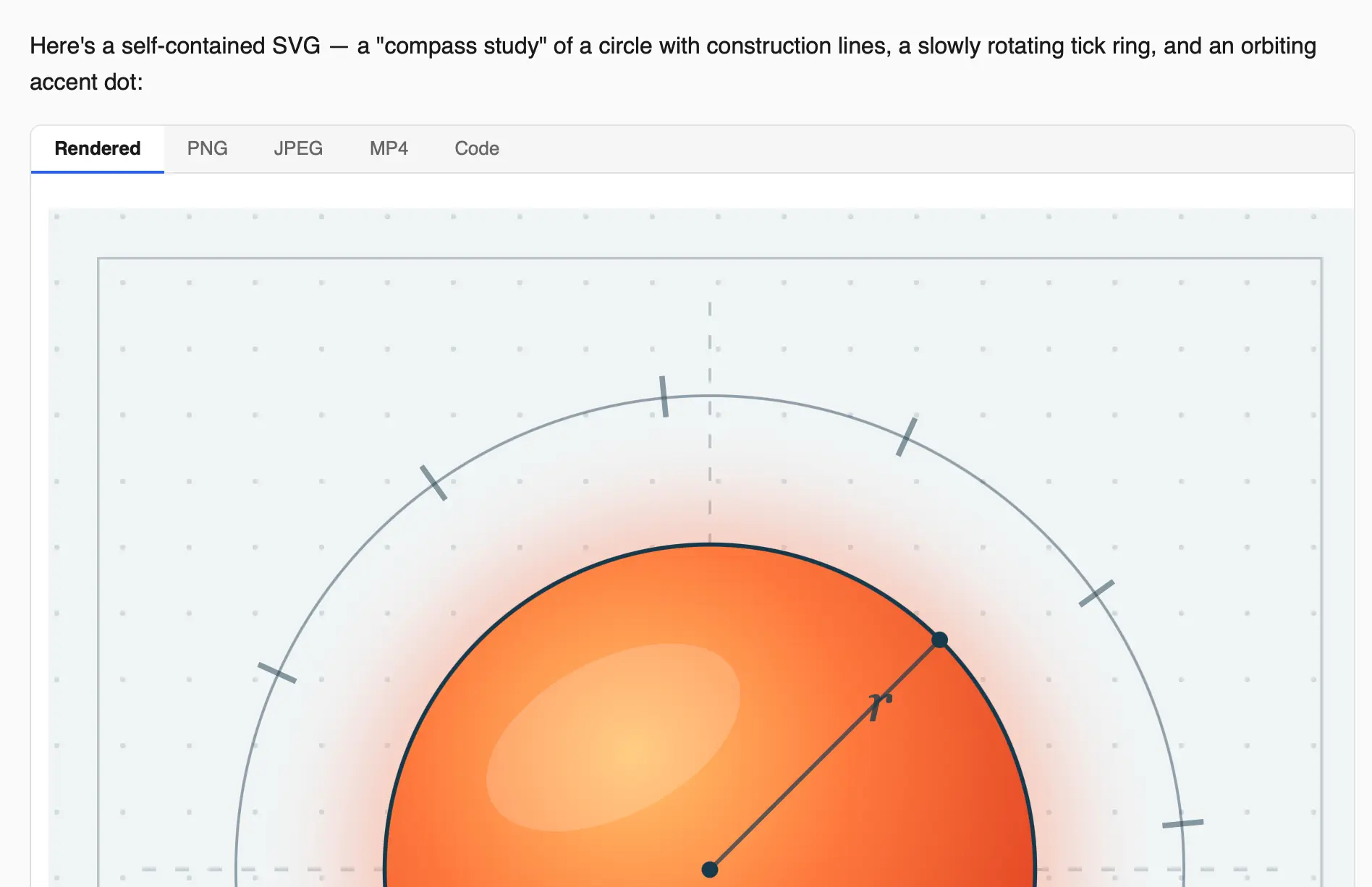
    The same text, but now the code block has been replaced by a tabbed panel. The selected tab reads "Rendered" and shows the rendered PNG. The other tabs are PNG, JPEG, MP4, and Code

    As you can see, that SVG block in the Markdown has been transformed into a rendered SVG (in this case animated) plus several tabs.

    The tabs are the really fun bit. The PNG and JPEG tabs render that SVG to those image formats in the browser and lets you copy or download them – useful for sharing on platforms that don’t support SVG directly.

    The MP4 tab is new today – it examines the SVG to see if it contains any animations, attempts to guess how long the looped video should be, then renders a whole bunch of frames of the animation and loads 30+MB of ffmpeg.wasm so it can compile those frames into an MP4 video using the full power of FFMPEG compiled to WebAssembly and running in the browser.

    Being able to turn an animated SVG into a MP4 again makes it easy to share on platforms that can’t support SVG animation natively. It’s a neat trick!

    Markdown SVG upgrades
    Share. Facebook Twitter Pinterest LinkedIn Tumblr Email
    Previous ArticleWordle Hints, Answer and Help for Aug. 17, #1885
    Next Article D23: All the New Lands and Rides Revealed for Disneyland and Disney World
    • Website

    Related Posts

    AI Tutorials

    ChatGPT Certification: What the Certificate Actually Proves

    AI Tutorials

    ChatGPT Training That Actually Sticks: What to Learn, What to Skip

    AI Tutorials

    ChatGPT Classes: What You’ll Actually Learn (and What’s Just Hype)

    Add A Comment
    Leave A Reply Cancel Reply

    Top Posts

    Microsoft Copilot Ease of Use Review: What 12 Real Users Taught Me

    0 Views

    DeepMind’s AGI Timeline: The Dates, the Doubts and the Signals That Matter

    0 Views

    ChatGPT Certification: What the Certificate Actually Proves

    1 Views
    Stay In Touch
    • Facebook
    • YouTube
    • TikTok
    • WhatsApp
    • Twitter
    • Instagram
    Latest Reviews
    AI Tutorials

    Quantization from the ground up

    AI Tools

    David Sacks is done as AI czar — here’s what he’s doing instead

    AI Reviews

    Judge sides with Anthropic to temporarily block the Pentagon’s ban

    Subscribe to Updates

    Get the latest tech news from FooBar about tech, design and biz.

    Most Popular

    Microsoft Copilot Ease of Use Review: What 12 Real Users Taught Me

    0 Views

    DeepMind’s AGI Timeline: The Dates, the Doubts and the Signals That Matter

    0 Views

    ChatGPT Certification: What the Certificate Actually Proves

    1 Views
    Our Picks

    Quantization from the ground up

    David Sacks is done as AI czar — here’s what he’s doing instead

    Judge sides with Anthropic to temporarily block the Pentagon’s ban

    Subscribe to Updates

    Get the latest creative news from FooBar about art, design and business.

    Facebook X (Twitter) Instagram Pinterest
    • About Us
    • Contact Us
    • Terms & Conditions
    • Privacy Policy
    • Disclaimer

    © 2026 ainewstoday.co. All rights reserved. Designed by DD.

    Type above and press Enter to search. Press Esc to cancel.