

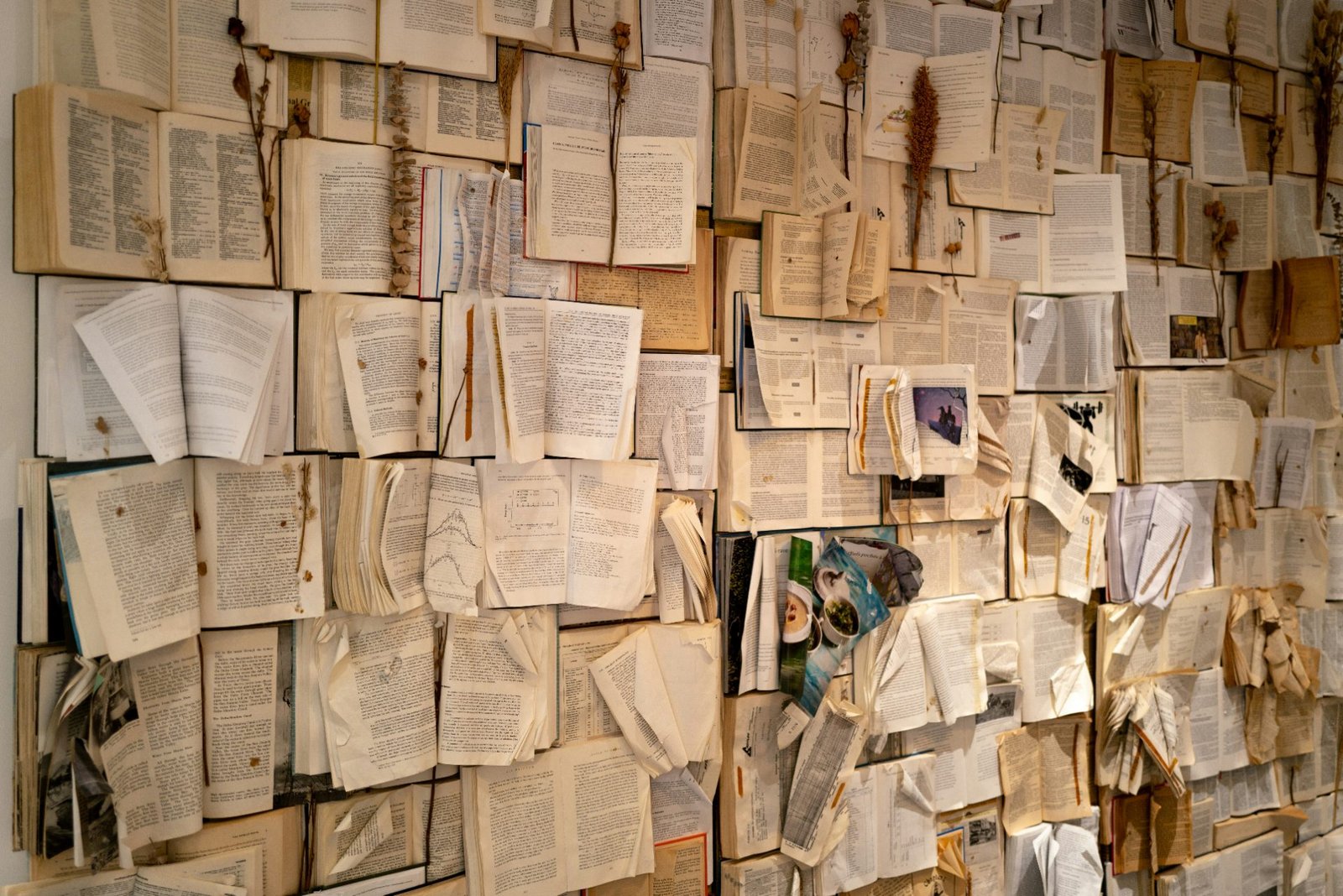
Dozens of abandoned ideas, code spread across countless repos and hundreds of research papers you read over 4 years ago. The thesis write-up is an attempt at making sense of this mess — a daunting task if your PhD journey was anything like mine. Thankfully, we now have the greatest tool of information synthesis to help.
I want to share the ways that I used AI tools. These include: a research assistant for finding citations, combining code from multiple experiments to improve reproducibility, fact-checking against cited papers. and generating defence questions based on my work. I’ll give specific prompts and details of the tools I used. You will see that we can implement these with a basic subscription from one of the AI companies.
At the same time, I hope this guide will help us avoid works of academic slop. These applications in no way offload mental bandwidth to an AI system, and in some cases they even increased the amount of time I put into the thesis. This is because they are not aimed at “writing” the thesis but at helping me produce a better piece of work than I would have been able to alone. In this way, I hope the applications can benefit anyone trying to produce a complex piece of writing.
1) Citation finder (research assistant)
The topic of my PhD was deep learning for coastal erosion monitoring. It involved developing models and frameworks for automatically detecting coastline proxies like the vegetation line (VL) (see Figure 1). I read many papers, from specific deep learning architectures to those applying them to general remote sensing problems and even geological studies in my country of interest, Ireland. By the end, I could write a sentence, be reasonably sure it was correct and know roughly which collection of papers could be used to cite it.
Vegetation lines on Bull Island, Ireland, from Geological Survey Ireland annotation compared with a deep learning model on Sentinel-2 imagery. Mean absolute error of 1.9m.
The problem is I read many of these papers 3-4 years ago and, without the hindsight of an exhausted final-year student, made no attempt at summarising them. Trying to dig out the best citation would require rereading them until I found the point I was looking for. As a blessing to my sanity, this use case is a RAG system in disguise — something LLMs are good at. However, we need to be careful not to incorrectly cite anyone, as this is a lesser-known form of plagiarism.
To help, I created a Claude Code project with the instructions below. In this project, I included the BibTeX file with all my citations. I also included some of the most important papers from the background section, which I thought would come up a lot as I wrote the thesis. Then, when I wanted to cite something, I would paste the sentence I wrote along with any additional research papers I thought would be helpful.
For example, as a prompt, I would have pasted something like:
I then, and I cannot stress this enough, did not blindly trust Claude’s output. The last part of the instructions provided useful information that allowed me to double-check the suggested citations. This involved going back to the research paper to understand the relevant text in the context of the rest of the paper.
This is far from the approach taken by some recent papers, where it is painfully obvious they have just passed a collection of papers and asked AI to produce a summary. Having marked many student papers during my PhD, I can guarantee you that this approach will lead to errors. The struggle of producing this summary is also important to the science itself.
It is through reading, summarising, and finding the links between multiple disjointed fields that you begin to form your own ideas. I think this application only worked so well because I had a good understanding of the research area, wrote my own text and asked the AI tool to cite it using a curated list of papers. In other words, using it as a search tool as opposed to a summary tool. We approach the next application with a similar mindset.
2) Code repository consolidation
We move on to an obvious application: writing code. Based on my thesis topic, you may expect a lot of Python code for building datasets, training and evaluating models, rather than running things in production. As it was all written in an academic setting, you could also imagine it was not the cleanest code. To make matters worse, it was spread across many, many repositories. Thankfully, this is something coding agents are ideal for handling.
Actually, most of the code was not written using agentic coding tools like Claude Code. If I’m honest, this was because they weren’t as capable when I started my PhD. I did, however, use Copilot in VS Code extensively. This is more of a coding autocomplete where it guesses the individual line of code you want to write. Looking back, I’m grateful I wrote most of my code this way.
Going line by line gave me a good understanding of the code. You can obviously still understand the code you write with agents, but paper deadlines and inherent laziness would likely have allowed me to simply trust the output. Recently, I’ve tried to do a few projects this way, and I very quickly end up with an overwhelming mass of complex code. Now, I did find agentic coding useful towards the end of my PhD.
One chapter of my thesis is aimed at producing image segmentation models that classify every pixel in an image as either land or ocean. As this was the exploratory phase of the thesis, I experimented with many approaches. You can see some of these in Figure 2. I trained models across four different datasets and applied different image segmentation architectures, data augmentation, and fine-tuning approaches. The results that made it past the untitled.ipynb phase were spread across 4 academic papers, all with an accompanying code repo.
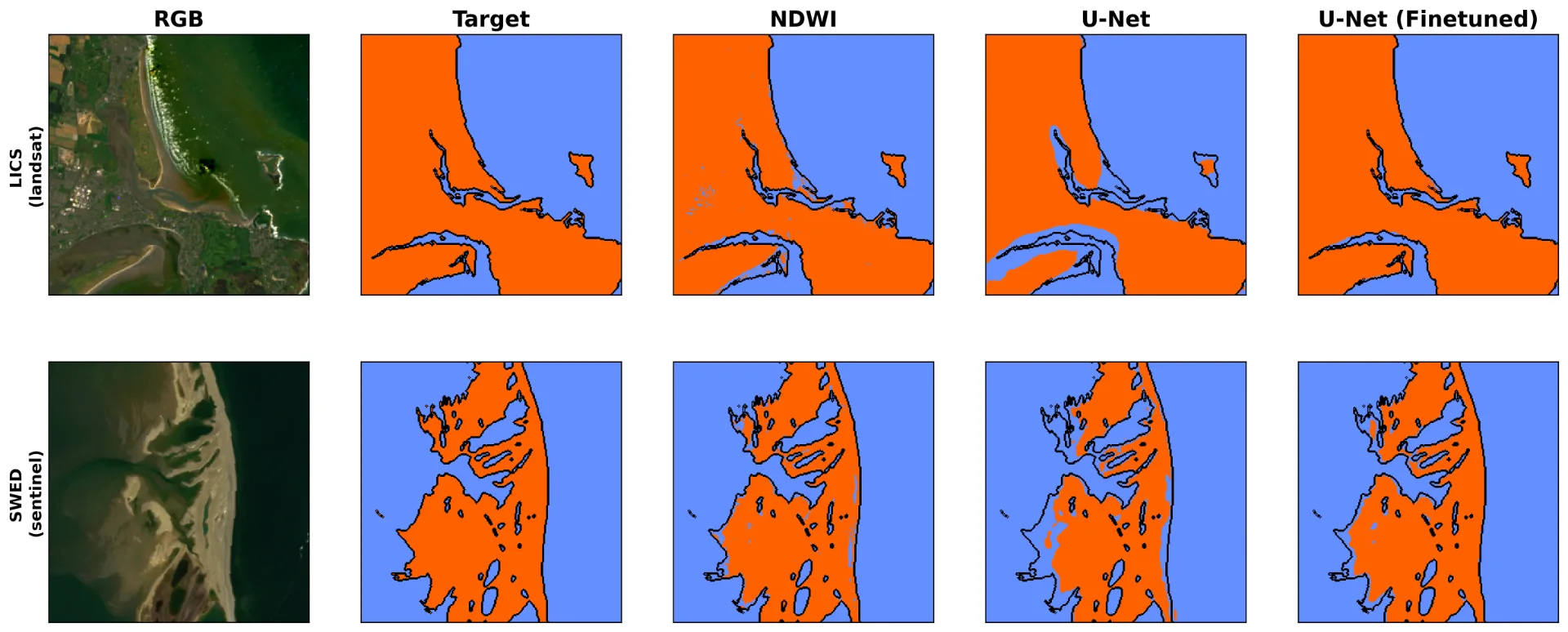
Coastal image segmentation on Landsat and Sentinel-2 imagery, comparing NDWI thresholding, a U-Net trained from scratch and a fine-tuned U-Net.
The thesis was an opportunity to consolidate all this work. For reproducibility, I wanted to create one repository that could be used to retrain any of the models. I did this using Claude Code in VS Code, following these steps:
-
I asked the agent to read all the repos containing the modelling code and summarise the different experiments.
-
I asked the agent to come up with a plan to consolidate all of the models and output the plan along with the list of adjustable hyperparameters (i.e. modelling decisions I could change). These hyperparameters could be changed using flags when running the code via the command line.
-
I made corrections to the plan. This mostly involved correcting the list of hyperparameters.
-
Let it do its thing.
The result was a single repository that could retrain any model from this chapter of my thesis. This saved me a lot of time that would otherwise have been dedicated to the tedious task of copying and debugging code. However, it was only effective because I had such a good understanding of the code the consolidation was based on. I could read through the repo and understood if the agent made a mistake or an unexpected change. As a final check, I retrained the key models using the new repo and compared their evaluation results to the ones in the original papers.
In the same way that a good understanding of the research area was necessary for the first application, a good understanding of the code was necessary for the second. If I had started from zero and asked the agent to write all the code for the extensive list of experiments, there is a high chance that something would go wrong. Even if there were no mistakes, I would not be able to trust that my understanding of the methodology matched what the code actually did — a clear case of poor academic practice.
These first two applications reduced the time I spent on the final thesis. Unfortunately, all that additional time went right back into this next one. In short, I used an AI tool to extensively fact-check the thesis. Apart from finding many mistakes, this process taught me so much more about the field I had spent the last 4 years researching.
3) Fact checker for citations
A thesis is a complex piece of work, in my case containing roughly 200 pages and over 200 citations. A bit demotivating, but only 2-3 people are ever going to read it, and even more demotivating, only you are really going to care about it. This makes finding mistakes hard. It requires you to meticulously comb through your own writing, rechecking every citation, figure and metric, and even then you are also almost guaranteed to miss something. To help, I used AI for a lot of proofreading-related tasks.
This includes using it as a more detailed spell checker that can consider the context of words, as well as a tool to cross-reference all my metrics derived from larger tables. However, perhaps the most useful approach was to compare the information I cited against the original papers I claimed to get that information from. Achieving this was a multi-step process using a Claude Code project.
Step 1: rename all cited papers with their BibTeX citation key
Assuming you are working with LaTeX, by the end you will have a bibtex.tex file containing hundreds of references like the one you see below. The first string, sun2023coastline, is the citation key. Throughout a document, you will cite work using these keys. For example, a passage from my thesis that cited this paper:
Lastly, optical aerial photography provides a useful companion for optical satellite imagery. It is the source that is traditionally used to digitise the coastline~cite{sun2023coastline}.
To organise your papers, you need to rename them using this citation key. Luckily, throughout my PhD, I named the papers using the key followed by a dash and then part of the paper’s name, like this:
sun2023coastline – Coastline extraction using remote sensing.pdf
This will make sense when it comes to step 3 of this process. As we will see, it allows you to programmatically split your papers based on the citation keys in a section of text.
Step 2: convert all papers to .txt files
This step is optional. The Claude Code project context window is limited, and I found that some large papers could take up most of it. The way I got around this was writing a Python script that extracted all the text from the PDFs and saved them as .txt files. So instead of
sun2023coastline.pdf
we could now upload
sun2023coastline.txt.
Doing so allowed me to upload more papers for any given prompt.
Step 3: divide papers into sections and group cited papers accordingly
For a more effective fact check, I found it better to split up the thesis into manageable chunks. For example, the background chapter had four subsections. I split each of these into its own text file. I then used a Python script to find all the citation keys in a given chunk of text and create a new folder containing all the associated papers. This makes the process of setting up a fact-checking run smoother.
Step 4: run the fact checker
As seen in Figure 3, I then uploaded all the text files to the Claude Code project along with the bibtex.txt file containing all the references. I then pasted the relevant chunk of text and asked the agent to fact-check it. When setting up the project, I also gave it a detailed set of instructions. The full prompt can be found at the end of this article. It provides context about my thesis, an explanation of the paper naming convention and detailed instructions on how to divide errors based on their severity and what information to output when an error is found.
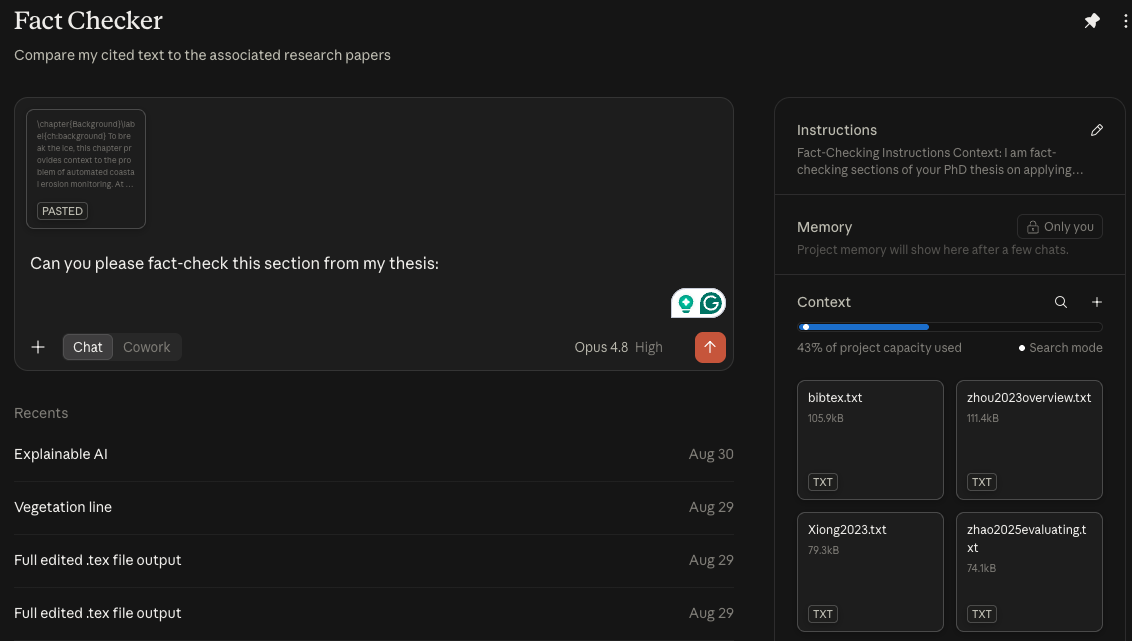
Using a Claude Code project to fact-check a PhD thesis against its cited papers and BibTeX file.
I went section by section through the thesis, with each step uploading the new set of relevant papers and removing the old ones. This was necessary as it reduced the amount of context for each fact-checking iteration, helping me avoid hitting a usage limit mid-prompt. More importantly, it broke the process up into manageable steps.
The bottleneck was me reading the errors, comparing them to the cited text and confirming they were genuine. In some cases, I had to go back to reevaluate my understanding of a topic. This would quickly become overwhelming had I done it for the entire thesis at once.
In the end, most of the errors were nitpicky finer details, something an expert in the field (i.e. your examiner) would still pick up on and that, collectively, could result in a weaker thesis. Did it find all the mistakes? Probably not. Did it find many that I would never have spotted? Definitely yes. Correcting them will hopefully make the next stage of the PhD journey a little smoother.
4) Defence question generator
This next application is something I plan to do in a few months, and it is inspired by how I am using AI right now — preparing for interviews. Unfortunately, submitting my thesis also coincides with me rejoining the job market, and interviewing is not something I’ve done in over 4 years. To cover the likely generic questions, I follow this process:
-
Upload my CV.
-
Upload the job description and other related company information.
-
Ask the chatbot to provide a list of 10-20 interview questions, with some context about the type of interview (providing the exact brief if available).
-
I then start an iterative round of questions with the prompt below.
-
With each question, I use the dictation functionality to record my answer.
-
After reading the feedback, I will sometimes reanswer the question if there are good points.
No offers yet, so it remains to be seen how useful this strategy is. Even so, I plan to do something similar for my thesis defence. In this case, I will upload the entire thesis and some background about my examiners. This should be good practice verbalising the arguments that I have in text. With about two months between thesis submission and my defence, this is more a way of reminding me what I wrote than predicting the exact questions that will be asked.
If it wasn’t already, it is during the defence that it will become apparent how you’ve used AI. In the same way that it is difficult to fully understand a complex piece of code you didn’t write, it will be difficult to memorise the text an AI tool has outputted. I know if I had leaned on it heavily to do my writing, I would likely fumble a question about a niche topic or reasoning behind some methodological choice. More ideologically, I think, with this approach, you are doing yourself a disservice as a scientist.
Writing is thinking. It is true that the citation finder, fact checker or even code consolidator would not have worked as well if I had not struggled through the writing and editing of the thesis beforehand. More importantly, it is through this process that I came up with some of my best ideas. Revisiting old work sparked new analysis, visualisations and results from the same raw data, and it is only from this basis that AI could make improvements.
···
I hope you enjoyed this article. If you want to hear more from me, check out my YouTube channel, and if you want to give me a job, find me on LinkedIn 😉
···