

Vibe coding SwiftUI apps is a lot of fun
27th March 2026
I have a new laptop—a 128GB M5 MacBook Pro, which early impressions show to be very capable for running good local LLMs. I got frustrated with Activity Monitor and decided to vibe code up some alternative tools for monitoring performance and I’m very happy with the results.
This is my second experiment with vibe coding macOS apps—the first was this presentation app a few weeks ago.
It turns out Claude Opus 4.6 and GPT-5.4 are both very competent at SwiftUI—and a full SwiftUI app can fit in a single text file, which means I can use them to spin something up without even opening Xcode.
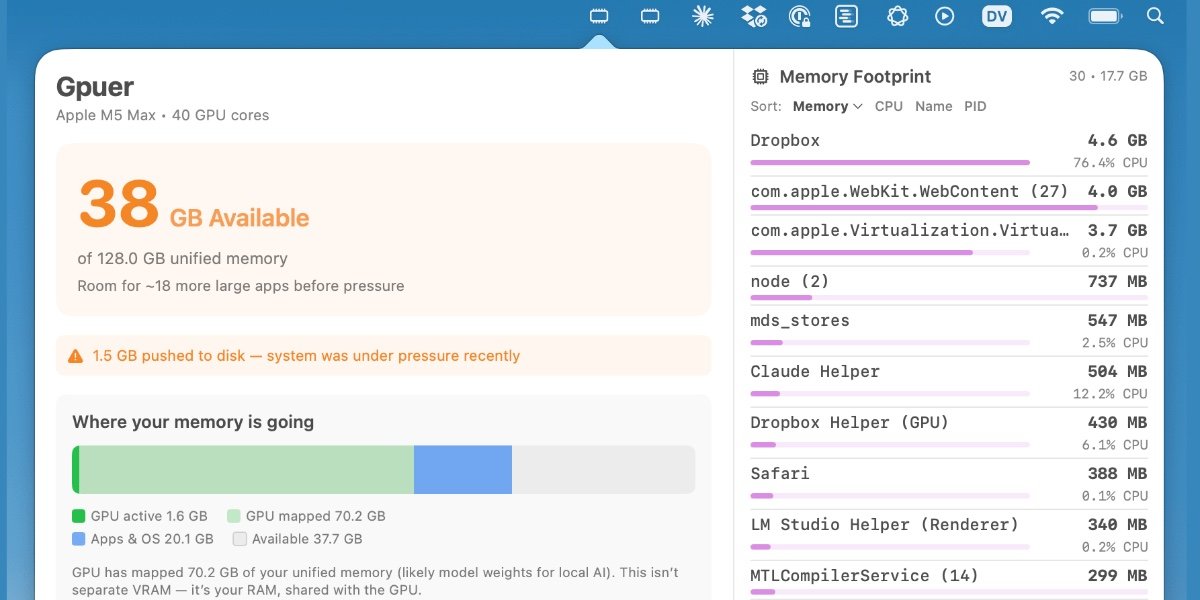
I’ve built two apps so far: Bandwidther shows me what apps are using network bandwidth and Gpuer to show me what’s going on with the GPU. At Claude’s suggestion both of these are now menu bar icons that open a panel full of information.
Bandwidther
I built this app first, because I wanted to see what Dropbox was doing. It looks like this:
I’ve shared the full transcript I used to build the first version of the app. My prompts were pretty minimal:
Show me how much network bandwidth is in use from this machine to the internet as opposed to local LAN
(My initial curiosity was to see if Dropbox was transferring files via the LAN from my old computer or was downloading from the internet.)
mkdir /tmp/bandwidther and write a native Swift UI app in there that shows me these details on a live ongoing basis
This got me the first version, which proved to me this was worth pursuing further.
git init and git commit what you have so far
Since I was about to start adding new features.
Now suggest features we could add to that app, the goal is to provide as much detail as possible concerning network usage including by different apps
The nice thing about having Claude suggest features is that it has a much better idea for what’s possible than I do.
We had a bit of back and forth fixing some bugs, then I sent a few more prompts to get to the two column layout shown above:
add Per-Process Bandwidth, relaunch the app once that is done
now add the reverse DNS feature but make sure original IP addresses are still visible too, albeit in smaller typeface
redesign the app so that it is wider, I want two columns—the per-process one on the left and the rest on the right
OK make it a task bar icon thing, when I click the icon I want the app to appear, the icon itself should be a neat minimal little thing
The source code and build instructions are available in simonw/bandwidther.
Gpuer
While I was building Bandwidther in one session I had another session running to build a similar tool for seeing what the GPU was doing. Here’s what I ended up with:

Here’s the transcript. This one took even less prompting because I could use the in-progress Bandwidther as an example:
I want to know how much RAM and GPU this computer is using, which is hard because stuff on the GPU and RAM does not seem to show up in Activity Monitor
This collected information using system_profiler and memory_pressure and gave me an answer—more importantly it showed me this was possible, so I said:
Look at /tmp/bandwidther and then create a similar app in /tmp/gpuer which shows the information from above on an ongoing basis, or maybe does it better
After a few more changes to the Bandwidther app I told it to catch up:
Now take a look at recent changes in /tmp/bandwidther—that app now uses a sys tray icon, imitate that
This remains one of my favorite tricks for using coding agents: having them recombine elements from other projects.
The code for Gpuer can be found in simonw/gpuer on GitHub.
You shouldn’t trust these apps
These two apps are classic vibe coding: I don’t know Swift and I hardly glanced at the code they were writing.
More importantly though, I have very little experience with macOS internals such as the values these tools are measuring. I am completely unqualified to evaluate if the numbers and charts being spat out by these tools are credible or accurate!
I’ve added warnings to both GitHub repositories to that effect.
This morning I caught Gpuer reporting that I had just 5GB of memory left when that clearly wasn’t the case (according to Activity Monitor). I pasted a screenshot into Claude Code and it adjusted the calculations and the new numbers look right, but I’m still not confident that it’s reporting things correctly.
I only shared them on GitHub because I think they’re interesting as an example of what Claude can do with SwiftUI.
Despite my lack of confidence in the apps themselves, I did learn some useful things from these projects:
- A SwiftUI app can get a whole lot done with a single file of code—here’s GpuerApp.swift (880 lines) and BandwidtherApp.swift (1063 lines).
- Wrapping various terminal commands in a neat UI with Swift is easily achieved.
- Claude has surprisingly good design taste when it comes to SwiftUI applications.
- Turning an app into a menu bar app is just a few lines of extra code as well.
- You don’t need to open Xcode to build this kind of application!
These two apps took very little time to build and have convinced me that building macOS apps in SwiftUI is a new capability I should consider for future projects.