


AI agents are used in many industries for various use cases — ranging from customer service and support to human resources to invoice processing. At their core, AI agents are software programs powered by a LLM that autonomously complete goals. They do this by breaking down complex tasks, and using tools and knowledge bases to execute action without step-by-step human intervention.
When it comes to building AI agents there are a few key components, including:
-
Large language model (LLM) – this is the “brain” or the “processor” of the AI agent. The LLM is used to process information, reason, and make decisions.
-
System instructions – i.e. the playbook. The instructions define the agent’s goals, objectives & behavior.
-
Tools – which are like the hands of the agent — they are things the AI agent can do / the actions it can take.
-
Short term chat history – this is context that’s held during an active conversation with the AI agent. Think of this as a whiteboard you would use to jot down ideas during a meeting — it’s available for the duration of the conversation, but not for new conversations afterwards.
-
Long term memory – via external databases, like Milvus for RAG. Think of these database like a bookshelf, or a library, for the AI agent. They provide additional knowledge the agent may not otherwise have.
While all of these components are important for an AI agent, the playbook — i.e. the instructions — is what ties it all together.
Without good instructions, your agent has no direction. No direction to tie together the brain, the memory, and the tools to perform those complex tasks and take action.
When it comes to writing instructions for agents, teams often struggle to make it easy to read, modify, and maintain long-term. Below are a few tips I’ve picked up along the way for writing effective agent instructions.
Tip #1: Draw it out — create a flow chart of the business process and the agent workflow
Before you develop an agent and write instructions, it’s first important to understand the business process the agent is supposed to augment or enhance. Work with your business stakeholders to understand the current workflow. Then create a flow chart to define the high level steps and components.
You’re probably thinking, a flow chart? Really?
And yes, really, a flow chart.
Creating a visual, such as a flow chart, is imperative when designing and developing agents across large teams. Flow charts provide several benefits including: understanding the overall agent flow and the different tools and knowledge sources it should interact with, providing the ability to map back to business requirements, helping the team debug issues, mapping decision points, and most importantly, ensuring team alignment.
draw.io and Mermaid.js are great tools to create these visuals. The following image shows a sample flow diagram sketch created with Mermaid.js.
Tip #2: Use AI developer tools to assist with writing, refining, and updating instructions
Whether you are creating a single agent, or multi-agent system, using AI developer tools, such as IBM Bob, can help speed up the process of writing, refining, and updating agent instructions. Similar to how you would work with a peer, AI tools can help with catching mistakes and ensuring consistency, especially as the length of the agent instructions grows.
These AI tools are helpful for debugging as well. If you find an agent is not performing as expected, try analyzing the instructions with an AI tool to help detect any potential issues. When using AI tools to write and update instructions, review the output before accepting any changes. Additionally, provide general guidance and rules for the tool in regards to how the instructions should be written. For example, prompt the AI tool or provide a file with specific rules that should be referenced when writing the instructions.
You can also use these tools to create the flow charts referenced in Tip #1. Again, helpful for debugging, and helpful for understanding instructions developed by someone else. Personally I’ve found IBM Bob is a great way to auto-generate Mermaid.js diagrams, for either new agents, or existing agents.
Tip #3: Design for failure, uncertainty, and boundaries
While agents handle tasks autonomously, it’s important to remember, in the real world, agents won’t always encounter a “happy path”. Which is why it is key to design agent instructions in a way that they can handle failures and uncertainty, and have clear boundaries. What should the agent do when the “happy path” breaks?
When writing agent instructions, the following list highlights some questions and scenarios to consider in how the agent addresses fallbacks:
-
How should the agent handle tool failures?
-
How should the agent handle scenarios where the knowledge base or tool doesn’t return the expected information? Or any information?
-
How many times should an agent retry a task that has failed?
-
When should the agent escalate?
-
When any sort of error occurs, what information is passed back to the user?
Tip #4: Add descriptions and clear guidance for tools and knowledge bases
For agents that use tools and knowledge bases, write instructions to help the agent select the correct one depending on the task at hand. In the agent’s instructions, when calling a tool or knowledge base, reference it by name. (Ideally, when you create the tool or knowledge base, provide a descriptive name. This will provide the agent with more context on what that tool or knowledge base is intended for).
Additionally, when calling a tool, explicitly state what parameters are required to call the tool, and how the agent should handle information that comes back from the tool output.
Similarly, for any knowledge bases your agent has access to, in the instructions address what should be returned from the knowledge base, how it should be used going forward in the workflow, and what to do in cases where no output is returned.
Tip #5: Make instructions clear, specific, and maintainable
As you write instructions for an agent, there are three questions that are helpful to keep in mind. One, is it clear? Two, is it specific? And three, is it maintainable?
Why is this important?
Instructions that aren’t clear and specific can make it harder for the agent to reason and make decisions.
Additionally, over time, workflows and requirements can change. Meaning it’s important to have something that is easy to maintain by multiple people.
Here are a few ways to make your agent instructions clear, specific, & maintainable:
-
Avoid conflicting rules – this can cause confusion for the AI agent. For any rules that must be addressed first, short-circuit them at the beginning of the agent instructions. (i.e. if you need to escalate based on self-harm)
-
Minimize “fluff” text – this helps to save token context/count. Avoid unnecessary or polite filler as this adds extra length and dilutes the agent’s focus.
-
Avoid complex conditional logic – don’t over-engineer logic in prompts. If you have large blocks of conditional logic in an agent, consider exploring other alternatives, such as developing a tool for the agent.
-
Make it readable and easy to update – break down instructions into numbered sections with titles. This helps anyone reading the instructions later to quickly find and understand the key components.
-
Define rules for when different tools and knowledge bases should be called – tying back to Tip #4 above.
-
Define constraints – define what the agent should not do.
Tip #6: Provide concrete examples
In addition to writing instructions that are clear, specific, and maintainable, it is helpful to provide concrete examples, particularly in situations that are more complex.
If you have agent instructions using words like “generally”, “appropriately”, “accurately”, or “if applicable”, those are opportunities to incorporate one shot or few shot prompts instead.
The following table provides a high-level overview of one-shot and few-shot prompts in agent instructions.
|
One-Shot Prompting |
Few-Shot Prompting |
|
|
What it means? |
One example is provided in the agent instructions |
Multiple examples are provided in the agent instructions |
|
When to use? |
Useful when you care about how the output looks, but there is not a lot of variation in the input. |
Great for situations where you want to help the agent understand how to define rules, logic, and exceptions. |
|
Example |
Defining input to a tool and the structure is always the same JSON format. |
Showing different self-harm disclosures or escalation scenarios to help the agent recognize when different rules apply. |
Tip #7: Define expected outputs and formatting
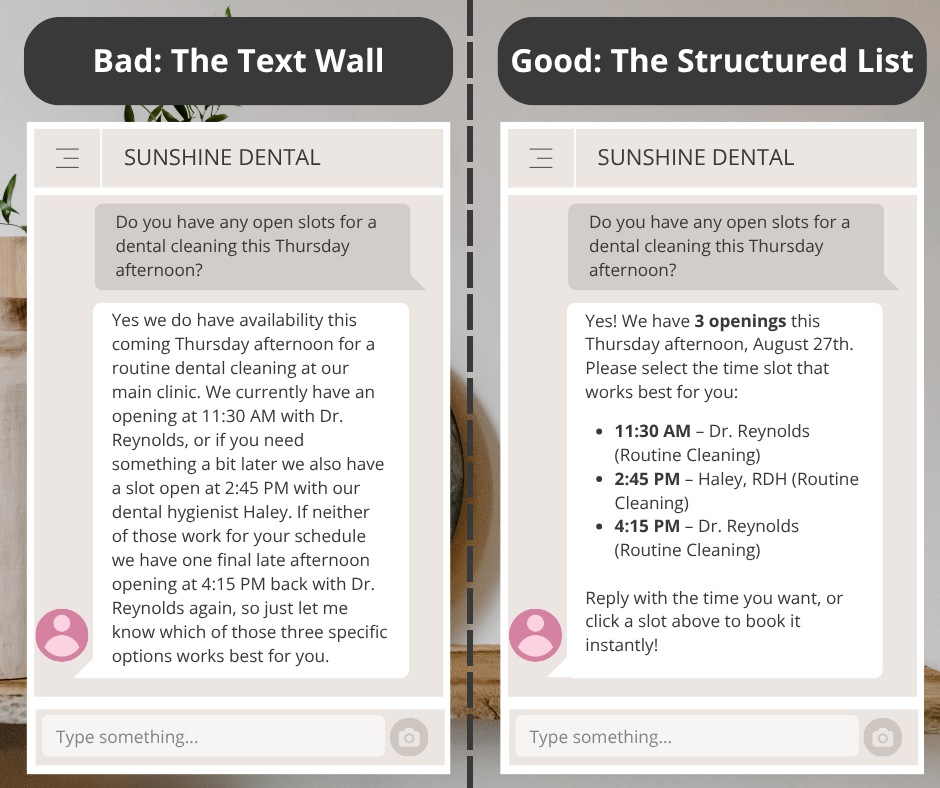
In the agent instructions, provide guidance on how the output to the user should be formatted. Does the response need to be provided in bullets or a table format? How many items should be presented to the user? How long should the response to the user be?
Thinking about the output is key to the user experience! Poorly formatted output can affect how long your user remains engaged with the agent, and whether they escalate or choose to use the agent for assistance going forward.
The following image shows an example of a poorly formatted agent response, and a more structured agent response.
Tip #8: Start small — iterate, test, & improve
As you develop agent instructions start with a small part of the workflow, and build and scale from there. An anchor point allows you to establish a baseline quickly, and reduce confusion for developers and stakeholders.
And with each iteration, make sure to test! When debugging, or implementing new features, it’s helpful to test small changes rather than multiple changes at once. This allows you to identify and understand the impact of a change, especially as LLMs are highly sensitive — even minor changes or tweaks can have large impacts.
Another thing to consider when writing agent instructions is what the definition of success is. Prior to agent development, and with each iteration, work with your stakeholders to define what “success” is for the agent, and for the business process. If you don’t know what you are optimizing for, or which metrics are key for your use case, you can end up in cycles of testing that feel unproductive and unclear.
The following list highlights common metrics used to define agent success — all of which can be impacted by how instructions are written.
-
Response Time/Latency: How fast does the agent reply?
-
Accuracy and Correctness: How often are the agent responses accurate?
-
Hallucination Rate: How often does the agent make up the response?
-
Escalation Rate: How often is the user conversation handed off to a human?
-
Cost and Token Usage: Is the agent running within budget? How many tokens is the agent consuming?
-
Tool or Knowledge Base Usage: Does the agent accurately select and call the appropriate tool(s) and knowledge base(s)?
Well-written instructions are key to developing robust and high-performing agents. Next time you write agent instructions, keep these tips in mind!
···
Payal is a Data & AI specialist. In her spare time, she enjoys reading, traveling, and writing. If you enjoy her work, follow or subscribe to her list, and never miss a story!
The above article is personal and does not necessarily represent IBM’s positions, strategies, or opinions.