

PaddleOCR 3.5 brings OCR and document parsing tasks closer to the Hugging Face ecosystem. With this release, supported PaddleOCR models can run with Hugging Face Transformers as an inference backend by setting:
engine="transformers"
PaddleOCR continues to provide OCR model series such as PP-OCRv5 and document parsing model series such as PaddleOCR-VL 1.5, while Transformers becomes one of the supported backends for running them.
Try the live demo on Hugging Face Spaces:
https://huggingface.co/spaces/PaddlePaddle/paddleocr-3.5-transformers-demo
What changed?
PaddleOCR 3.5 introduces a more flexible inference-engine interface. Developers can select the backend through the engine parameter and pass backend-specific options through engine_config.
In practice, this means:
- The pipelines behind these tasks are managed by PaddleOCR, so developers do not need to manually call each internal component.
- Transformers becomes one of the supported inference backends for running supported PaddleOCR models.
- Developers can configure backend-related options such as
dtype, device placement, and attention implementation throughengine_config.
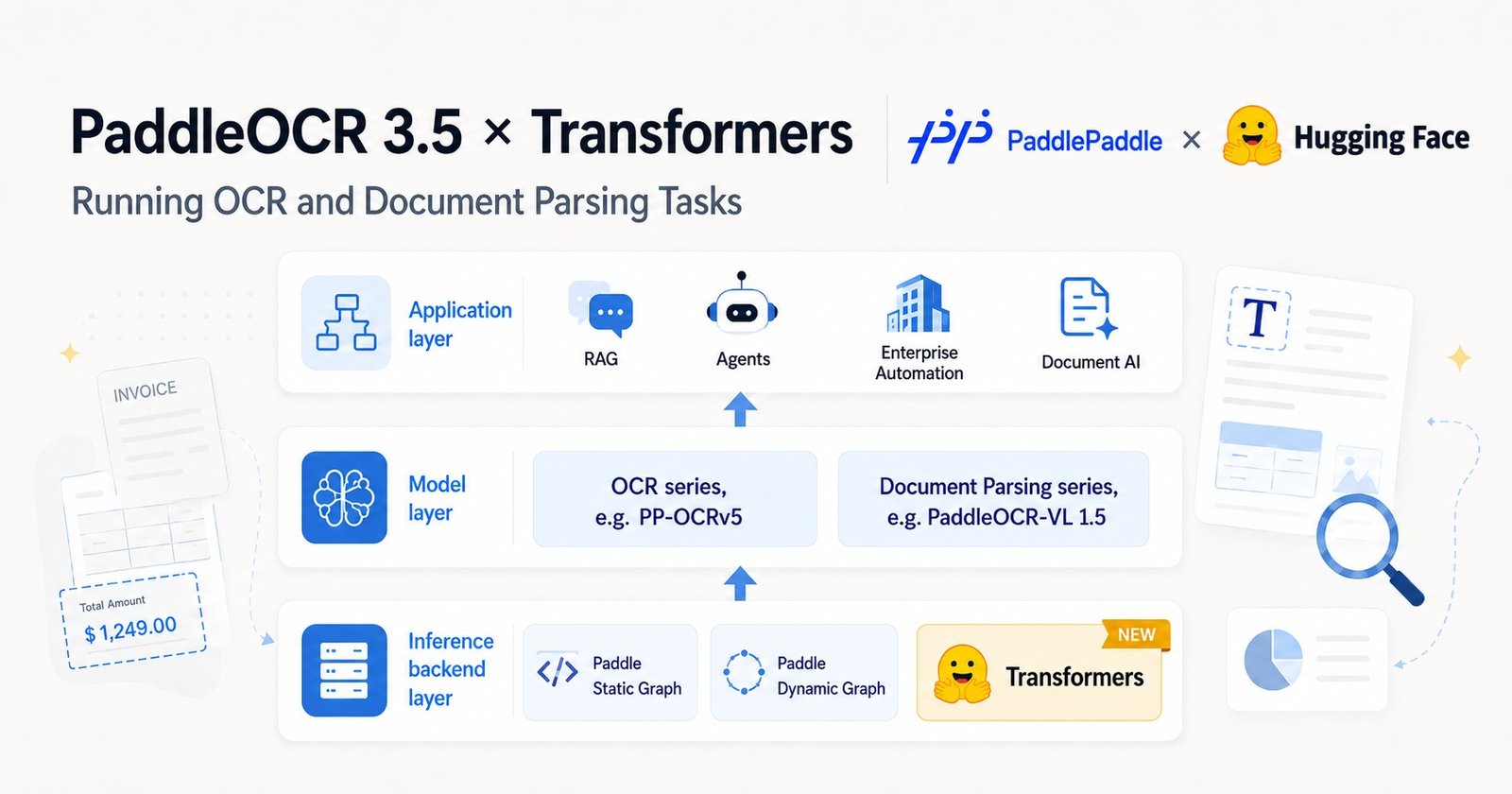
A simple way to understand the stack:
| Layer | What it means | Examples |
|---|---|---|
| Application layer | Applications that use OCR and document parsing outputs | RAG, agents, Document AI… |
| Model layer | OCR and document parsing capabilities | PP-OCRv5, PaddleOCR-VL 1.5… |
| Inference backend layer | Runtime used to run supported models | Paddle static graph, Paddle dynamic graph, Transformers |
This release is mainly about the inference backend layer: PaddleOCR continues to provide OCR and document parsing capabilities, while Transformers gives supported PaddleOCR models another backend option that fits naturally into Hugging Face-centered environments. The larger Document AI workflow remains in the hands of developers and application builders.
Why this matters
For RAG, Document AI, and document agent applications, the hard part often starts before the LLM.
Developers first need to turn PDFs, scanned documents, screenshots, tables, charts, formulas, and complex page layouts into reliable structured data. If this ingestion step is weak, the downstream LLM workflow may miss key information, retrieve the wrong context, or produce unreliable answers.
PaddleOCR helps address this document ingestion challenge by providing OCR series models such as PP-OCRv5 and document parsing series models such as PaddleOCR-VL-1.5.
With PaddleOCR 3.5, these capabilities are now easier to connect with Transformers-centered stacks. Supported PaddleOCR models can run with a Transformers backend, while PaddleOCR continues to manage the OCR or document parsing pipeline behind the scenes.
For developers, this means less integration friction and a more natural path from documents to downstream RAG, agent, search, analytics, or automation workflows.
Quick start
Install PaddleOCR 3.5, PaddleX, Transformers, and a compatible PyTorch build for your hardware.
For example, on a CUDA 12.6 environment:
python -m pip install torch torchvision torchaudio --index-url https://download.pytorch.org/whl/cu126
python -m pip install "paddleocr==3.5.0" "paddlex==3.5.2" "transformers>=5.4.0"
For CPU, ROCm, or other environments, install the PyTorch build that matches your target hardware.
Run from the command line:
paddleocr ocr
  -i https://paddle-model-ecology.bj.bcebos.com/paddlex/imgs/demo_image/general_ocr_002.png
  --device gpu:0
  --engine transformers
Or use the Python API:
from paddleocr import PaddleOCR

pipeline = PaddleOCR(
    device="gpu:0",
    engine="transformers",
    use_doc_orientation_classify=False,
    use_doc_unwarping=False,
    use_textline_orientation=False,
    engine_config={
        "dtype": "float32",
    },
)

results = pipeline.predict(
    "https://paddle-model-ecology.bj.bcebos.com/paddlex/imgs/demo_image/general_ocr_002.png"
)

for result in results:
    print(result)
The Hugging Face Space uses float32 for broad compatibility. For your own hardware, you can tune backend-specific options through engine_config:
engine_config = {
    "dtype": "bfloat16",
    "device_type": "gpu",
    "device_id": 0,
    "attn_implementation": "sdpa",
}
The best configuration depends on your model, hardware, and deployment environment.
When should you use the Transformers backend?
Use the Transformers backend when you want PaddleOCR’s OCR and document parsing capabilities to fit more naturally into a Hugging Face-centered stack.
This is especially useful if you are building RAG, Document AI, search, analytics, or agent applications and already rely on PyTorch / Transformers infrastructure for model loading, experimentation, deployment, or model artifact management.
The Transformers backend is a good fit when you want:
- a more familiar development experience for teams already using Transformers,
- Hub-compatible model discovery and distribution for supported PaddleOCR models,
- easier integration with existing PyTorch / Transformers services.
When maximizing OCR or document parsing throughput is the priority, PaddleOCR’s default paddle_static backend is usually the recommended choice.
This release is not about replacing one backend with another. It is about giving developers more flexibility: use PaddleOCR for OCR and document parsing capabilities, and choose the inference backend that best fits your stack.
Try it now
Try the PaddleOCR 3.5 Transformers demo on Hugging Face Spaces:
https://huggingface.co/spaces/PaddlePaddle/paddleocr-3.5-transformers-demo
Explore PaddleOCR models on the Hub:
https://huggingface.co/PaddlePaddle/models
PaddleOCR 3.5 brings OCR and document parsing capabilities closer to Transformers-centered workflows, while giving developers the freedom to build the larger Document AI applications around them.
Resources
Acknowledgements
We sincerely thank the Hugging Face engineers who supported the PaddleOCR 3.5 Transformers integration.
Special thanks to Anton Vlasjuk for his end-to-end involvement, including reviewing and merging all related pull requests.
We also appreciate Raushan Turganbay and Yoni Gozlan for their valuable PR reviews and feedback.
Their guidance helped improve the integration quality, documentation, and developer experience for the Hugging Face community.