

when you wanted an LLM agent to talk to a system at the start of 2026 was to install an MCP server for it.
GitHub. Jira. Slack. Linear. Postgres. Neo4j. Each one ships a server that exposes a tidy menu of tools, create_issue, list_pull_requests, merge_pull_request, get_repository, search_code, and so on, and you point your agent at it.
It’s a great onboarding experience. It’s also, for a surprising number of real workloads, the wrong shape.
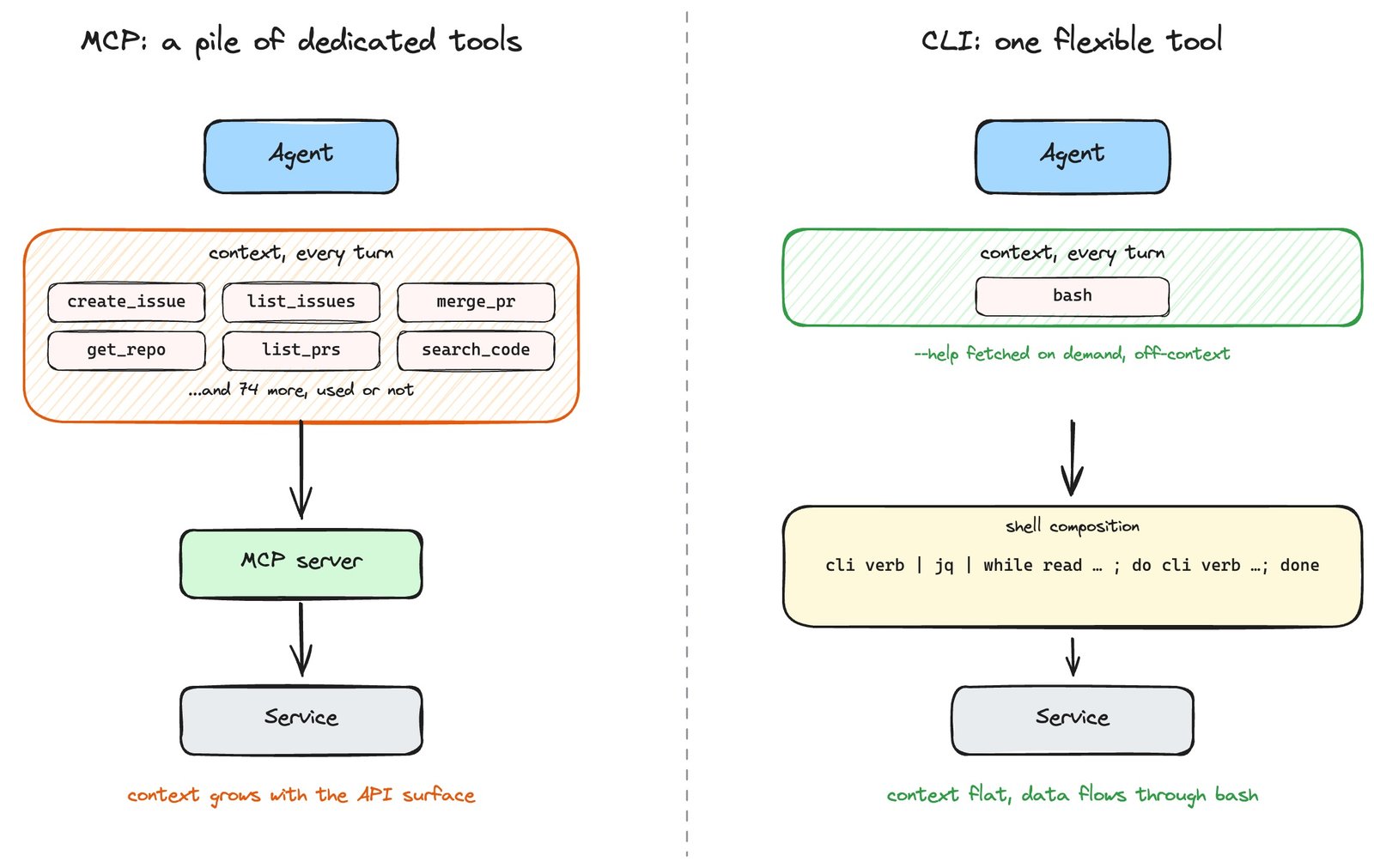
The thesis is short: MCP design usually wraps each service as a pile of dedicated tools; a CLI hands the agent one really flexible tool. With today’s models, the flexible tool wins.
The two shapes ask the model to do different work. With a pile of dedicated tools, the agent just has to pick the right one off a menu. With a flexible tool, it has to figure out how to put the pieces together itself. That second part used to be the hard one. Models would hallucinate flags, lose the thread on long pipelines, misread help text, so wrapping every operation in a pre-baked tool was a sensible defense. That just isn’t true anymore. Today’s models read a --help page or SKILL.md when they need to, know the canonical CLIs from training, string together bash without supervision, and retry when they get a flag wrong. The hard part got easy, the easy part was always easy, and all those neatly-wrapped tools mostly just bloat the model’s context for nothing now.
Of course it’s not all roses and sunshine. Handing the agent a terminal also hands it a much bigger blast radius. The same flexibility that lets it compose gh | jq | xargs into something useful also lets a prompt injection talk it into something a lot worse than a hostile Cypher query. So yes, there’s a trade-off, and you have to actually think about it (sandbox, allowlist, separate OS user, read-only role at the database, the usual stuff).
But when you can give the agent a terminal in a reasonably safe way, the flexible side still comes out ahead.
Where CLI shines
The same “wrap a service as a pile of dedicated tools” pattern shows up wherever MCP does. Postgres MCPs vs. psql. Kubernetes MCPs vs. kubectl. Filesystem MCPs vs. cat, ls, mv, grep glued by pipes. Same instinct every time, same CLI counterpart every time. And the same three failure modes too, because they aren’t really about any one product.
Nothing in the MCP spec actually requires this approach of piling up dedicated tools. The protocol asks for typed tools, nothing more; it says nothing about how narrow each tool has to be. Implementations just gravitate toward many small narrow tools for historic reasons. You can build flexible tools that take a single expressive input the agent shapes however it wants, and most of the time you probably should.
To make it concrete, we’ll look at an example pitting Neo4j MCP server against Neo4j CLI.
Disclaimer up front: I work at Neo4j. The choice is just convenience, but the learnings apply to most other CLIs.
The Neo4j MCP server is the official server that exposes Neo4j to agents through MCP, shipping a handful of dedicated tools like read query, write query, and get schema. neo4j.sh is the official command-line interface for Neo4j, a single binary you run in a terminal with credential profiles for each database you talk to. To keep the comparison honest, we’ll only look at the read-query and schema pair on the MCP side against the equivalent query invocation in neo4j.sh. Same operations, same database, same Cypher going over the wire. The only thing that changes is whether the agent reaches them through a typed tool schema or through a string handed to a shell.
Querying across environments
We already saw how a pile of dedicated tools eats the context window with descriptions, and that some servers now ship deferred tools to push that cost off until the agent actually reaches for them. But there’s a second multiplier nobody talks about: what happens when you want to talk to more than one instance of the same service. With MCP, the tool count doesn’t just grow with features, it grows with environments.

The agent wants a node count from dev, staging, and prod. Through MCP, you stand up a neo4j-mcp-server per environment, each one carrying its four tool schemas into the agent’s context on every turn. Three databases is twelve schemas in the model’s window, the same four schemas three times over, before the agent has done anything.
Through the CLI, it’s a for loop:
$ for c in dev staging prod-ro; do
    neo4j-cli query -c $c --format toon
      "MATCH (n) RETURN count(n) AS nodes"
  done
One binary, three credential profiles, zero per-turn context cost. Adding a fourth environment is one more credential dbms add, not one more MCP server process. The same shape carries over to any “reach out to N similar things” workflow you might want: snapshotting prod before a risky deploy, diffing the schema between staging and prod, running a health check across every database the agent knows about.
Chaining queries
Say the agent is investigating a known fraud account: from a single seed, find every account it transacted with, then find which other accounts those counterparties transact with the most often. Two queries against the same database, where the second’s parameters are the output of the first.

Through MCP, the model has to be the pipe. It calls read-cypher, the result comes back as a list of, say, 80 counterparty IDs, those 80 IDs sit in the model’s context now, the model formats them into the parameter for the second read-cypher call, and only then can query two run. The intermediate list rides the conversation verbatim, and every extra ID is another row of context the agent pays for whether it ever reads it again or not.
Through the CLI, the pipe is a literal |:
$ neo4j-cli query -c prod-ro --format json
    --param "seed=acct_19f3"
    "MATCH (:Account {id: $seed})-[:TRANSACTED]-(c:Account)
     WHERE c.id <> $seed
     RETURN collect(DISTINCT c.id) AS counterparties"
  | neo4j-cli query -c prod-ro --params-from-stdin
      "MATCH (a:Account)-[:TRANSACTED]-(b:Account)
       WHERE a.id IN $counterparties
         AND NOT b.id IN $counterparties + ['acct_19f3']
       RETURN b.id, count(DISTINCT a) AS edges_into_cluster
       ORDER BY edges_into_cluster DESC LIMIT 20"
--params-from-stdin reads the previous query’s JSON result and binds it as a parameter for the next. The counterparties list never enters the model’s context, the agent’s token cost is the same whether the cluster has 5 counterparties or 500.
This is where the shell starts to feel like a different category of tool altogether. The agent isn’t picking from a menu of operations anymore, it’s composing pipelines, and the intermediate data never has to surface. A two-step query becomes a |. A fan-out becomes a for loop. A join across two databases becomes one query piped into another with --params-from-stdin. Each of those would be three or four MCP round-trips with every intermediate result paraded through the context window, and at that point the agent has spent more tokens shuffling rows than thinking about them.
Pipe across many CLIs
Same problem, bigger scale. Say the agent wants to materialize a project’s recent GitHub issues into Neo4j: an :Issue node per ticket, a :User node per author, a :TAGGED relationship per label. The data lives in one CLI (gh), wants reshaping (jq does that), and lands in another CLI (neo4j-cli). Three different tools in one line. Through MCP, you’d hit GitHub’s MCP server for the issue list, every issue body lands in the model’s context, the model extracts the fields it wants, and write-cypher fires once per issue. Hundreds of round trips through the model, every issue body sitting in the conversation along the way.
Through the CLI, three programs in a pipe:
$ gh issue list --repo neo4j/neo4j --limit 100
    --json number,title,author,labels
  | jq -c '.[]'
  | while read issue; do
      neo4j-cli query --rw -c prod
        --param "data=$issue"
        "WITH apoc.convert.fromJsonMap($data) AS i
         MERGE (n:Issue {number: i.number}) SET n.title = i.title
         MERGE (u:User {login: i.author.login})
         MERGE (u)-[:OPENED]->(n)
         FOREACH (label IN i.labels |
           MERGE (l:Label {name: label.name})
           MERGE (n)-[:TAGGED]->(l))"
    done
gh pulls the issues, jq reshapes each one into a single JSON line, the while loop hands each line to neo4j-cli as a Cypher parameter. The model writes this script once and then steps off; the data flows through bash, not through the agent. A hundred issues or ten thousand, the agent’s token cost is the same.
The shape generalizes well beyond GitHub. Swap gh for any other CLI that emits JSON (jira issue list, linear, curl against a webhook, your own internal dump command), swap the Cypher pattern for whatever database you’re building, and the pipeline carries. Two MCP tools can’t pipe to each other; two CLIs can, and so can ten.
Terminal control is powerful, and that’s the catch
The terminal isn’t a fixed surface, it’s the most flexible tool you can hand an agent because it composes with everything else on the box.
That power is also the catch. A flexible tool used badly does flexible damage. With great terminal access comes the obvious responsibility: sandbox the shell, allowlist the verbs you actually want, run the agent as a separate OS user, bind credentials to roles that physically can’t do the destructive thing. None of this is novel, it’s just sysadmin hygiene applied to an LLM that types fast. And if you can’t do any of that, an MCP server with a small fixed surface is still the right answer; the protocol-level guarantee that the agent can’t cat ~/.ssh/id_rsa is a real thing.
The broader point holds even if you stay entirely inside MCP. The reason the terminal wins isn’t that bash is special, it’s that bash is one tool with very flexible input. Pipes, variables, substitution, looping. That’s the shape worth copying. Read the terminal as MCP’s limit case and design toward it: fewer tools, each one accepting expressive input, the agent doing the composing instead of you anticipating every combination in advance. Most MCP servers are a long list of narrow endpoints because that’s how the underlying API was already shaped, not because the agent works better that way. The servers that age well will be the ones that picked a smaller, more expressive surface on purpose.
All images in this blog post are created by the author.