

While, conversational AI and agentic AI are now distinct foundational use cases of generative AI, moving an agent from a proof-of-concept to a reliable, production-ready enterprise workflow requires it to qualify on the measures of scalability, responsiveness, and cost-effectiveness.
To understand how to achieve this, we first have to ask: Why are agents needed in the first place? Because conversational insight from data is often not enough. LLMs have the capability to plan, reason, and act. And agents are the logical constructs around the LLM “brain,” using tools, interacting with external APIs, correcting their own mistakes, and collaborating with other agents. Agentic systems rely on many high-frequency decisions to complete the workflow, such as what the next step should be, which agent to delegate the next step, which tool to use, whether we have enough context to respond to the user, etc. A major evolution is the advent of low-cost calibrated decision models such as TypeSafe’s JEV. which shifts the deterministic workload from LLMs, leaving them to focus purely on deep reasoning and synthesis.
Just as retrieval evolved beyond flat semantic search into specialized, deterministic topologies (as explored in my practitioner’s guide to advanced GraphRAG patterns), the broader agentic landscape is similarly moving away from naive “single agent loops” toward heavily engineered multi-agent workflows and constrained architectures. Instead of dwelling on the basics, this article provides a practitioner’s deep dive into six distinct architectural patterns for building agentic systems. We will explore how they work, visualize the data flow, the vital role of Context Engineering in managing the LLM’s working memory, and exactly when to use these patterns in production.
Core Components
Before diving into specific architectures, let’s define the baseline components of an agent. An AI agent consists of four pillars:
-
The Core LLM (The Reasoning Engine): The foundational model (e.g., GPT-5, Claude 5.5 Sonnet, Llama-4) that orchestrates the logic. In agentic systems, the model’s ability to natively support
Tool Calling(or Function Calling) is crucial. -
Tools/Actions: Executable functions the agent can call, ranging from API wrappers (e.g.,
search_web,query_database,send_email) to code interpreters that execute Python scripts in a sandbox. -
Planning & Control Flow: The mechanism by which the agent decides what to do next. This can be rigid (a state machine or directed acyclic graph) or fluid (an open-ended reasoning loop).
-
Memory: The system’s ability to retain information across steps and interactions. This includes short-term working memory (the active prompt window) and long-term episodic memory (vector stores of past interactions).
The Hidden Success Criterion: Context Engineering
In agentic systems, Context Engineering is a key criterion for production readiness. Unlike traditional prompts where context is static, an agent’s context is highly dynamic. As an agent takes actions, it accumulates observations, errors, and intermediate thoughts. If we append every observation to the prompt, the context window will easily bloat, leading to increased latency and exorbitant costs. Also, the LLM may lose visibility of granular facts in the middle of a very large block of text in the context, leading to incorrect or incomplete responses from downstream agents.
Context Engineering in agentic systems involves several techniques:
-
State Projection: Only injecting the context strictly necessary for the current step of the workflow. If an agent has moved on from researching to writing, the raw research logs should be removed from the active context.
-
Memory Pruning & Summarization: Using secondary LLM calls (often smaller, cheaper models like GPT-mini) to compress past steps (e.g., “Summarize the last 5 search results into key facts”) before appending them to the active prompt.
-
Structured Scratchpads: Prompting the LLM to write its intermediate reasoning into designated JSON fields or XML tags (e.g.,
I should check the API docs -
Semantic Memory Retrieval: Treating past agent actions as a vector database. Instead of loading the entire conversation history, the agent retrieves only its past actions that are semantically relevant to the current obstacle.
-
Prompt Caching: A new feature offered by model providers such as Anthropic and OpenAI. In complex agentic systems, the system prompt and tool definitions can easily exceed 5,000 tokens. However, these are static instructions that do not change during the lifecycle of the system. By organizing the context window so that such static system instructions sit at the top, providers can cache these precomputed attention states into a Key-Value (KV) cache. When the agent loops 10 times, we only pay for the newly appended observations, which can drastically reduce LLM inference costs.
Human-in-the-Loop (HITL)
Enterprise applications cannot trust autonomous agents to execute without human supervision. LLMs are inherently non-deterministic. Therefore, anything that is not a read operation, could be potentially undesirable or harmful. Examples could be external-facing actions such as dropping a SQL table, authorizing a payment, or emailing a client. Human-in-the-Loop (HITL) is a control flow mechanism where the agent pauses its execution state and waits for a human reviewer.
For instance, in a State Graph implementation (like LangGraph), invoking a specific tool (e.g., send_email_tool) interrupts the graph. The state is serialized to a database, and execution halts. A human reviews the drafted email in a UI, edits it if necessary, and clicks “Approve.” The orchestrator then resumes the graph execution with the approved state.
With these components and context engineering principles in mind, let us look at the six agentic architectural patterns.
Pattern 1: The Standard ReAct (Reason + Act) Loop
The ReAct (Reason + Act) pattern is the foundational building block of agentic workflows. It makes the LLM alternate between “thinking” (reason about what to do) then “acting” (calling tools and observing the result), then think about the result and its relevance to the goal again.
How it Works
The agent is given a system prompt describing its persona, available tools, and the rules it should follow. When a user provides a task, the agent enters a while loop. In each iteration, it outputs a “Thought” explaining its logic, followed by an “Action” (a tool call). The orchestration layer intercepts this action, executes the tool, and returns the “Observation” back to the LLM. The LLM then reassesses the situation. This continues until the LLM decides it has enough information to output the “Final Response”.
Implementation Details and Data Flow
A useful Context Engineering aspect here is managing the “Agent Scratchpad”. As the loop progresses, the prompt grows linearly: [System Prompt] + [User Query] + [Thought 1 + Action 1 + Obs 1] + [Thought 2 + Action 2 + Obs 2]...
To prevent bloat, we can implement Observation Truncation. If a tool returns a large HTML document, the orchestration layer should truncate it or run a summarization script before feeding it back to the agent. Otherwise, a single web search may overwhelm the context window.
Pros and Cons
Pros:
-
High Flexibility: It can handle unpredictable tasks because the path to the solution is not hardcoded. It dynamically adapts based on the observations it receives.
-
Error Recovery: If a tool fails (e.g., a 404 error from an API), the observation feeds the error back to the LLM, which can “reason” its way around the problem (e.g., trying a different URL, correct the tool parameters or falling back to a different tool).
Cons:
-
High Latency & Cost: A single query might require 10 sequential LLM calls. Even with Prompt Caching, this takes time and consumes significant amounts of tokens.
-
Drift and Hallucination: For highly complex tasks, the agent might forget its original goal, entering a chain of irrelevant tool calls or looping endlessly on a broken tool.
When to Use It
ReAct is best suited for open-ended, research-oriented tasks where the exact sequence of steps cannot be known in advance. It is great for data analysis, deep-dive web research, or debugging code in an isolated sandbox. It is generally not recommended for deterministic, low-latency, user-facing chat applications where users expect precise replies quickly.
Pattern 2: The Sequential Multi-Agent Workflow
When a task is too complex for a single ReAct agent to handle reliably, we must break it down. The Sequential Multi-Agent Workflow is like a factory assembly line. Instead of one super agent trying to do everything at once, we chain together highly specialized agents, passing the output of one as the structured input to the next.

How it Works
Each agent in the sequence has a focused persona, a limited set of tools, and a very specific Context Window. As an example:
-
The Researcher: Gathers raw data using search tools and scrapes web pages. It compiles a raw dossier.
-
The Analyst: Receives the dossier, processes the data, performs numerical calculations (often by writing Python code), and extracts key metrics.
-
The Writer: Takes the Analyst’s metrics and formats them into a final, client-ready report.
Implementation Details and Data Flow
This architecture demonstrates Context Engineering via State Projection. The Writer Agent does not need to see the 50 web pages the Researcher scraped, nor the 4 attempts it took the Analyst to write a working Python script. The Writer only receives the finalized analytical brief. This isolates the context windows, result being that we prevent the “Lost in the Middle” problem and significantly reduce token usage.
This is implemented using State Graphs (like LangGraph), passing a strict State object between nodes.
Pros and Cons
Pros:
-
High Reliability: As compared to ReAct, specialized prompts yield significantly higher quality results than generic “do everything” prompts. We can tune temperature and model sizes individually (e.g., cheap model for researching, expensive model for analysis).
-
Token Efficiency: Context windows are kept small and highly relevant at each step.
-
Easy Debugging & Checkpointing: We can determine exactly which agent in the chain failed, and save the state after each node to resume later.
Cons:
-
Strict Linearity: It is difficult to handle scenarios where the Writer realizes the Researcher missed something critical and needs to send the workflow backward. While cycles can be added to state graphs, they complicate the architecture and risk infinite loops.
When to Use It
Use sequential workflows for well-defined, multi-stage pipelines: content generation, data processing pipelines, ETL tasks, or any workflow that mimics a traditional human assembly line (e.g., Drafting -> Editing -> Formatting -> Publishing).
Pattern 3: The Adaptive Router Agent
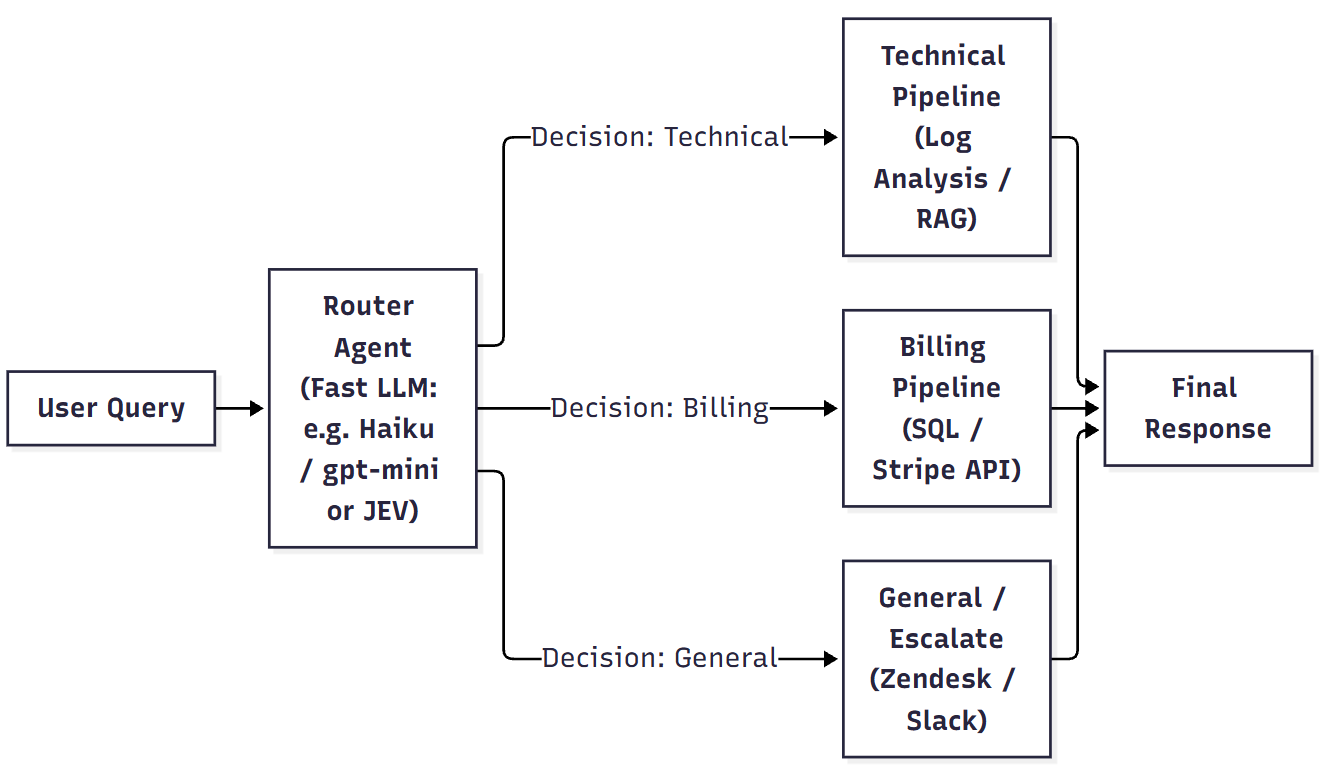
Not every query can be answered satisfactorily using a linear, Sequential workflow. The Adaptive Router pattern treats the agentic system not as an open-ended problem solver, but as an intelligent triage system. It analyzes the user’s intent and routes the execution to a sub-pipeline, specialized for the identified query intent.
How it Works
The Router Agent is typically a fast, calibrated LLM (like GPT-mini or Claude Haiku) or a non autoregressive JEV model. It is presented with a user query and a list of available pipelines (e.g., technical_support, billing_inquiry, general_escalation). Its only job is to perform intent classification and entity extraction, outputting a structured JSON decision. Once the decision is made, the router’s job is done, and traditional deterministic code takes over. It is also possible that a query has a mixed intent; technical as well as billing, in which case, multiple pipelines are executed in parallel and the outputs combined in the synthesizer step for final response.
Composite Architectures: The downstream pipelines do not have to be simple deterministic code or basic RAG scripts. For example, if it routes to the Technical Pipeline, that pipeline might actually be a fully independent Pattern 2 (Sequential Workflow) containing a Researcher Agent and a Python Coder Agent. In enterprise implementations, the Router acts as the “front door” to a full agentic automation workflow spanning master data, transactional and analytics applications.
Implementation Details and Data Flow
Context Engineering here focuses on Prompt Compression. Since the router must be very fast, the system prompt should not contain the full instructions for every downstream pipeline. It should only contain the metadata, descriptions, and few-shot examples necessary to make the routing decision.
Pros and Cons
Pros:
-
Low Latency router: Only one fast router call is required before deterministic execution begins.
-
Predictability & Safety: The downstream pipelines are bounded in scope, it is much easier to test, monitor, and guarantee performance.
-
Cost Efficiency: We can use micro-LLMs or non-autoregressive models for the routing step, making it cost effective.
Cons:
-
Handling Mixed Queries: Real-world user questions are frequently “mixed” (e.g., “Why did my credit card fail, and how do I restart the server?”). While modifying the schema to return a list of pipelines (as shown above) helps, combining disjointed responses from multiple pipelines can feel robotic (like billng response appended below the technical response and not addressing the query holistically). For highly complex overlapping tasks, a Supervisor pattern discussed in the next section is better.
-
Single Point of Failure: If the router misinterprets the intent, the entire downstream execution is sent to the wrong system and is very likely to fail.
When to Use It
The Router is the standard for modern multi-tenant enterprise chatbots and customer service automation. It should be used when the categories of user requests are known well enough that they can be resolved using a set of internal tools or workflows, which are mostly independent of each other. For instance, a contact center bot for resolving technical or billing queries. Or an enterprise chatbot for multiple departments.
Pattern 4: The Supervisor-Worker (Hierarchical) Architecture
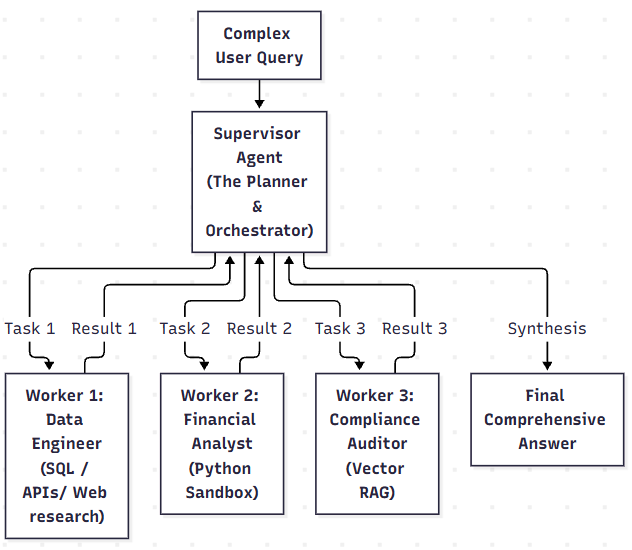
While the Sequential and the Adaptive Router patterns are straight line(s), the Supervisor-Worker pattern is a dynamic tree. It introduces a central “Manager” agent that dynamically plans the workflow, delegates sub-tasks to specialized worker agents in parallel, and synthesizes the final results.
How it Works
The user submits a complex, multi-faceted query. The Supervisor Agent analyzes it and breaks it into an execution plan containing sub-tasks. It then dispatches these sub-tasks to the appropriate specialized Worker Agents. These workers execute their tasks, potentially using their own internal ReAct loops, and report back to the Supervisor. The Supervisor reviews the compiled work. If the data is incomplete, it issues new instructions to the workers. If complete, it synthesizes the final response.
Implementation Details and Data Flow
Context Engineering in this pattern is quite complex. The Supervisor must maintain a Global Context (the overarching plan, the state of the task ledger, and the finalized summaries from the workers), while the Workers only receive Local Context (their specific isolated sub-task).
A best practice technique here is utilizing a Task Ledger in the Supervisor’s prompt. This ledger acts as a dynamic checklist that is updated as workers complete their jobs.
A point to note above is how the execute() methods for the workers are only passed task.description. They do not receive the overarching user_query or the entire contents of the results_ledger. The Worker thread is closed at the end of its execution, with any accumulated local history deleted. Only the result is passed to the Supervisor. The Supervisor translates the global goal into a narrow, isolated instruction (e.g., “Extract Q3 revenue from the SQL database”). Or if the instruction requires previous context, the Supervisor is intelligent enough to include that while framing the new instruction (e.g. “You previously reported that the drug causes nausea and headaches. Perform a new deep-dive web search specifically looking for severe, long-term adverse effects beyond just those mild symptoms.”)
Pros and Cons
Pros:
-
Parallel Execution: Because sub-tasks are delegated concurrently, the overall latency is reduced compared to sequential single-agent execution.
-
High Scalability: We can easily add new specialized worker agents to the organization (e.g., an
Image_Generator_Worker) without rewriting the Supervisor’s core logic. -
Divide and Conquer: It is good at solving composite queries that span multiple, unconnected domains.
Cons:
-
High Complexity and Orchestration Overhead: Managing asynchronous calls, state reconciliation, and timeouts is a complex engineering task. The Supervisor prompt needs to be elaborate and tested well enough to be able to handle different scenarios using a powerful reasoning model.
-
Single Point of Failure: The system is entirely dependent on the Supervisor’s intelligence. If the Supervisor creates a poor plan or misinterprets the user’s intent, the entire system fails, regardless of how capable the individual workers are.
When to Use It
This architecture is standard for complex chatbots, such as enterprise research, comprehensive financial analysis, multi-modal content generation, or coding tasks where a composite answer must be derived from multiple disjointed data sources simultaneously.
Pattern 5: The Reflection and Self-Correction Loop
LLMs are probabilistic engines. They make mistakes. They write buggy code, hallucinate facts, and frequently misinterpret the raw JSON outputs of their own tools. The Reflection pattern intends to catch and correct the flaws before it reaches the user. It relies on self-critique, automated testing, and iterative self-correction to improve the final output.
How it Works
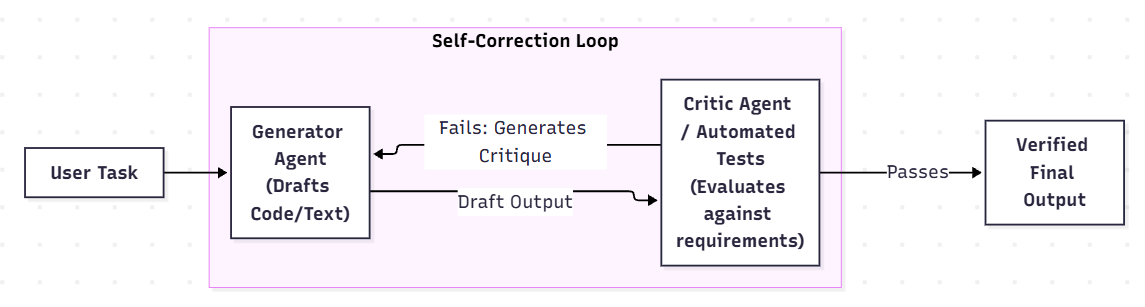
Structurally, this pattern is essentially a Sequential Workflow (Pattern 2) with a feedback loop. Instead of chaining completely different functional roles to move a task forward, it typically involves two agents dedicated to the exact same output (e.g., Coder ↔ Code Reviewer) until it reaches an acceptable level of quality.
An agent (the Generator) produces an initial output (e.g., a Python script, a SQL query, or a legal summary). This output is then passed to an evaluation layer. This layer can be a second LLM (the Critic) acting as a reviewer, or a deterministic automated test (like a Python compiler, a SQL dry-run, or a factual consistency checker). The Critic evaluates the output against the original instructions and generates a strict list of flaws. This critique is fed back into the Generator’s context window as an instruction to revise the output. This loop continues until the Critic approves the output or a maximum iteration limit (e.g., 3 attempts) is reached.
Implementation Details and Data Flow
Context Engineering here revolves around managing the mistakes that may creep into a LLM output. If the agent fails 5 times, and we append every failure, the prompt will contain 5 sets of failed drafts and critiques. This massive history confuses the LLM, causing it to hallucinate and frequently revert to previous, broken versions of the output.
A vital best practice is Context Pruning via Diffing: Instead of passing the entire history, the orchestration layer actively prunes the context. It passes only the original task, the latest failed draft, and the latest critique.
Pros and Cons
Pros:
-
Higher Quality: Iterative critique significantly improves logical coherence and factual accuracy compared to zero-shot generation.
-
Automated QA: It prevents the system from confidently returning flawed, non-compliant, or hallucinated results to the user.
Cons:
-
High Latency & Cost: Generating, critiquing, and rewriting content multiple times inherently requires waiting and consumes extra tokens.
-
Degradation Loops: Occasionally, a Critic will hallucinate a flaw, forcing the Generator to ruin perfectly good work in a downward spiral.
When to Use It
Reflection loops are mandatory for autonomous software engineering (e.g., Agentic coding assistants/vibe coders), automated data science, and high-stakes content drafting.
However, Strategic Reflection is the industry best practice:
-
In Pattern 2 (Sequential): Don’t use LLM critics on every node (too slow/expensive). Use fast, deterministic checks (like JSON validation) for intermediate steps, and reserve LLM Reflection for the final, high-stakes output.
-
In Pattern 4 (Supervisor): Dedicated LLM critics are rarely needed. The Supervisor naturally acts as the critic when evaluating a worker’s output.
Pattern 6: The Autonomous Swarm (Decentralized Network)
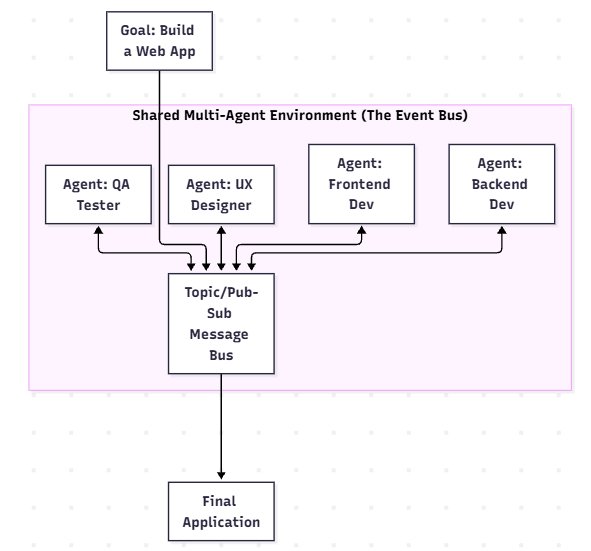
The most advanced, experimental, and chaotic pattern is the Autonomous Swarm. Unlike the Supervisor-Worker model, which relies on a strict, top-down hierarchy and rigid planning, a Swarm consists of multiple highly specialized agents existing in a shared environment. They collaborate, negotiate, and execute tools without a central manager dictating their every move.
How it Works
Agents in a Swarm are defined by their specific capabilities (their tools), their persona, and their communication protocols. They are given a high-level goal and placed in a shared context (like a group chat, a shared virtual file system, or a simulated world). When a problem arises or a message is broadcast, any agent capable of contributing can “step up.” Agents can ask each other questions, hand off tasks, debate solutions dynamically, and execute tools in the shared space.
Implementation Details and Data Flow
Context Engineering in a Swarm is difficult. A naive implementation places every agent in a massive shared chat room. If there are 5 agents, and they debate for 20 turns, appending every message to every agent’s prompt results in massive token bloat and overwhelming context limits within minutes.
Advanced implementations (often built using frameworks like Microsoft AutoGen) utilize Topic-Based Pub/Sub Context. Agents do not read the entire chat history. They only subscribe to messages tagged with relevant topics. Furthermore, agents communicate via Structured Protocols (e.g., sending strict JSON payloads containing code blocks or API parameters to one another) rather than using unstructured conversational prose.
Pros and Cons
Pros:
-
Emergent Problem Solving: The swarm can brainstorm organically and route around unexpected obstacles that would break rigid pipelines. An example could be to prove a difficult mathematical theorem whose solution is not known.
-
Modular Scalability: Adding new capabilities is as simple as dropping a new agent into the shared environment.
Cons:
-
Unpredictability: Execution paths are non-deterministic, making debugging and enterprise compliance a challenge. There is no guarantee that a satisfactory solution would be reached in a finite number of iterations.
-
Infinite Chat Loops: Without strict orchestration and turn-taking rules, agents can get stuck in infinite conversational loops; either debating endlessly or simply acknowledging each other without making progress.
When to Use It
Swarms excel in open-ended research, creative sandboxes, and simulation environments. However, for strict enterprise automation, one should almost always prefer the stability and predictability of Sequential or Supervisor patterns.
Evaluating Agentic Systems
In standard RAG, frameworks like RAGAS use metrics like Context Precision and Faithfulness to evaluate a single output. Agents, however, take multiple steps. If the final answer is wrong, we must figure out why: Did the agent choose the wrong tool? Did it hallucinate the tool arguments? Did it ignore the tool’s output? Or did it just synthesize the final answer poorly?
We evaluate agents using Trajectory Analysis:
-
Tool Selection Accuracy: Using LLM-as-a-judge, evaluate if the agent chose the optimal tool for the given state.
-
Schema Compliance: Tracking how often the agent generates invalid JSON or missing arguments for a tool call.
-
Iteration Count: Monitoring the average number of steps it takes an agent to reach a conclusion. A sudden spike in iterations may suggest the agent is struggling with a new tool or getting caught in loops.
Logging every thought, action, and observation to observability platforms like LangSmith or Arize Phoenix is the standard for debugging agent trajectories in production.
Challenges and Best Practices for Implementation
Following best practices helps to upgrade an agent from a sandbox prototype to production:
-
Mitigating Infinite Loops
Agents frequently get stuck calling the same failing tool repeatedly. To prevent this, implement strict circuit breakers. Hardcode a
max_iterationscap and use Context Engineering to inject aggressive warnings (e.g., “SYSTEM ALERT: You failed 3 times. Use a different strategy.”) if identical consecutive tool calls are detected -
Brittle Tool Parsing
A hallucinated JSON parameter can crash the entire pipeline. Use strict structured pydantic outputs to guarantee schema compliance. Wrap all tool executions in
try/exceptblocks, and return parsing errors directly back to the agent as a string observation so it can self-correct. -
Cost Management
Running every node in a multi-agent workflow on a frontier model (like GPT-5) is financially unsustainable. Implement Adaptive Model Routing (as explored in Optimizing LLM Inference Costs). Use cheap, fast models (Haiku, mini, or JEV) for routing and routine data extraction. Reserve frontier models for Supervisor planning, Reflection evaluation, and final output synthesis.
Conclusion
Agentic systems represent a fundamental shift in software architecture. We are moving away from writing explicit step-by-step deterministic code and toward orchestrating networks of probabilistic, intelligent entities.
The choice of architecture is crucial and dictates the success or failure of the product. If we need speed, low cost, and predictability, use the Adaptive Router. If we have a clear, multi-stage data process, rely on the Sequential Workflow. And if we are building a highly autonomous software engineer or data analyst, we must invest the time to implement Reflection Loops and a Supervisor Hierarchy.
The secret sauce in this new paradigm lies not just in choosing the right foundational model, but in mastering Context Engineering, which is meticulously managing what the agents see, remember, and forget. By combining strict architectural patterns with context pruning, practitioners can build systems that don’t just answer questions, but autonomously and reliably solve problems in the real world.
Further Reading
-
GraphRAG: A Practitioner’s Guide to 6 Advanced Architectural Patterns
Connect with me and share your comments at www.linkedin.com/in/partha-sarkar-lets-talk-AI
Images used in this article are generated using Google Gemini. Code developed by me.