

the first part of my journey building Fernão, my personal AI agent. Now it’s time to continue the story and let’s dive into the second part!
In this post, I’ll walk you through the latest improvements to Fernão, refining existing features and adding new capabilities to the agent. Let’s start with what changed.
Remember the function that fetched the calendar through ICS (the universal calendar format) and extracted my calendar tasks?
That function was a mess and it reflected a poor architectural decision. ICS calendars don’t support native filtering, which means every request required pulling all events from the calendar and filtering them afterward. In practice, Fernão was downloading my entire schedule just to extract a few relevant meetings.
This was like bringing home an entire library just to look up a single sentence in one book.
The more I tried to optimize the function, the less I would get anywhere, because I needed a new system solution. I needed to change the way the system was getting the calendar and I would NEVER get around this bottleneck with ICS.
So I dug deeper and found that Google provides calendar access through an API that supports native filtering. Fernão now only retrieves the events it actually needs. This improved the schedule generation, that dropped from nearly five minutes to about twenty seconds.
With this new pipeline in place, I also refactored the surrounding logic. The entire function is now significantly cleaner and faster. We now have a beautiful way to fetch the calendar events via API:
def get_events_for_date(target_date=None, use_api=True):
    """
    Fetches events for a specific date from Google Calendar.
    Tries API first (if use_api=True), falls back to ICS if API fails.

    Args:
        target_date: datetime.date object for the target day. If None, uses today.
        use_api: If True, try Google Calendar API first. If False, use ICS only.

    Returns:
        List of event dictionaries.
    """
    if use_api and GCAL_API_AVAILABLE:
        print("[GCal] Attempting to use Google Calendar API...")
        try:
            events = get_events_for_date_api(target_date)
            if events is not None:
                print(f"[GCal] Successfully fetched {len(events)} events via API")
                return events
            else:
                print("[GCal] API returned None. Falling back to ICS...")
        except Exception as e:
            print(f"[GCal] API failed with error: {e}")
            print("[GCal] Falling back to ICS...")

    # Fallback to ICS
    print("[GCal] Using ICS feed method...")
    return get_events_for_date_ics(target_date)
.. and here is our API fetch:
def get_events_for_date_api(target_date=None):
    """
    Fetches events for a specific date from Google Calendar using the Calendar API.

    Args:
        target_date: datetime.date object for the target day. If None, uses today.

    Returns:
        List of event dictionaries, or None if API call fails.
    """
    service = get_calendar_service()
    if not service:
        return None

    day_start, day_end, target_date, tz_name, local = _get_local_time_range(target_date)

    print(f"n[GCal API] Fetching events for {target_date.strftime('%Y-%m-%d')}")
    print(f"  Timezone: {tz_name}")

    # Get calendar IDs from environment, or use primary
    calendar_ids_str = os.getenv('GCAL_CALENDAR_IDS', '')
    if calendar_ids_str:
        calendar_ids = [cid.strip() for cid in calendar_ids_str.split(',')]
    else:
        calendar_ids = ['primary']

    all_events = []

    # Fetch from each calendar
    for calendar_id in calendar_ids:
        try:
            print(f"[GCal API] Fetching from calendar: {calendar_id}")

            # Call the Calendar API with timeoutlobally
            old_timeout = socket.getdefaulttimeout()
            socket.setdefaulttimeout(10)

            try:
                events_result = service.events().list(
                    calendarId=calendar_id,
                    timeMin=day_start.isoformat(),
                    timeMax=day_end.isoformat(),
                    singleEvents=True,
                    orderBy='startTime'
                ).execute()
            finally:
                socket.setdefaulttimeout(old_timeout)

            events = events_result.get('items', [])
            print(f"[GCal API] Found {len(events)} event(s) in {calendar_id}")

            # Parse events
            for event in events:
                # Get start time
                start = event['start'].get('dateTime', event['start'].get('date'))
                end = event['end'].get('dateTime', event['end'].get('date'))

                # Parse datetime
                if 'T' in start:  # DateTime
                    start_dt = datetime.fromisoformat(start.replace('Z', '+00:00'))
                    end_dt = datetime.fromisoformat(end.replace('Z', '+00:00'))

                    # Convert to local timezone
                    start_local = start_dt.astimezone(local)
                    end_local = end_dt.astimezone(local)

                    start_str = start_local.strftime("%H:%M")
                    end_str = end_local.strftime("%H:%M")
                else:  # All-day event
                    start_str = "00:00"
                    end_str = "23:59"

                all_events.append({
                    "title": event.get('summary', 'Untitled Event'),
                    "start": start_str,
                    "end": end_str,
                    "location": event.get('location', ''),
                    "description": event.get('description', '')
                })

        except Exception as e:
            print(f"[GCal API] Error fetching from {calendar_id}: {e}")
            continue

    # Sort by start time
    all_events.sort(key=lambda x: x["start"])

    print(f"[GCal API] Total events: {len(all_events)}")
    return all_events
Beyond the back-end improvements, I’ve also added new features to the assistant.
In the schedule view, I can now mark tasks as completed. The cool thing is that and when I do it, they’re automatically synced with Microsoft To-Do app.

Marvelous!
It makes me think that, over time, many of us will end up building our own “personal operating systems”, assembling workflows from our preferred tools, integrating what we need, and replacing components whenever better options appear. If features become easy to replicate, loyalty to specific platforms will weaken.
This also raises an interesting question: will companies eventually try to lock down their systems by restricting APIs and external integrations? Possibly. But isolating themselves is unlikely to work in the long run. If users can’t connect tools to their own workflows, they’ll simply move elsewhere (… and will this be a behavior only done by power users?)
With this new capability in the Schedule Maker, I went on to implement another feature for Fernão, suggested by one of the readers.
Introducing: the Task Breaker.

The Task Breaker follows a simple workflow:
- Start with a large, generic task in Microsoft To Do;
- Add context on how the task should be broken down;
- Fernão decomposes the task and builds a plan;
- The resulting tasks are saved back to To-Do with due dates, and later appear in the daily assistant;

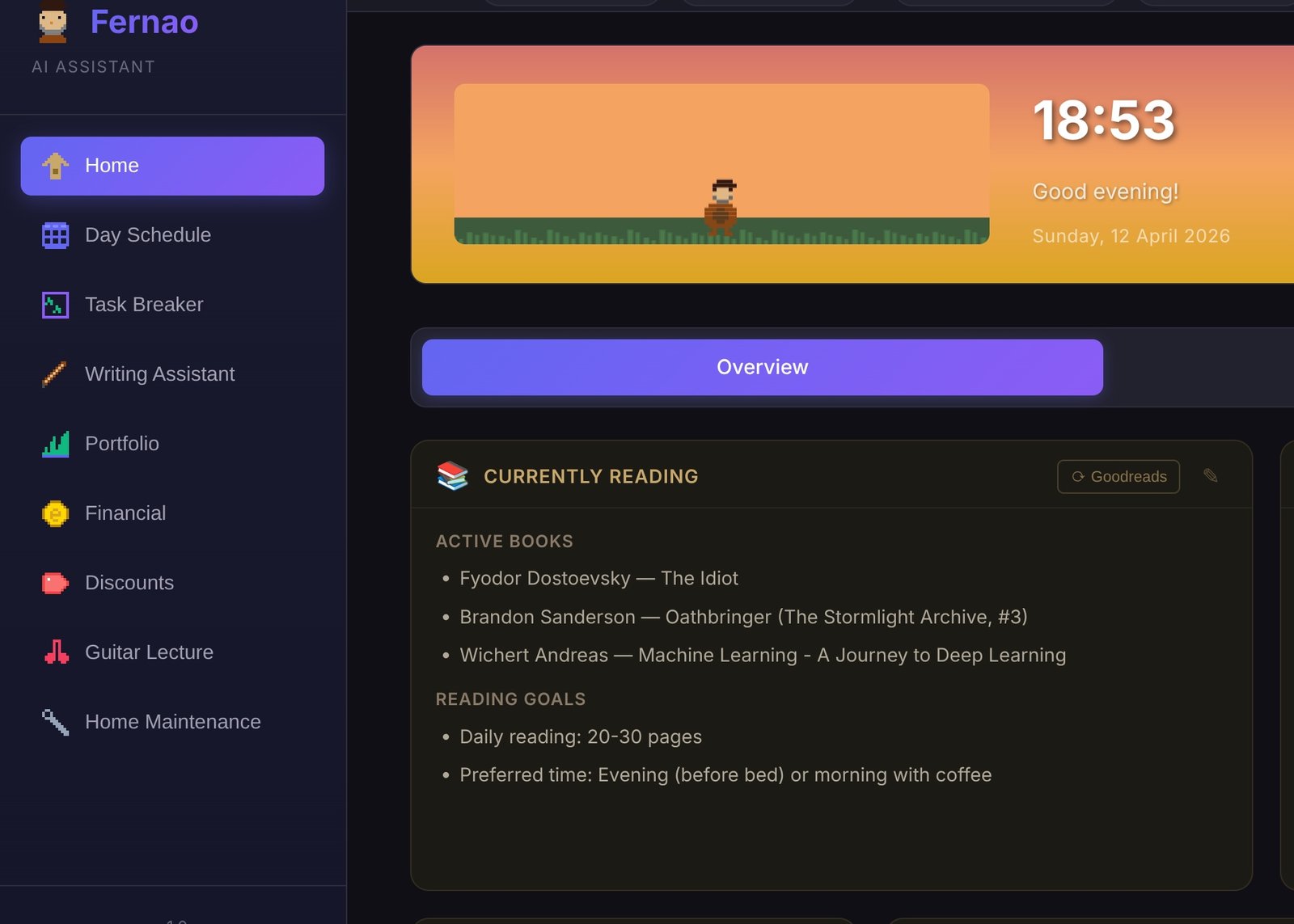
Here’s how the Task Breaker appears in the sidebar:

And here’s the current (still rough) front end for the Task Breaker:

Let’s take a real example. One of the larger tasks sitting in my To Do list is “Project Documentation at DareData.” This isn’t a small operational task, it’s a structural project.
The goal is to consolidate and formalize the internal knowledge of the company in Notion, making sure the main questions about the enterprise are clearly answered in our Knowledge Hub. That means reviewing every department, identifying gaps, creating or refining pages, structuring information properly, and assigning clear ownership for each section.
In practice, this requires auditing, writing, and governance decisions. It’s not something you “just do” in one sitting and I want to complete this within three weeks. Realistically, I can dedicate between 30 minutes to one hour per day.
This is exactly the kind of task that benefits from decomposition, so I’ll use some context information in the Task Breaker and turn this giga-task into an actionable plan:
I’m currently building our Knowledge Hub in Notion. Here’s the current structure of Notion and Departments:

# DareData Hub

## Handbook for Network Members

[DareData Network Member Handbook ]

## Teams

### Sales & Partnerships

### Marketing (Brand and Gen-OS)

### Finance

### Delivery

[Tech Specialists]

[Principals]

[Account Managers]

I’ll need to:

- Go Through Every department and create the pages that make sense (search the web for more context on what DareData is if you need ideas of the pages I need to create on every department or use your knowledge on what definitely needs to be documented in a 130 people B2B company).

- Make sure that every page has an Owner

- Revisit the Suggestions recorded by my team in the suggestions, I can probably pick one or two suggestions every day

- Add some departments that are not in there: Admin, Core Members, Finance, Product

I have around 30 minutes to 1 hour to work every day and want to complete this project by 7 March 2026.
After hitting “breakdown”, Fernão will start to forge:

Marvelous x2!

We can now review the tasks and plan generated and submit them to my Microsoft To-Do. I also need to assign which list on Microsoft To-Do they will be assigned to:

Cool! Let’s see how it looks in Microsoft app:

Perfecto.
While testing this, I realised I want to adjust two things.
- First, Fernão is meant to be a medieval chronicler, not a fantasy warrior, so I’ll change the forging design. His clothing should feel medieval.
- Second, on a more practical note, I need a “Submit All” button. Submitting tasks one by one is tedious, especially when breaking down larger projects.
Let’s break another task after making these changes:

Fernão now forges in a proper medieval vest:

And now we can also use the nice “Submit All” button:

I’ll likely remove the emoji. That kind of “emojification” is very typical of LLM-generated code in the front-end, and it really annoys me.
Anyway, building this new feature for Fernão was genuinely satisfying. If you have ideas for additional features, I’m open to suggestions!
Below is the current prompt I’m using for task breakdown. I’ll continue refining it as I experiment and observe how it performs in real use cases.
name: task_breakdown
description: Break down a task into 20-minute actionable subtasks
max_tokens: 4096

variables:
- task_name
- task_context
- current_date
template: |
You are a productivity expert helping break down complex tasks into manageable 20-minute chunks.

**CURRENT DATE:** {current_date}
**TASK TO BREAK DOWN:**
{task_name}
**CONTEXT PROVIDED BY USER:**
{task_context}

**YOUR JOB:**

Break this task into specific, actionable subtasks that can each be completed in approximately 20 minutes.
**RULES:**
1. Each subtask should be concrete and actionable (starts with a verb)
2. Each subtask should take ~20 minutes (can be 15-25 min, but aim for 20)
3. Subtasks should follow a logical order
4. Be specific - avoid vague tasks like “work on X”
5. If the task is already small enough, you can create 1-3 subtasks
6. If it’s large, create > 5 subtasks
7. Consider the context provided - use it to make subtasks relevant and specific
8. **SCHEDULING:** Based on the user’s context (e.g., “every other day”, “weekends only”), suggest a specific Due Date for each task starting from the Current Date.

**OUTPUT FORMAT:**

Return ONLY a markdown list of subtasks in this format:
- {task_name} - [Subtask description] (20 min) [Due: YYYY-MM-DD]

Example:
- {task_name} - Create project repository (20 min) [Due: 2026-02-13]
- {task_name} - Configure CI/CD pipeline (20 min) [Due: 2026-02-15]
Do NOT include any other text or explanations. Just the list.
In parallel, I’m already working on several new modules:
- A Dividend Analyzer to project income from my stocks and ETFs
- A Writing Assistant to create an editorial plan for my writings.
- A Discounts module to check relevant promotions when I’m planning a purchase
- A Guitar Organizer to structure and schedule practice sessions whenever I pick up my guitar
Stay tuned for the next modules and hope this inspires you for your personal projects as well!