

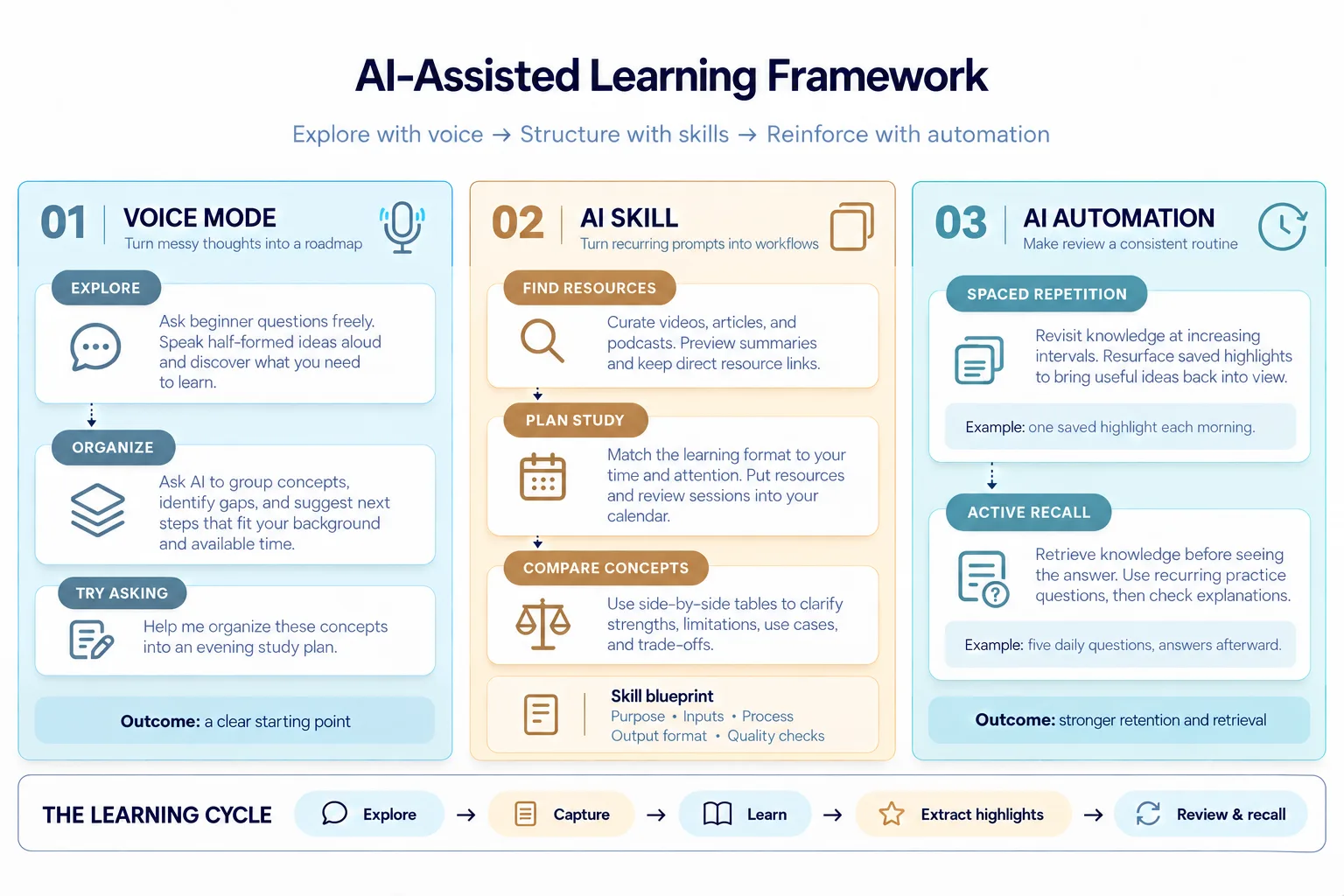
Whether AI is changing the way we work, think, and learn for better or worse remains an ongoing discussion, with one side arguing that AI is making us think less and another emphasizing that it dramatically reduces mundane work and boosts productivity. As AI continues to disrupt the entry-level work of data practitioners and developers, continuous learning and upskilling is essential. I believe we should leverage AI’s capabilities and use it as a thinking partner to improve the effectiveness of learning, as if we were standing on the shoulders of giants. I’ll share three approaches to build an AI-assisted workflow that reduces friction in learning any new topics, including capturing ideas, finding resources, prioritizing attention, comparing similar concepts, and practicing spaced repetition and active recall.
The goal is not to outsource learning and thinking to AI but to make it easier to start, repeat, and embed into everyday life.
1. Use AI Voice Mode for Exploration
Our learning process naturally progresses through four phases from being completely new to a knowledge domain till when knowledge becomes intuitive and difficult to explain.
-
not knowing what you don’t know (unknown unknowns)
-
knowing what you don’t know (known unknowns)
-
knowing what you know (known knowns)
-
not knowing what you know (unknown knowns)
I found that chatting with AI using voice mode is a great entry point in this learning journey, particularly during the unknown unknowns stage, when exploration matters more than precision. Instead of navigating an ocean of unfamiliar concepts and incomplete ideas, we can verbalize our questions to organize our thinking while allowing AI to turn half-formed hypotheses into more structured pathways for exploration. Compared to writing your questions in a chat interface, voice mode feels more spontaneous and less formal, making it easy to fit into a morning walk or household chores.
Here is a real-world scenario: when I began to learn about app development, I used AI voice mode to ramble freely without worrying about using the correct terminology or feeling judged as a beginner.
Example:
“I want to learn how to build apps but no idea where to start from as a beginner. What are the basics or fundamentals?”AI’s response: “An app has five basic parts: a user interface, application logic, data storage, integrations or APIs, and deployment …”
Once you become aware of the unknowns, all the new terminology and unanswered questions can soon feel overwhelming. Speak your unstructured thoughts out loud, and your AI companion will organize them into a clear outline or a learning roadmap. Asking AI to suggest immediate steps can help you quickly build momentum and turn ambiguity into concrete action.
Example:
“Help me organize these concepts into a study plan.”
You can also add personal context, such as “a study plan that fits into my evenings over the next couple of weeks,” “tailored to someone with a data science background,” or “for someone who prefers visual learning.”
From there, I can talk through what I already understand, ask questions as they arise, and use AI to identify gaps and gradually build a learning roadmap suited to my existing knowledge and experience.
Using AI voice mode is not simply a faster method of entering text. It becomes a tool for externalizing, organizing, and challenging our thinking, turning unstructured thoughts into a more focused learning or working process.
2. Use AI Skills for Repeatable Instructions
You may soon realize that many questions we ask AI follow a similar structure or have the same formatting requirements but are applied in different contexts. Instead of repeatedly typing the same prompt, you can turn commonly used instructions into reusable AI skills that are applicable to various topics. Skills are becoming a core functionality in most AI assistants, such as ChatGPT and Claude Code, and can often be invoked with an in-chat command such as “/” or “@”.
AI skills are composed of 5 key elements:
-
Purpose: what the skill is for and when to use it
-
Inputs: required user inputs for further clarification
-
Process: the step-by-step workflow
-
Output format: how the response should look (structure, tone, length, headings, formatting, and required sections)
-
Quality checks: validation rules and common mistakes to avoid
I’d like to share three AI skills that I use to learn any new topics more efficiently.
-
Collect learning resources
-
Schedule a study plan
-
Compare similar concepts
2.1 AI skill for collecting learning resources
The primary goal at this stage of learning has shifted from exploration to systematic enrichment of the preliminary study roadmap created via voice chat. This means adding concrete details, such as learning resources, a beginner-friendly curriculum, and practical projects, so the roadmap becomes more actionable.
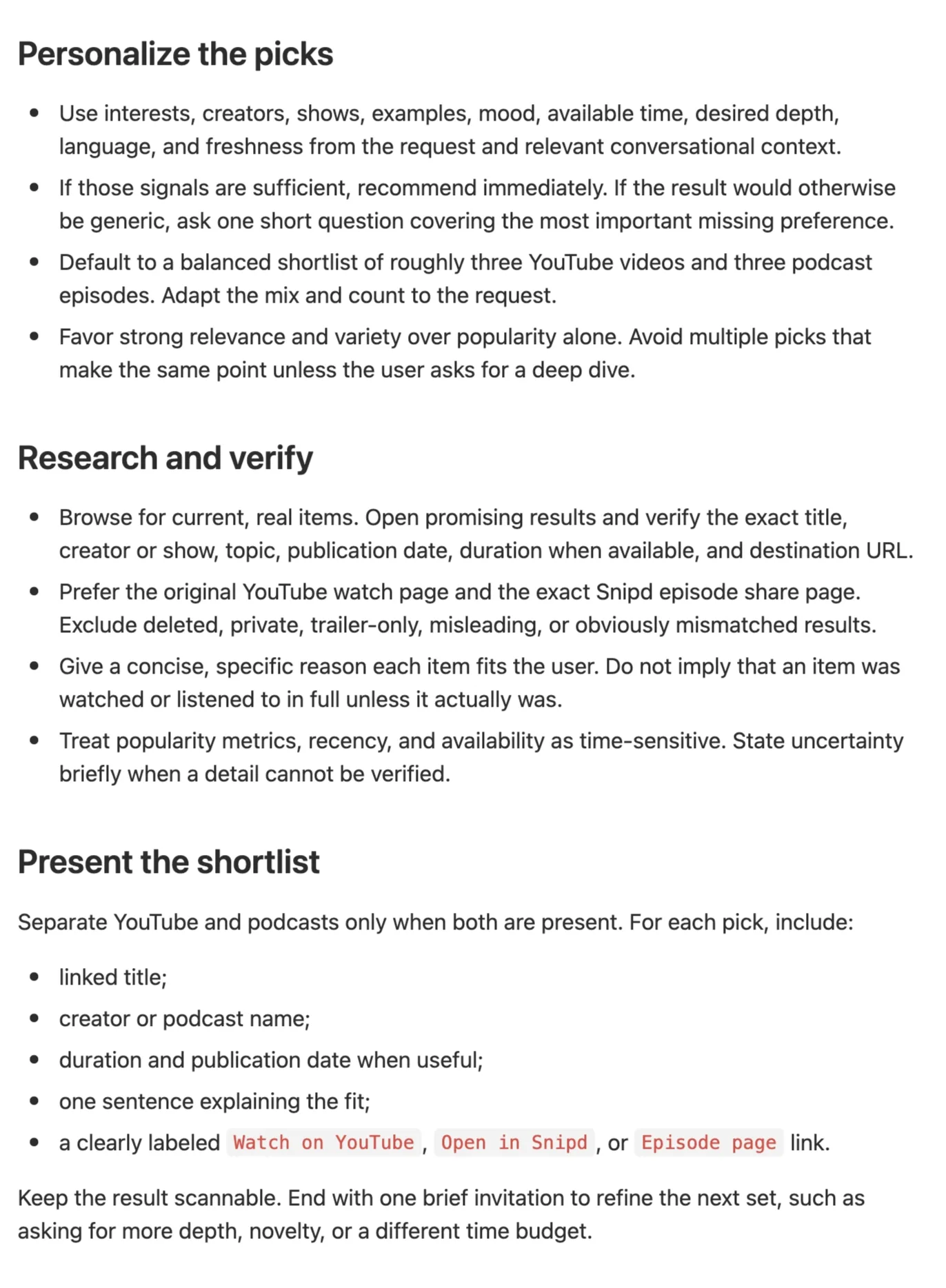
For instance, I create AI skills to collect materials on the subject of interest, including YouTube videos, articles, blog posts, or podcast episodes. Different formats work better in different situations—for example, podcasts are useful during early discovery to build intuition from professionals and fit easily into a daily commute.
You can additionally ask AI to summarize these materials in bullet points first, giving you an overview before you commit a significant amount of time and effort. If a resource looks promising, then ask for URL links that can directly open in an app or browser. The purpose is to make resource gathering more systematic and reduce the friction of repeatedly searching across multiple platforms.
Most AI assistants now support creating skills with simple prompts. For example, I provide the requirement: “Help me to create a skill that recommends YouTube videos and podcast episodes related to a given topic, with URLs that open directly in the YouTube and Spotify apps.” Then, my assistant creates a comprehensive skill instruction that directs it to personalized, structured responses. The instruction file is typically stored locally as a Markdown file, such as SKILL.md, and can be easily adjusted to suit your needs.
Example:
“Help me to create a skill that recommends YouTube videos and podcast episodes related to a given topic, with URLs that open directly in the YouTube and Spotify apps.”
AI Skill: youtube-podcast-recommender
description: Suggest personalized YouTube videos and podcast episodes with verified, direct item links for YouTube and Snipd. Use for requests asking what to watch or listen to, a mixed video-and-podcast shortlist, or recommendations that should open in those apps; do not use for music queues or permanent playlists.
2.2 AI skill to schedule tailored study plan
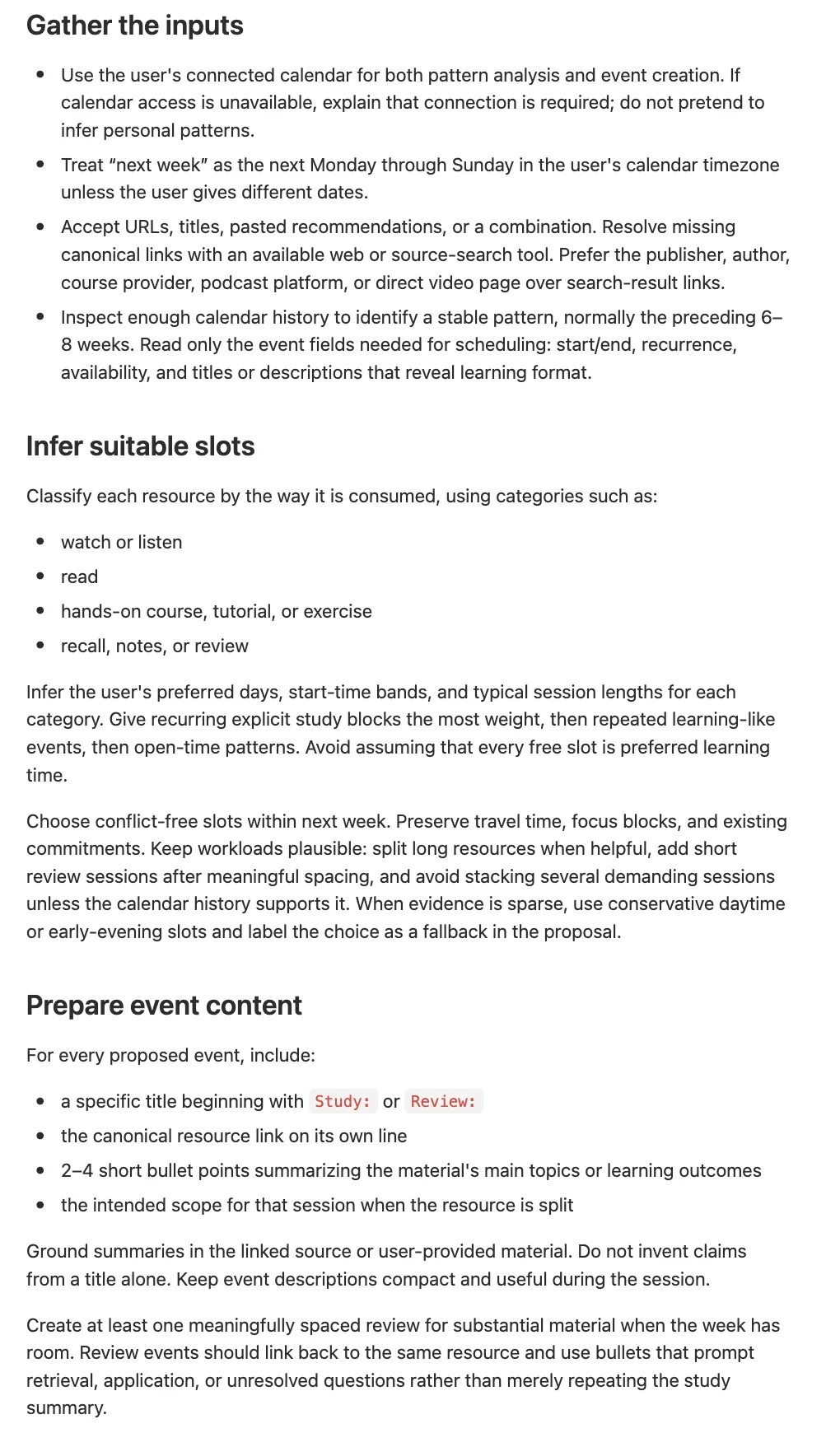
After gathering a list of learning resources, a practical next step is to time-box them in your calendar so they do not become another reading list that grows indefinitely. AI assistants can streamline this process and reduce the time spent manually scheduling events in your calendar and remembering to look up the relevant resources.
Before creating an AI skill to automate this process, it is worth asking yourself, “What format is appropriate for the time and attention I have available?” Here are some examples that work well for me.
-
Podcasts and YouTube videos can support learning while commuting, walking, exercising, or doing other low-attention activities.
-
Articles and blog posts are useful when you want detailed explanations, foundational concepts, and implementation guidance.
-
Tutorials and case studies are valuable when the topic requires practical exercises rather than passive understanding.
AI should not replace our reflection on what works best for us. Instead, we should give it that context and ask it to suggest plans within those constraints.
This skill can become more powerful when paired with MCP tools for your preferred task management apps or calendars. AI can create events with references to these learning resources directly in the app, and gradually use your scheduling patterns to identify suitable windows for different types of learning activities.
For a guide to MCP, check out my previous blog post.
 Model Context Protocol (MCP) Tutorial: Build Your First MCP Server in 6 StepsA step-by-step guide to develop a custom code-to-diagram MCP serverDestin Gong · 9 min read
Example:
Create a skill to schedule several review sessions for these recommended learning resources spread across next week based on the times I usually reserve for different types of learning materials. Include the relevant links in each calendar event’s description, along with a brief bullet-point summary of the material. Use my previous scheduling patterns to identify the most suitable time slots.
AI Skill: study-review-scheduler
description: Schedule recommended learning resources and follow-up reviews across the next week by learning the user’s material-specific time preferences from prior calendar patterns. Use when the user wants study sessions placed on their calendar with resource links and concise summaries; do not use for a generic study plan that should not inspect or modify a calendar.
2.3. AI skill for comparing similar concepts
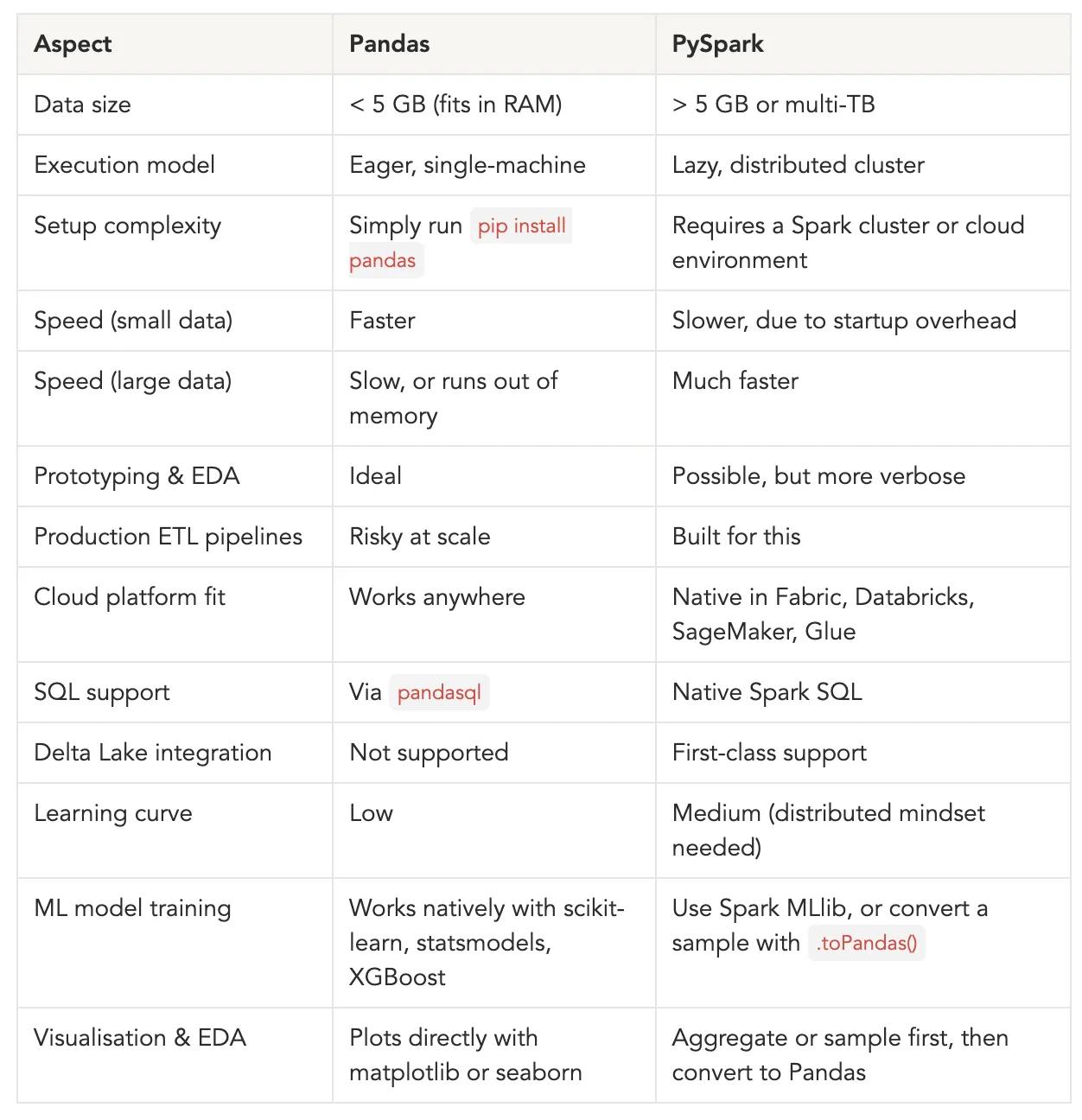
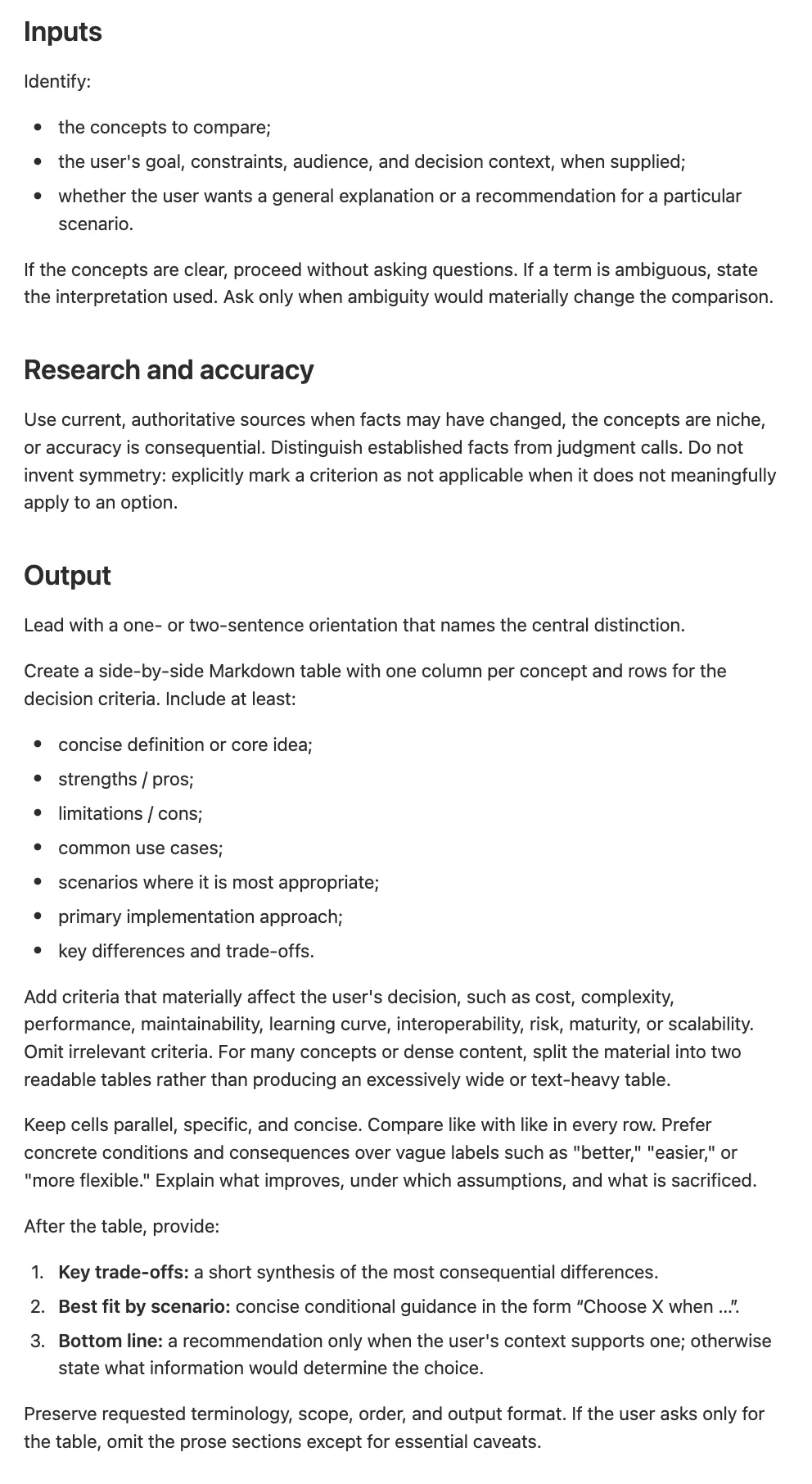
While learning any new topics, we can get confused with concepts that sound similar but behave differently. AI can accelerate understanding by explicitly contrasting them and also effectively converting them into a visual format to highlight the distinctions. What consistently works for me is a structured table that compares concepts side by side, covering pros and cons, common use cases, scenarios in which each option is most appropriate, primary implementation approaches, and key differences or trade-offs between them. This helps move beyond basic definitions towards a practical understanding of when and why a concept should be used. For example below, I use this skill to create a comparison table of Pandas vs. Pyspark
AI Skill: compare-concepts
description: Compare two or more similar concepts, technologies, methods, products, patterns, or options in a decision-oriented side-by-side table. Use when a user asks for differences, pros and cons, use cases, implementation approaches, trade-offs, or guidance on which option fits a scenario.
3. Use AI Automation for Scheduled Tasks
A step beyond creating AI skills is to schedule tasks at a defined time and frequency. When we’d like to create study routines that are executed at a consistent time through a structured workflow, AI automations are the best way to approach this. We can leverage AI to enhance our workflow through two established learning techniques—spaced repetition and active recall.
3.1 AI automation for spaced repetition
Spaced repetition refers to revisiting information at intentionally increasing intervals to improve retention of information in long-term memory. This is a widely recognized technique for counteracting the forgetting curve, which describes the tendency for new knowledge to fade over time, especially within the first 24 hours after encountering it. That’s why Anki cards are a popular tool for students to periodically review new concepts.
With the help of AI assistants, we can set up scheduled tasks to resurface highlights from your recently read articles so that it forms a cohesive workflow: exploring new concepts → capture useful materials → consume learning materials → extract key highlights → review highlighted content. This workflow is especially useful for people who frequently save articles into reading list, but forget to return to them.
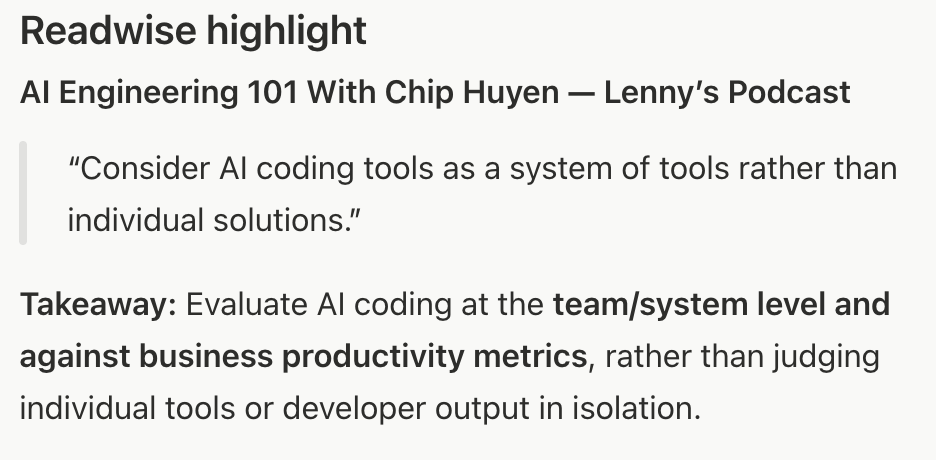
An example setup I had is using Readwise app (a knowledge management tool that organizes highlights and notes from e-readers, books, and articles) to consolidate my reading lists and capture highlighted contents, then use AI tool (e.g. ChatGPT) to link to Readwise MCP, then create a scheduled task to provide a daily reminder of highlights from your recently saved articles.
Example:
Create a scheduled task to search my Readwise highlights and send me one useful highlight each day at 7:40 am. Prioritize my most recently saved highlights, but occasionally surface an older highlight for rediscovery. Avoid repeating highlights already sent. Include the source title and a brief one-sentence takeaway.
As a result, I receive a reminder at 7:40 am everyday with a short message covering one highlight from my Readwise catalogue.
3.2 AI automation for active recall
Active recall is the step beyond merely consolidating information and requires retrieving knowledge from long-term memory. Reading something multiple times rarely produces durable knowledge, therefore I would consider “active recall” as the most practical exercise. This is because the main purpose of us absorbing new knowledge is being able to apply them in the appropriate context. What makes this process difficult is that there are always misalignments between our perception of obtaining new information and being able to retrieve that information from long term memory when needed. For example, we might read a coursebook two or three times yet still struggle to recall the correct information during an exam. That’s why mock exams are crucial, as they train the brain to retrieve information, rather than letting us assume we’ve learned it just because we reread the material multiple times.
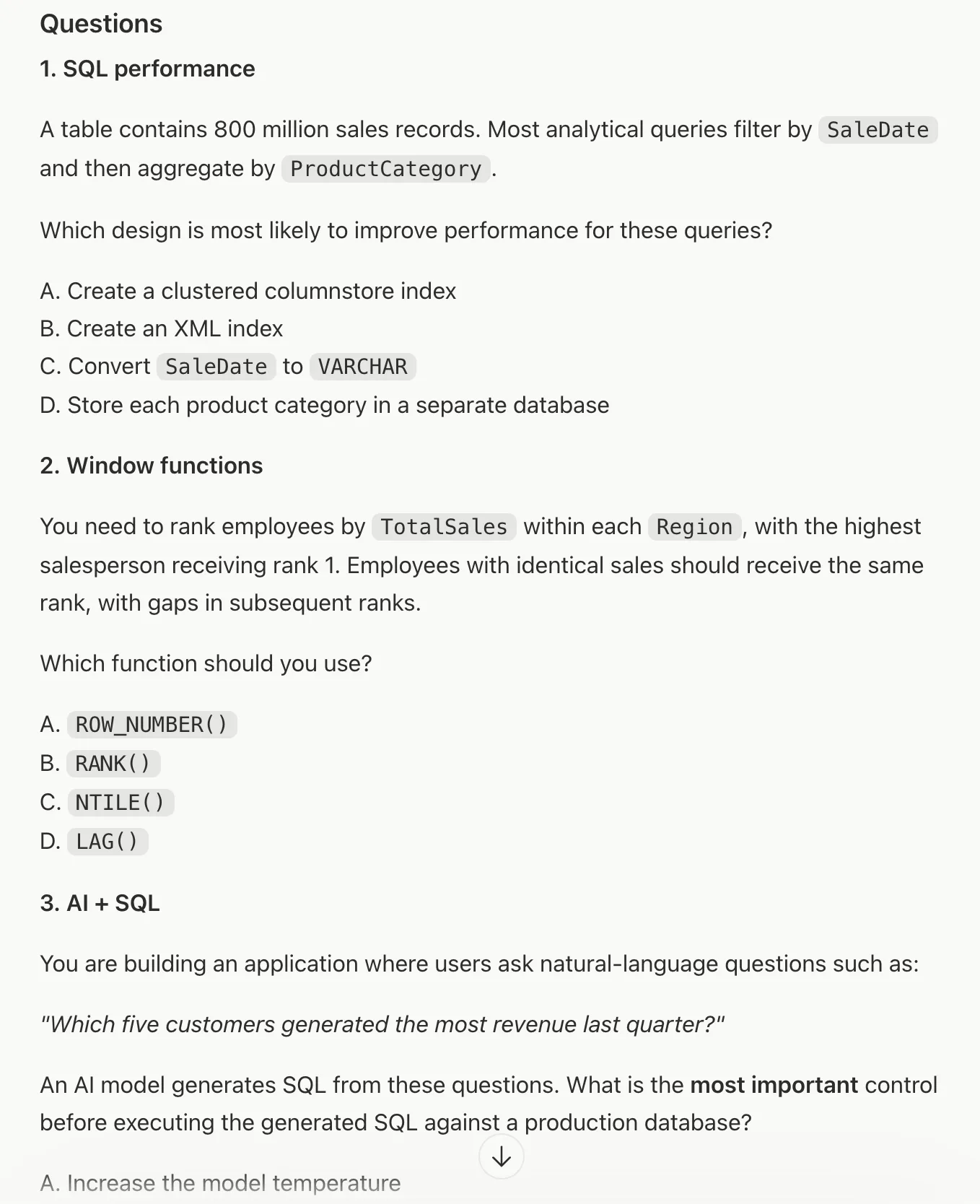
AI can support active recall by automatically creating and delivering Q&A at regular intervals. This can reduce the need to search for practice tests online and make learning more enjoyable—like answering pub quiz questions. For example, when I’m preparing for DP800 certification exam, I asked AI to create a daily question set to test my knowledge on topics covered in the exam.
Example:
Create a daily scheduled task to give me five DP-800 Microsoft Certified SQL and AI Developer practice questions. Present all five questions first so I can attempt them, then provide the correct answers afterward with concise explanations. Vary the questions from day to day and cover the exam’s relevant skills.
Here is a snapshot of AI generated DP-800 assessment questions.
Now that we’ve seen how we can leverage AI beyond a chat interface. Through voice mode, reusable skills, and lightweight automations, we can build a learning lifecycle that keeps us moving from curiosity to a repeatable routine.
···
Take-Home Message
AI can boost learning productivity most when it reduces the friction of turning curiosity into consistent action: use voice to quickly externalize and organize messy thoughts into a learning roadmap, convert recurring workflows into reusable skills (e.g., resource discovery, study-plan creation, structured comparisons), and add lightweight automation to sustain retention via spaced repetition and active recall—so learning becomes a repeatable system rather than a pile of notes.
-
Voice mode: capture helps you move from ambiguity to a clear starting outline and next steps, fast
-
Reusable skills: turn your best prompts into consistent workflows for finding resources, planning, and comparing concepts
-
Automation: reinforce knowledge with spaced repetition (resurfaced highlights) and active recall (daily practice questions)
More Content Like This:
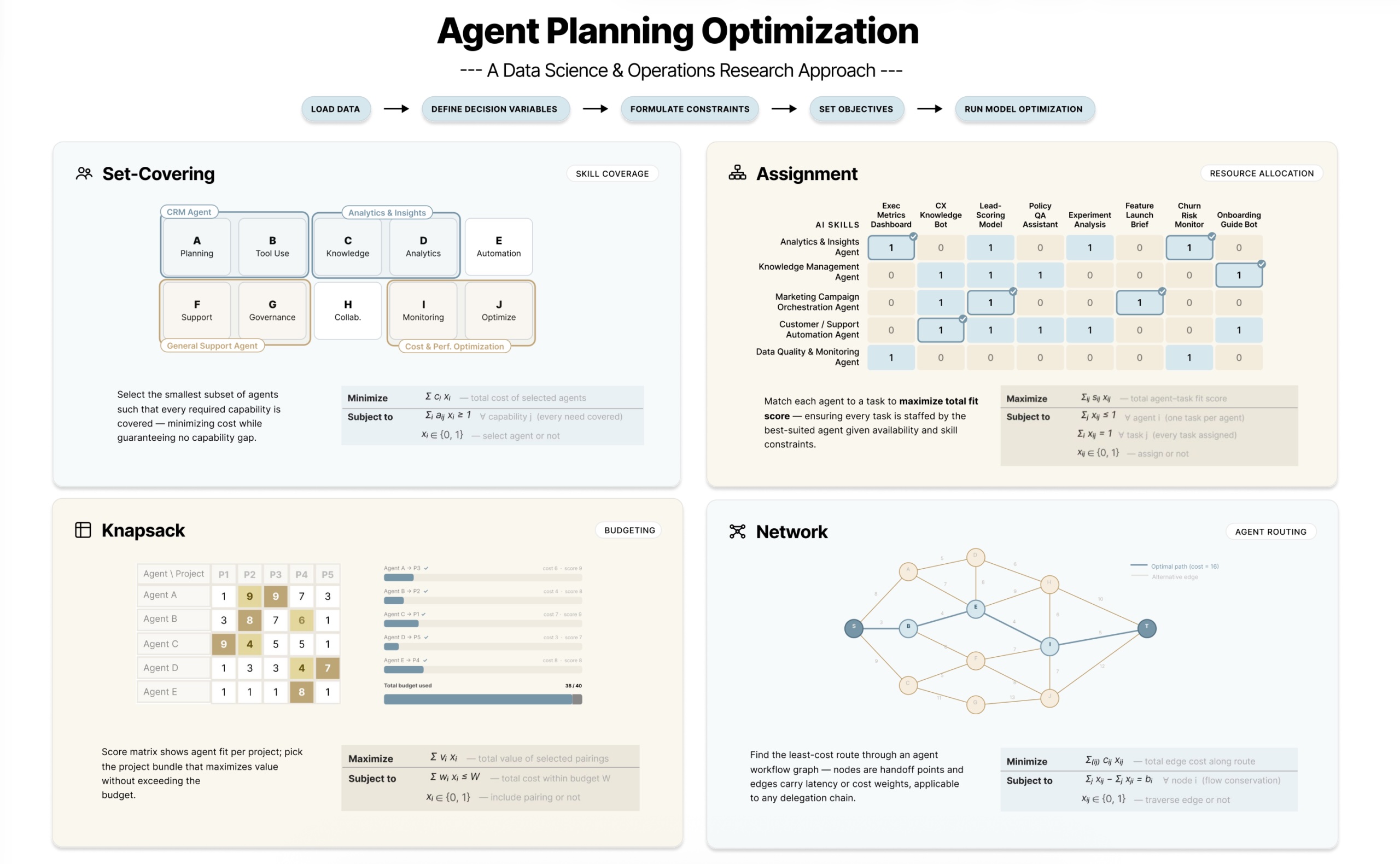 Optimizing AI Agent Planning with Operations Research and Data ScienceAI agent cost and resource planning using four common optimization modelsDestin Gong · 17 min read
 MCP Client Development with Streamlit: Build Your AI-Powered Web AppA practical guide to build an interactive user interface for connecting multiple MCP serversDestin Gong · 8 min read