

A new test called DolphinBench checks whether an AI assistant’s memory helps it get things done. Most memory tests ask the assistant a question about the past, such as which coffee shop Sam likes. The authors say that is too easy, because the question itself hints that a fact must be looked up. DolphinBench gives the assistant a job, such as ordering coffee, and checks that it used the right fact.
DolphinBench has three simulated people. Each has about 500,000 tokens of chat history. A token is a small piece of text, about three quarters of a word. Each person also has 200 tasks.
Every task was checked both ways. The assistant had to pass with the relevant history and fail without it. Results must also report total cost and time, not only accuracy.
DolphinBench’s own project site calls it a benchmark by Mem0, a company that sells a memory system. Its announcement post, written by one of the paper’s authors, shows a Mem0 setup with the top score, 70.67 percent of tasks. I did not reproduce DolphinBench, and I tested no company’s memory product.
That raises a question for anyone building an assistant. If it can repeat a fact, will it use the fact when it acts? And what does each way of giving it memory cost? I built a much smaller test of my own to find out.
The test gives a made up project manager a year of chat history, about 40,000 tokens. An assistant then does 30 tasks that need one or two facts from that history, and answers 30 plain questions about the same facts. I tried four ways of giving the assistant its memory on two models, which made 1,260 runs. I logged every run to Weights & Biases (W&B), a tool that records experiments. The W&B Report has the charts and tables.
One result surprised me. With the whole history in front of it, GPT-4o mini answered 97 percent of the questions correctly, yet it did only 58 percent of the tasks correctly. A cheaper way of giving it memory, retrieval, got 89 percent of the tasks right.
By the end, you will have a short script that runs the same four memory designs on your own history and tasks.
What does it mean to give an assistant a memory?
Suppose you hire a new assistant, and your whole year of diary sits in a cabinet. There are three ways to help them. You can hand over the whole diary every morning. You can hand over a one page cheat sheet that someone wrote from the diary. Or you can pull out the few diary pages that match each request.
Those are the three designs I tested, plus a fourth where the assistant gets nothing. A language model does not remember anything between requests. Whatever it should know has to be written into the prompt, which is the text you send with each request.
How was the test built?
The person is Dana Whitfield, a made up project manager. Her history has 80 entries over a year, about 40,000 tokens in total. Thirty entries each state one fact, such as her lunch place, a meeting time, a project launch date, or who owns a project. Eleven more entries change one of those facts later. The remaining 39 entries are ordinary days of chat about printers, trains, and the weather, so the facts are not easy to spot.
A changed fact makes the old value the wrong answer. For example, the team lunch order moves from one restaurant to another. A model wrote the chat from my list of facts, and code checked that every fact appears as one exact sentence and nowhere else.
There are 30 tasks, one for each fact. Each task is a request that ends in a tool call, which is the assistant asking a program to do one action. The tools are scheduling a meeting, ordering food, sending a message, and assigning a task. Nine tasks need two facts. For example, “tell the Atlas owner the launch date” needs both the owner and the date.
A task passes only when the tool call holds the right values, such as the right person and the right day and time. The reply text is never read. For each fact I also ask one plain question, such as “when is Dana’s regular one on one with Sam?”, and check that the reply gives the newest value.
I checked that the tasks are fair in two ways. With no memory, no task should pass. With exactly the right snippets handed over, almost every task should pass.
My first try at the second check failed, with only about 70 percent passing. Some snippets named a person without saying their role, and my tool instructions let models write full calendar dates. I fixed both before the real run.
Which memory designs and models did I test?
-
No memory. The assistant sees only the request.
-
Full history. The whole 40,000 token history goes into every prompt.
-
Running summary. A model reads the history in 11 steps and rewrites one summary of about 1,000 words as it goes. The assistant sees only the summary. Each model wrote its own summary once.
-
Retrieval. The history is cut into 184 pieces of about 1,200 characters. Each piece becomes a list of numbers, called an embedding, that captures its meaning. For each request, the 5 pieces closest to the request go into the prompt.
The two models are GPT-4o mini from OpenAI, called mini from here on, and Claude Haiku 4.5 from Anthropic, called Haiku from here on. Each task ran 3 times for every design except full history, which ran twice because it costs the most. Each question ran 3 times, except full history once.
How can you run the test on your own history?
Save the script below as memory_test.py in a new folder. It needs Python 3.9 or later and an OpenAI key, and no other packages. It holds a small made up history of 14 messages and 6 tasks, which you can replace with your own.
Open a terminal in that folder and run these two commands. The first sets your key. The second runs the test with gpt-4o-mini. A run makes about 70 calls and costs a few cents.
This is the output I got. The history is tiny, so full history does well here, and the numbers only show that the script works. The experiment below uses the 80 entry history.
How well did each memory design do?
For each design, I count the share of the 30 tasks done correctly, averaged over the repeats. I do the same for the 30 questions. Higher is better, and the table shows both models side by side.
|
Memory design |
Mini, tasks done (percent) |
Mini, questions answered (percent) |
Haiku, tasks done (percent) |
Haiku, questions answered (percent) |
|---|---|---|---|---|
|
No memory |
0.0 |
3.3 |
0.0 |
3.3 |
|
Running summary |
70.0 |
63.3 |
67.8 |
86.7 |
|
Retrieval |
88.9 |
96.7 |
85.6 |
94.4 |
|
Full history |
58.3 |
96.7 |
81.7 |
93.3 |
With no memory, no task passed on either model, so the tasks really do need the memory. Mini guessed in all 90 runs, and every guess had a wrong or missing value. Haiku asked a question instead of acting in 72 of its 90 runs, even though it was told never to ask.
Retrieval did the most tasks correctly for mini, 88.9 percent. For Haiku it scored 85.6 percent against 81.7 percent for full history, which is close enough that I would not call a winner. With exactly the right snippets handed over, both models did 96.7 percent of the tasks, so that is the ceiling for this test.
Cost tells a different story. The table shows what it cost to do the 30 tasks once, including building the memory, and the median time for one task.
|
Memory design |
Mini, cost for 30 tasks |
Haiku, cost for 30 tasks |
Mini, seconds per task |
Haiku, seconds per task |
|---|---|---|---|---|
|
No memory |
$0.002 |
$0.047 |
1.4 |
1.5 |
|
Running summary |
$0.031 |
$0.311 |
1.3 |
1.7 |
|
Retrieval |
$0.007 |
$0.081 |
2.3 |
2.4 |
|
Full history |
$0.232 |
$1.661 |
2.1 |
2.3 |
Full history cost 20 to 31 times more than retrieval. Retrieval was the slowest by a little, because it makes two calls, one to find the pieces and one for the assistant. Sending 40,000 tokens with every request added little time.
Did the assistant use what it remembered?
Here I compare two scores for each design. The grey bars show how many of the 30 questions the assistant answered correctly. The colored bars show how many of the 30 tasks it did correctly, using the same facts.
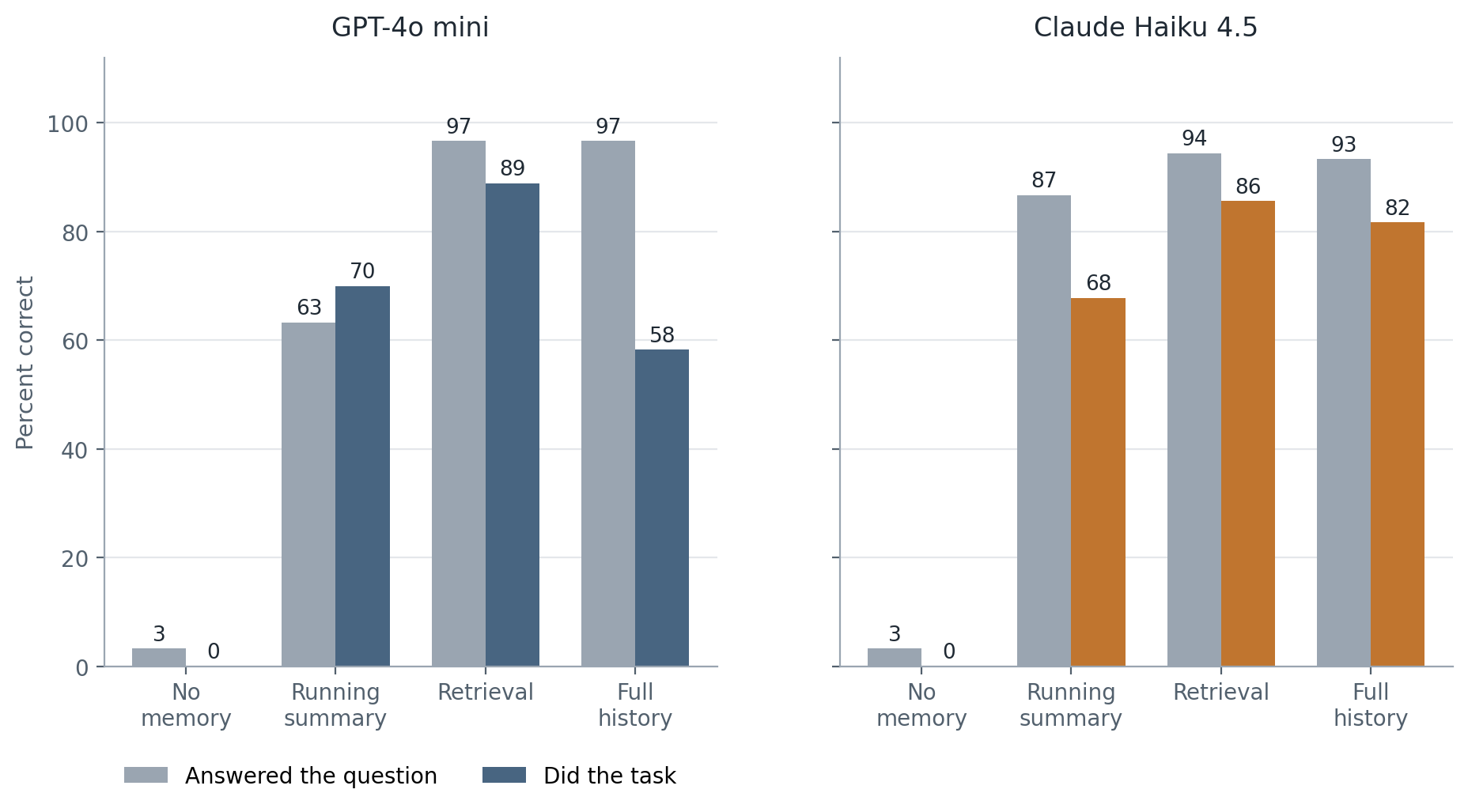
Mini with the full history shows the biggest gap, 38 points. It answered 29 of the 30 questions correctly. Yet it did only 58 percent of the tasks. In 5 of its 13 scheduling misses, it chose the right time and the wrong day, such as “Monday 10:00” for a Tuesday 10:00 meeting.
Haiku’s gaps were smaller, 12 points with full history and 9 with retrieval. With the full history, 10 of its 11 missed tasks were questions asked in place of acting. One example is asking whether to book a meeting at a time it had already found.
Mini with a running summary went the other way. It did 70 percent of the tasks but answered only 63 percent of the questions. So the idea that an assistant remembers more than it uses held for five of the six setups with memory, and not for all of them.
Where did each design fail?
The clearest failure came from corrections. Figure 3 splits the tasks into the 19 facts that never changed and the 11 that were corrected later.
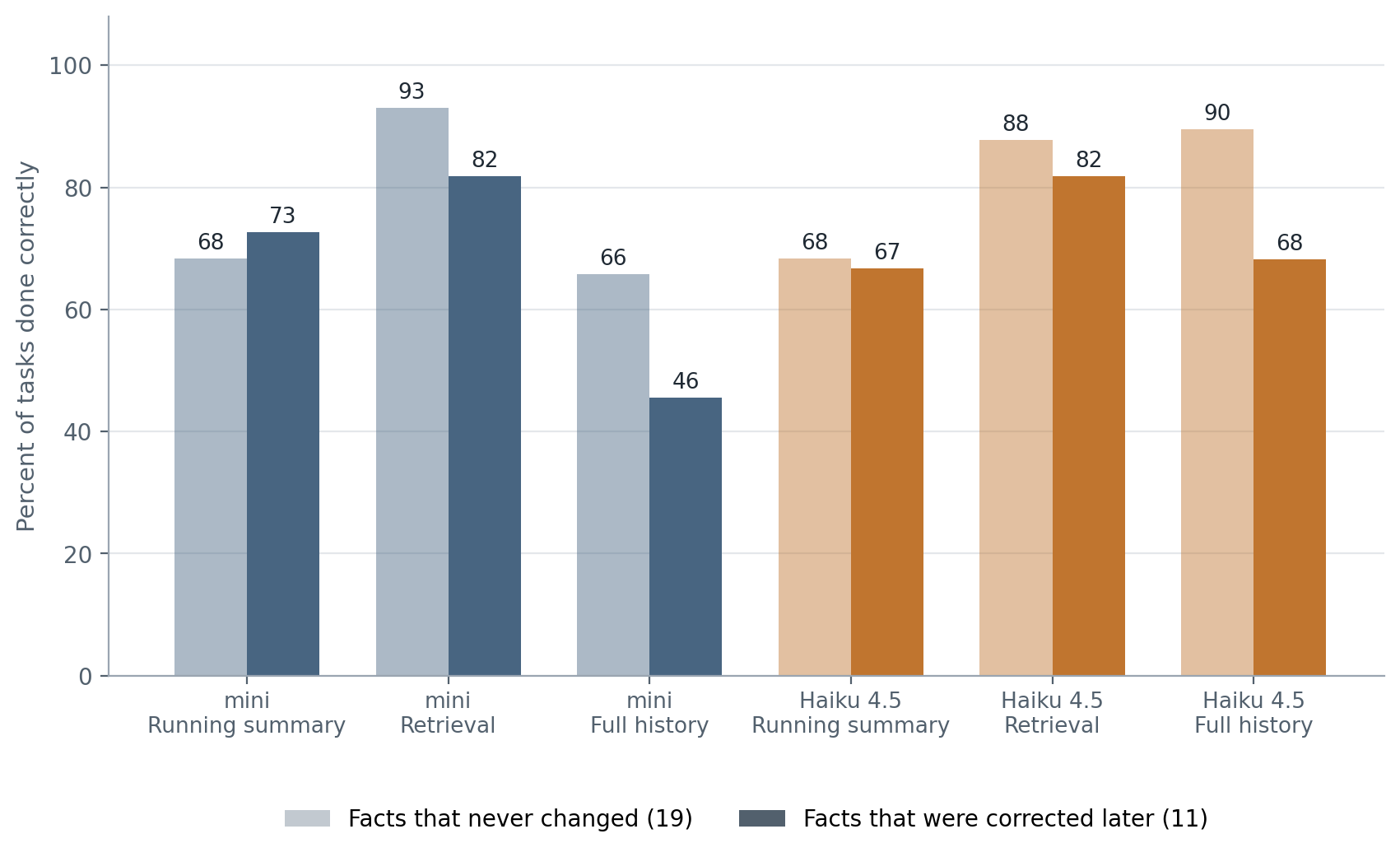
Full history keeps both the old message and the new one in the prompt, and the model has to notice that the later one wins. Mini did not always. Asked to order lunch for the team workshop, it ordered from the old restaurant in both of its runs. A later message had moved the order to a new one. With the full history it did 46 percent of the tasks about corrected facts, against 66 percent for facts that never changed.
The running summary failed in a different way. It lost facts while it was being written. Mini’s summary kept the newest value for 20 of the 30 facts, and Haiku’s kept 28. The same job took mini 122 seconds and $0.019, and Haiku 250 seconds and $0.19.
Retrieval failed only when it missed. It fetched every piece a task needed in 93 percent of runs. In those runs it passed 95 percent of tasks for mini and 92 percent for Haiku. In the 6 runs per model where it missed a piece, nothing passed.
Here is a question for you. When an assistant is unsure, would you rather it asks first or acts and gets corrected? My score counts a question as a miss, because the task asked for the action, and your answer decides how harsh that is for Haiku.
How do the runs show up in Weights & Biases?
In W&B, each recorded test is called a run. The W&B Report has one run for each model and memory design, a comparison table, a line chart of the repeats, and the results for each fact. Each run also holds every tool call and reply, so you can filter for the tasks where the assistant used the old value.
The logging happened after the experiment, from the saved files, so it records what happened and did not change it. The logging script is optional, and the test above works without a W&B account.
Did my test agree with DolphinBench?
I went in expecting three things. First, that no memory would fail, as it does in DolphinBench. Second, that doing a task would be harder than answering a question. Third, that full history would set the ceiling, with the other designs trying to match it more cheaply.
The first two held. No memory passed none of the tasks, and acting was harder than answering in five of the six setups with memory. The third did not hold. Full history was not the ceiling. Retrieval did better for mini and about as well for Haiku, at a fraction of the cost.
That matches why DolphinBench asks for cost and time next to accuracy. In my test, the designs that use memory differed in cost by up to 31 times, and the score did not follow the cost. I cannot compare my numbers with DolphinBench’s 70.67 percent, because my tasks, history, and models are different.
What should you take away?
-
Test the action, not only the question. Mini answered 97 percent of the questions and did 58 percent of the tasks with the same history.
-
Do not assume more memory is better. Full history cost 20 to 31 times more than retrieval and did not score higher.
-
Check what happens after a correction. Add a later message that changes a fact, and see which value the assistant uses.
-
Count what your summary kept. Check how many facts survive in it, because mine lost 10 of 30 for mini.
-
Check the tasks first. Run them with no memory and with exactly the right snippets, so you know a failure is about memory.
My results come from 30 tasks on one made up person, so they show what to test, not how every assistant behaves.
What should you try next?
Replace the bundled history in the script with a few weeks of your own notes, and write six requests that need a fact from them. Run all four designs and compare the tasks done with the questions answered. Then add a message that changes one fact, and run it again.
Selected sources
-
Soumil Rathi, Deshraj Yadav, and Taranjeet Singh. DolphinBench: Mapping the Pareto Frontier of Agent Memory. arXiv, September 21, 2026, revised September 22, 2026. Source for the three simulated people, the 500,000 token histories, the 200 tasks each, and the rule to report cost and time. Licensed CC BY 4.0, which allows reuse with credit.
-
Mem0. Introducing DolphinBench. Announcement post by Deshraj Yadav, September 22, 2026. Source for the 70.67 percent top score and for Mem0’s connection to the benchmark.
-
DolphinBench. Project site. Describes the benchmark as a benchmark by Mem0 and links the dataset and code.
-
OpenAI. Function calling guide and Embeddings guide. Documentation for tool calling and for the retrieval step.
-
Anthropic. Tool use with Claude. Documentation for tool calling with the Claude Haiku model.
-
Weights & Biases. Track experiments. W&B documentation, for logging the runs and building the report.