

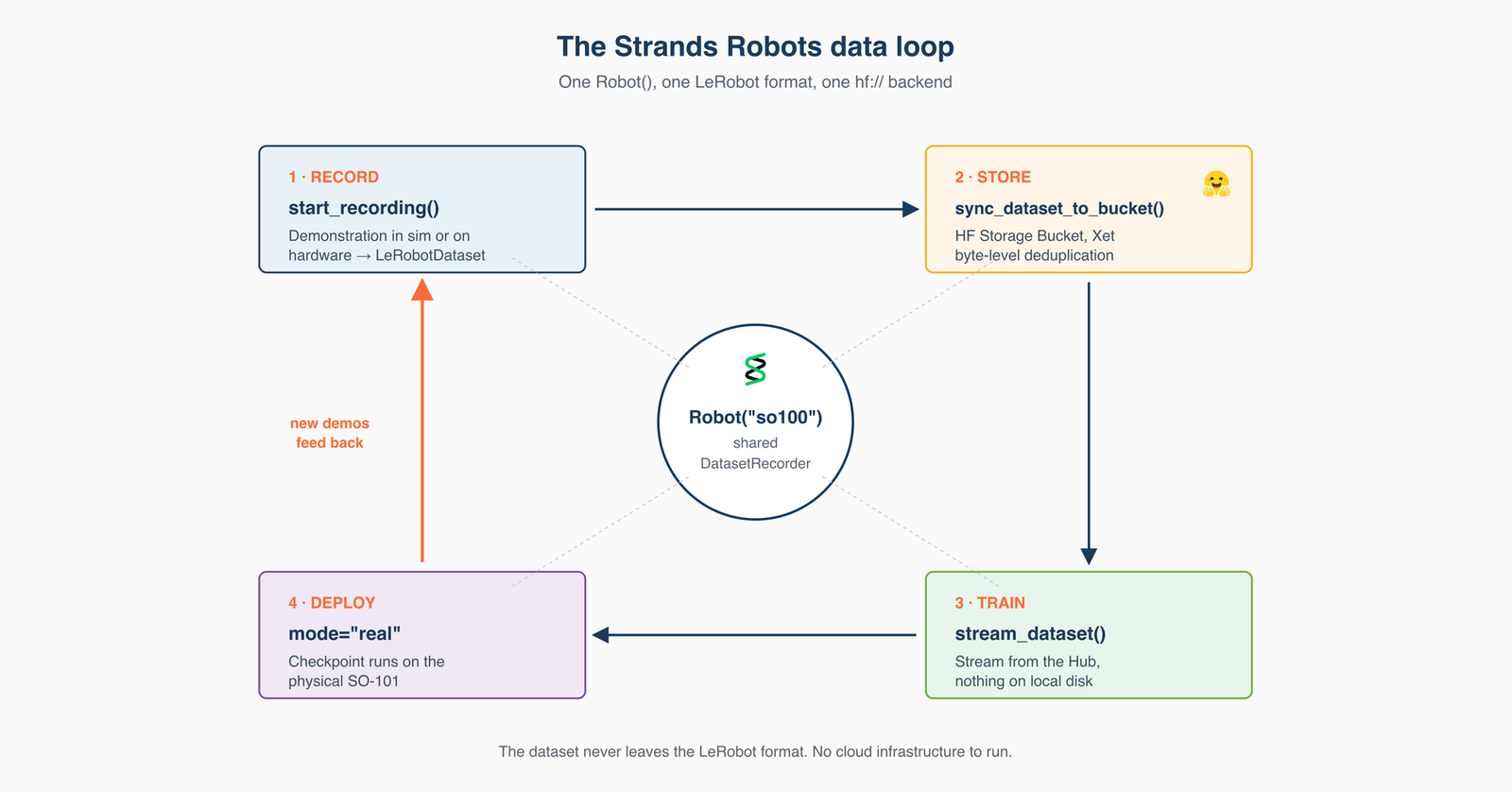

A walkthrough of the streaming data loop in Strands Robots, one agent loop that records robot demonstrations, trains on them by reading straight from the Hub, and deploys the policy back to hardware, with the dataset in the same on-disk LeRobot format the whole way through.
You have an agent that can already record a demonstration and push it to the Hugging Face Hub. Now you want to run that loop continuously: collect episodes through the day, train a policy on the growing dataset, deploy it, and pull the next batch back to improve it. Run that loop once and every piece works. Run it every day and you start paying for the same byte transfers over and over. The recordings you upload keep growing, each training run copies the whole dataset to the GPUs before it starts, and every new checkpoint ships out while the next batch of recordings comes back.
The first post in this series introduced Strands Robots, an open source SDK from AWS (Apache 2.0) that exposes robot abstractions, simulation, and the LeRobot stack as AgentTools you compose into a single Strands agent. It covered the Robot() factory, recording a demonstration in simulation, running a policy, and deploying the same agent code to a physical SO-101. That factory resolves a name against a registry of arms, humanoids, mobile bases, and hands, so the SO-100 used throughout this post is one of many supported embodiments. The robot catalog lists every robot the factory knows about. LeRobot’s dataset format is already used by over 90,000 datasets and models on the Hub from more than 8,000 publishers (LeRobot Project Pulse). A Strands Robots recording is one more of them, so anything built to read LeRobot data can read it without conversion. If you are new to Strands Robots, start there; this post assumes that setup.
That post followed the agent loop in one direction, from a Hub dataset to a physical robot. This one follows the data the other way, from the first recorded frame back to the deployed policy, over Hugging Face Storage Buckets – a mutable, non-versioned, Xet-backed object-storage repository type announced in March 2026. A bucket sits beside your dataset repositories in the same hf:// namespace and uses the hf CLI you already have, so it becomes the working layer that holds your data between the day you record it and the day you train on it.
Someone has to decide which episodes to keep, when the scene has drifted far enough to re-record, whether today’s batch is enough to train on, and which checkpoint replaces the one on the arm. Each of those decisions comes up dozens of times over a collection campaign, and each one needs a look at what came back before the next command goes out. That is the work an agent is for. This post walks you through the data loop inside a single agent: record a demonstration into a Storage Bucket, store it so that each sync uploads only the bytes that changed, train by streaming the dataset straight from the Hub instead of downloading it, and deploy the checkpoint back to hardware with one keyword argument change. The runnable companion to this post lives at examples/notebooks/05_streaming_data_loop.ipynb.
What you’ll build
Where the first post recorded a dataset and pushed it to the Hub, the agent you build here records a LeRobotDataset from a natural-language prompt, syncs it into a Storage Bucket, and streams that same dataset back frame by frame, decoding camera video on the fly, with no local copy. You read it back in the same process that wrote it: the same Strands Robots Robot() that recorded the dataset streams it. Your trained checkpoint then deploys to that same Robot() with one keyword argument change, and the demonstrations it records on hardware return to the same bucket.

Figure 1. The four stages share one backend. Robot("so100") records a LeRobotDataset through the shared DatasetRecorder; sync_dataset_to_bucket(...) syncs it into a Storage Bucket; stream_dataset(...) reads it back over the Hub with no full download; and the trained checkpoint deploys to the same Robot with mode="real". The on-disk format stays exactly as LeRobot wrote it.
Because one Robot() both records a dataset and reads it back, collecting data and training on it are two methods on one object over one backend. The agent decides to run an episode and invokes one tool; the rollout then proceeds at the robot’s control frequency until the episode ends, with the trained policy producing every action. The whole loop, in a handful of lines:
from strands import Agent
from strands_robots import Robot

sim = Robot("so100")
agent = Agent(tools=[sim])


agent("Record a pick-the-cube demo and sync it to my-org/robot-fave.")


for batch in sim.stream_dataset("my-org/robot-fave/cube_pick", repo_type="bucket").dataloader(batch_size=64):
    ...
What follows is what’s actually happening inside that loop, step by step.
Prerequisites
Minimal (default simulation path)
- Python 3.12+, on Linux or macOS (Apple Silicon supported for the MuJoCo backend).
- A Strands-compatible model provider for the agent’s reasoning. Amazon Bedrock with AWS credentials, the Anthropic API, OpenAI, or Ollama running locally.
- Strands Robots with the dataset extras:
uv pip install -U "strands-robots[sim-mujoco,lerobot]>=0.5.1". Thelerobotextra pulls in LeRobot (>=0.6.1),datasets,av, andtorchcodec, so recording and video decode both work without further setup. Refer to installation guide.
That’s it. Every stage in this post runs on a laptop with these three. What runs is the loop, not a working policy: the default path uses a mock policy, which records a valid dataset but not a useful one.
Advanced (buckets, hardware, real policies)
- A Hugging Face account and a token with write permission, plus the
hfCLI for creating buckets and syncing datasets:pip install -U "huggingface-hub>=1.6.0,<2.0.0", thenhf auth login. - For the hardware path: an SO-101 follower and leader pair, or any other LeRobot-supported robot, with calibration files under
~/.cache/huggingface/lerobot/calibration/. - For local vision-language-action (VLA) inference: an NVIDIA GPU. For training at scale, a GPU cluster reading from the Hub.
- To run the training step:
uv pip install "lerobot[training]". Recording and streaming do not need it. If you skip it,trainer.train()returns an error result rather than a checkpoint. The troubleshooting guide names that error and the install that fixes it.
Step 1 – Record a demonstration into a bucket
You record new episodes through the day, each a continuous run of camera frames and joint state-action telemetry. LeRobot writes that as a small set of large files that grow as you record. Push them into a versioned dataset repository and every append becomes a commit, and every revision is retained. Collection wants the reverse: somewhere to write bytes and overwrite them in place. That is a Storage Bucket, which lives inside your Hugging Face workspace and uses the permissions you already have. There are no identity and access management (IAM) roles to configure, no cross-origin resource sharing (CORS) rules, and no upload service to maintain.
Your agent records a LeRobotDataset in the same format LeRobot writes on hardware. Record the episode, then sync the finished dataset into a bucket. The prompt asks for the mock policy, a stand-in that produces joint actions without a trained model, so you can run the whole loop before you have a checkpoint to run:
from strands import Agent
from strands_robots import Robot, sync_dataset_to_bucket

sim = Robot("so100")
agent = Agent(tools=[sim])

agent(
    "Create a world with the so100 robot, add a red cube and a front camera, "
    "start recording (repo_id='local/cube_pick', root="/tmp/cube_pick", fps=30, "
    "overwrite=True, task='pick up the red cube'), run the mock policy for "
    "60 steps, then stop recording."
)

sync_dataset_to_bucket("/tmp/cube_pick", "my-org/robot-fave")
The sync writes to hf://buckets/{bucket}/{run_id}, where run_id defaults to the dataset directory name. The streaming read in Step 3 names the run too: the first two segments of the id are the bucket, and everything after them is the path inside it.
sync_dataset_to_bucket(root, bucket, run_id=...) validates the dataset and syncs it through the hf CLI, decoupled from the recording lifecycle. The same capability is on DatasetRecorder.sync_to_bucket(bucket, run_id=...) if you drive an open recorder directly, and stop_recording(bucket=...) syncs at the moment you stop an active recording. The bucket is the working layer you write to through the day; for the versioned, published artifact you still call push_to_hub(). Both hold the same format.
The episode is structurally complete, but the actions are placeholders, so it is not training data you would want. Swap in a real policy with create_policy(" for actual grasping; the prompt, the format, and the bucket sync stay identical.
Recording on hardware
To record on a physical SO-101, LeRobot’s record CLI handles the leader-follower bring-up:
lerobot-record
  --robot.type=so101_follower --robot.id=my_follower
  --teleop.type=so101_leader  --teleop.id=my_leader
  --dataset.repo_id=my_user/cube_picking
  --dataset.single_task='Pick up the red cube'
The dataset lands on disk in the same format as the simulation recording, so the same sync call takes it to a bucket: sync_dataset_to_bucket("./recordings", "my-org/robot-fave", run_id="run-021") (or the hf sync ./recordings hf://buckets/my-org/robot-fave/run-021 CLI it wraps). Collection runs append into one place, and your published repositories only get the versions you choose to publish.
Step 2 – Store with byte-level deduplication
Now that a dataset is in the bucket, the question is what the next sync costs you. Point two fixed cameras at an arm clearing the same table for eight hours and most of what you record is pixels you already have: the same lighting, the same chassis, the same background, across thousands of episodes. On a versioned repository it gets worse, because changing one frame in a multi-gigabyte video shard re-uploads the whole file.
Buckets are backed by Xet, which deduplicates your uploads at the byte level using content-defined chunking. Chunk boundaries follow the content, so inserting a few bytes changes only the chunk it lands in instead of shifting every boundary after it. In Hugging Face’s own measurements (HF Storage), content-defined chunking reduces data transferred per upload by about four times across the Hub, and on Enterprise plans billing is on the deduplicated footprint. Their bucket benchmarks show what that looks like on a single file. Starting from a 500 MB upload, changing 1% of the bytes and re-uploading moved 5.5 MB, changing 5% moved 27.5 MB, and changing 10% moved 55 MB. Without chunk-level deduplication, overwriting an object means sending all of its bytes again, whether or not they changed.
How much that saves you depends on the file layout, and the Strands Robots recorder uses LeRobot’s. Episodes go into Parquet shards (data/chunk-000/file-000.parquet) and per-camera MP4 shards (videos/observation.images.front/chunk-000/file-000.mp4), rolling to a new file only when the current one fills, at LeRobot’s defaults of 100 MB for data Parquet and 200 MB for video MP4. So a sync after a day of recording uploads the new trailing shards plus the one partially-filled shard that grew, rather than the whole dataset. Sync the same bucket again tomorrow and Xet handles the deduplication.

Figure 2. A sync uploads only what changed. The first sync of a fresh dataset uploads every chunk; after recording more episodes, Xet’s content-defined chunking means the next sync uploads only the new chunks and skips the ones already stored.
Step 3 – Train by streaming from the Hub
To train, you point GPUs at your dataset. Download it first and those GPUs sit idle until hundreds of gigabytes finish copying. Streaming straight from the Hub works here because of the shard layout from Step 2: a batch becomes a few byte-range reads over large shards rather than thousands of small fetches. LeRobot’s StreamingLeRobotDataset turns that into a drop-in torch iterable, and Strands Robots exposes it through stream_dataset():

Figure 3. Stream, don’t download. The download path copies the whole dataset to local disk first, so the GPU waits; stream_dataset() reads batches straight from the bucket with nothing on local disk, so the GPU trains from the first batch.
reader = sim.stream_dataset("my-org/robot-fave/cube_pick", repo_type="bucket",
    shuffle=False, max_num_shards=1, buffer_size=1,
)

print(reader.num_episodes, reader.num_frames, reader.fps)
for frame in reader:
    frame["observation.images.front"]
    frame["observation.state"]
    frame["action"]
    break
Nothing lands on local disk except the small meta/ folder of schema, statistics, and episode index. Camera frames are decoded from the remote MP4 shards as you iterate; state and action come from the Parquet shards. That loop reads one frame at a time, which suits inspecting an episode. To train, pass the reader to a DataLoader and iterate batches instead. The streaming dataset shuffles internally through a bounded reservoir buffer, so video decoding parallelizes across worker processes, and the training step itself is the ordinary PyTorch one:
for batch in reader.dataloader(batch_size=64, num_workers=4):
    loss, _ = policy(batch)
    loss.backward()
If you would rather not write the loop at all, LeRobot’s own trainer reads through the same engine, so the dataset your agent collected trains without a line of new code. It takes a bucket through the same keyword argument the in-process reader uses:
lerobot-train --policy.type=act
  --dataset.repo_id=my-org/robot-fave/cube_pick
  --dataset.repo_type=bucket
  --dataset.streaming=true
  --num_workers=4
Buckets are streaming-only, so --dataset.repo_type=bucket requires --dataset.streaming=true and the config rejects the combination otherwise. Reach for stream_dataset() when you want the loop in your own process: validating an episode, replaying it in simulation, or feeding a custom evaluation loop. For proprioceptive-only streaming, drop_videos=True skips video decode entirely, which is what makes this work on an edge device with no torchcodec wheel. The recording and datasets guide documents that argument along with the delta_timestamps map it requires.
Provider names are shared between running a policy and training one. create_trainer("lerobot_local") returns a Trainer that works like create_policy(), and a TrainSpec describes the run; the record-train-deploy loop then closes in a few lines:
import os
os.environ["STRANDS_TRUST_REMOTE_CODE"] = "1"

from strands_robots import create_policy
from strands_robots.training import TrainSpec, create_trainer

trainer = create_trainer("lerobot_local", device="cuda")
spec = TrainSpec(dataset_root="/tmp/cube_pick", output_dir="/tmp/cube_pick_ft",
                 base_model="", steps=500, extra={"policy_type": "act"})
result = trainer.train(spec)
policy = create_policy(result.checkpoint_dir)
On a single NVIDIA L4 (g6.4xlarge), 500 optimizer steps of ACT (51.6M parameters, effective batch size 8) over a 120-frame episode completed in 133 seconds and wrote a checkpoint that create_policy() loads back through the same entry point used to run any other policy. Training time scales with dataset size, batch size, and step count, so treat this as one measured configuration rather than a benchmark. The "groot" and "cosmos3" providers target the same TrainSpec and Trainer lifecycle, so the surrounding loop is unchanged; each one validates its own required fields first, so a GR00T run needs a base_model and an embodiment tag, and a Cosmos 3 run needs a base_model and an SFT recipe. Call trainer.validate(spec) before train() and it returns the exact list of what a given backend is missing.
Hugging Face’s pre-warming caches bucket data at edge locations near the cloud and region where your jobs run, so your cluster reads locally and the dataloader stays ahead of the GPU. In Hugging Face’s own bucket benchmarks, a warm content delivery network (CDN) read hit about 1,086 MB/s on a 10 GB payload against 780 MB/s cold, and roughly 1,124 MB/s warm at 100 GB, measured on an m5dn.24xlarge in us-east-1. The full comparison against plain object storage, upload as well as download, is on that dashboard. Choosing where that data lives is a Storage Regions setting on Team and Enterprise plans, as of this writing US and EU, with Asia-Pacific and Gulf Cooperation Council (GCC) regions announced as coming; outside those plans repositories are stored in the US.
On macOS, import strands_robots puts Homebrew’s ffmpeg on the loader path for you, so torchcodec decodes streamed video without extra setup.
Step 4 – Deploy the policy and return data to the loop
In this step you take the checkpoint you just trained, run it on a physical robot, and record the next round of demonstrations with it. This is the same agent code from the first post, with one keyword argument changed to mode="real":
robot = Robot("so100", mode="real", port="/dev/ttyACM0",
              cameras={"front": {"type": "opencv", "index_or_path": "/dev/video0", "fps": 30}})
agent = Agent(tools=[robot])
agent("Pick up the red cube.")
The checkpoint runs against the physical arm, and the demonstrations that arm records are saved to disk in the same LeRobot format you started with, ready to sync back to the bucket for the next training run.
If your data already lives on Amazon Simple Storage Service (Amazon S3), none of the format work in this post changes. A LeRobotDataset is a directory of Parquet and MP4 shards, so it stores on Amazon S3 the same as anywhere else, and the recording, training, and deploy steps read that format wherever it sits. What a bucket adds is the Hub-native route: sync_dataset_to_bucket and stream_dataset(repo_type="bucket") target hf:// directly, so you get the sync and the streaming read with no separate storage path to wire up. Both paths run the same loop: Amazon S3 if that is where your data already sits, a bucket if you want the sync and the streaming read without provisioning storage first.
Run the loop again tomorrow and you are recording into that bucket, syncing only the bytes that changed, and streaming those bytes to the GPUs without waiting for a download. The data never leaves the LeRobot format, and it never leaves the Hub.
Try it using the sample application
The full Strands Robots sample is on GitHub at strands-labs/robots in examples/notebooks/05_streaming_data_loop.ipynb. It walks you through the full loop cell by cell: record, render, sync to a bucket, stream back, train, and load the checkpoint. Every cell runs in simulation on the mock policy, so no GPU, no Docker, and no Hugging Face credentials are needed.
git clone https://github.com/strands-labs/robots.git
cd robots
uv pip install -U "strands-robots[sim-mujoco,lerobot]>=0.5.1"
jupyter notebook examples/notebooks/05_streaming_data_loop.ipynb
Run the cells top to bottom. The recorded dataset lands under /tmp/nb5_dataset. To sync it to a bucket, set BUCKET = "my-org/robot-fave" in the first cell (after hf auth login); the neighboring RUN_ID names the folder inside the bucket, and the notebook streams back from f"{BUCKET}/{RUN_ID}". To train on a GPU, raise steps to 500 and set device="cuda". The agent-driven version of the same loop lives at examples/06_agent_collect_and_stream.py.
Security Considerations
The snippets here are a “hello world” of the Strands Robots data loop. Five things change once you run it against real data.
-
Prompt injection. Supplying untrusted data to an agent can lead to prompt injection, where untrustworthy context is treated as LLM instructions. These agents actuate robots and now also write to and read from shared storage, so this is an important risk to track. Feed the agent only data from trusted sources. If not all input can be trusted, restrict the tools available to the agent so it cannot take safety-critical actions or overwrite bucket contents.
-
Training data is a trust boundary. An agent that can write into the collection bucket can also write episodes that a policy later trains on, and that policy drives a physical arm. Keep the credential that writes collection data separate from the one a training job reads with, sync each run under its own
run_idso an episode can be traced to the run that produced it and removed on its own, and treat the versioned dataset repository as the reviewed artifact, because the bucket keeps no revisions to audit against. -
Bucket credentials and scope.
sync_dataset_to_bucket(...),stop_recording(bucket=...), andsync_to_bucketupload through thehfCLI using the token fromhf auth login. Use a token scoped to the specific namespace you are writing to, prefer--privatebuckets for collection data, and keep the bucket distinct from the versioned dataset repository youpush_to_huband share. -
Overwrite in place keeps no revisions. A bucket overwrites in place and retains no revisions, which is what makes it a working layer and also means a repeated
run_idreplaces the run already stored there. Pass an explicitrun_idper collection run, as insync_dataset_to_bucket("./recordings", "my-org/robot-fave", run_id="run-021"). For anything you need to be able to return to,push_to_hub()to a versioned dataset repository, where every revision is retained. -
Only use trusted Hugging Face orgs. The local inference path loads Hugging Face models with
trust_remote_code=True. SetSTRANDS_TRUST_REMOTE_CODE=1to opt in, and only load checkpoints from organizations you trust. When loading pre-trained weights from the Hub (e.g., viapretrained_name_or_path), verify the organization is trusted before loading. Model weights can contain arbitrary code (pickle-based checkpoints). Prefer safetensors-format checkpoints where available.
Clean up
The loop leaves a bucket, datasets under /tmp, and a checkpoint on disk. Bucket contents count toward your stored volume, so remove what you no longer need:
hf buckets rm my-org/robot-fave/cube_pick/ --recursive --dry-run  # lists, removes nothing
hf buckets rm my-org/robot-fave/cube_pick/ --recursive            # --yes skips the prompt
hf buckets delete my-org/robot-fave                               # takes everything in it
rm -rf /tmp/cube_pick /tmp/cube_pick_ft /tmp/nb5_dataset /tmp/nb5_ft
Stop any training process still on a GPU instance, and stop the instance. If you ran the notebook, substitute its RUN_ID (nb5_demo by default) for cube_pick. Anything you published with push_to_hub() is in a versioned repository and is untouched.
Where to go from here
The Strands Robots documentation covers the robot catalog, simulation, policy providers, recording, and the mesh in depth. The recording and datasets guide documents the DatasetRecorder API, sync_dataset_to_bucket / sync_to_bucket, and stream_dataset in full.
If you collect from more than one robot, give each one its own run_id and they write into the same bucket in parallel. The multi-robot mesh fans one agent out across those robots, so the same loop becomes a fleet collecting through the day into shared storage. A streaming reader reads one run at a time. The recording and datasets guide describes how to train across several of them.
If you want a larger policy than ACT, the TrainSpec and Trainer lifecycle from Step 3 covers GR00T and Cosmos 3 behind their own provider names, so fine-tuning a VLA on the dataset you just streamed is the same calls with a different provider string and a base model. Running the result is where the paths diverge, because a VLA checkpoint deploys to hardware rather than to the simulator you trained from. For heavier simulation to generate that data, the Newton (sim-newton) and Isaac Sim (isaac) backends sit behind the same Robot() factory, so the agent code does not change as you scale up.
Bucket streaming reached LeRobot through contributions from both the Strands Robots and LeRobot teams, upstream in LeRobot itself, so the datasets your agent collects are readable by every tool in that ecosystem. That runs both ways: the reader in Step 3 opens any of the LeRobot datasets already published on the Hub, so an agent can replay and evaluate against existing demonstrations before it records one of its own.
Contributions are welcome under Apache 2.0. If you build something with this loop, open an issue with what worked and what didn’t.
Resources
Strands Robots
LeRobot and the Hub
Policies
Background