

Close Menu
AI News TodayAI News Today

    Subscribe to Updates

    Get the latest creative news from FooBar about art, design and business.

    What's Hot

    Theban tomb reveals how Egyptian burial trends evolved in time

    Today’s NYT Mini Crossword Answers for Tuesday, Aug. 18

    Sonos finally added Live Activities controls for your iPhone lockscreen

    Facebook X (Twitter) Instagram
    • About Us
    • Contact Us
    Facebook X (Twitter) Instagram Pinterest Vimeo
    AI News TodayAI News Today
    • Home
    • AI News
    • AI Reviews
    • AI Tools
    • AI Tutorials
    • Chatbots
    • Free AI Tools
    • Artificial Intelligence
    AI News TodayAI News Today
    Home»AI Reviews»Sonos finally added Live Activities controls for your iPhone lockscreen
    AI Reviews

    Sonos finally added Live Activities controls for your iPhone lockscreen

    By No Comments2 Mins Read
    Share Facebook Twitter Pinterest LinkedIn Tumblr Reddit Telegram Email
    Sonos finally added Live Activities controls for your iPhone lockscreen
    Share
    Facebook Twitter LinkedIn Pinterest Email

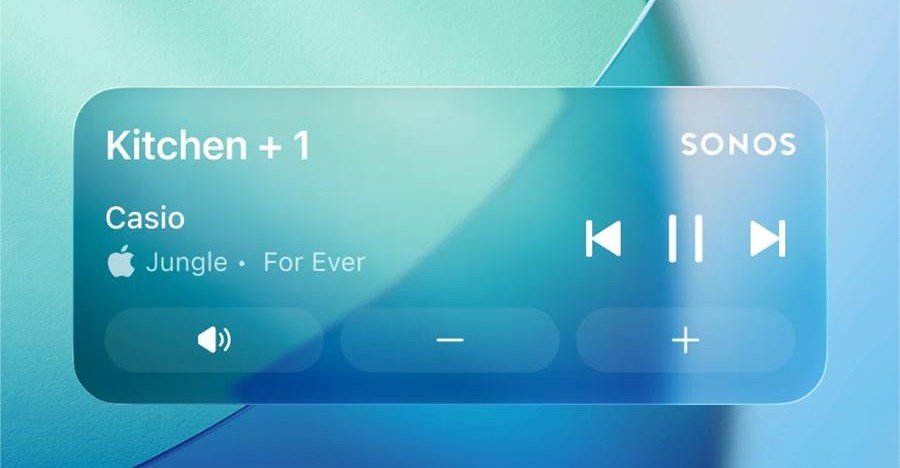
    Sonos released an update to its mobile app that finally introduces support for iOS’ Live Activities, giving iPhone users quick access to playback controls on their lockscreen. The added functionality is a “much requested, anticipated, and needed feature,” according to a post Sonos shared to Reddit today that was spotted by 9to5Mac.

    While some features like displaying album art are not available, the Sonos Live Activity provides basic details and controls when listening to music or podcasts through a Sonos system without having to fully unlock your iPhone and open the app.

    Support for Live Activities and lockscreen controls similar to what’s already available in the Android version of the Sonos app was teased by the company’s CEO Tom Conrad during an interview with Bloomberg last February. And following backlash to a major Sonos app update in 2024, support for Live Activities is off by default but can be enabled by navigating to both the Sonos app’s preferences as well as the Sonos app section of iOS’ settings.

    Once it’s turned on, the Live Activity will appear “after you initiate playback and then close the app” and displays the name of the group or room where audio was last playing from and the title of what you’re listening to. After playback stops, the Live Activity will automatically disappear from your lockscreen after 15 minutes.

    Support for the Apple Watch and CarPlay is included, but while the Live Activity will be displayed on your wrist or in your car, the controls aren’t supported there. It’s not known if or when those controls will ever work, but Sonos says its team is still working to improve the new feature, and when it comes to album art, the company is exploring “alternative ways to enhance the lock screen experience.”

    activities added controls finally iPhone live lockscreen Sonos
    Share. Facebook Twitter Pinterest LinkedIn Tumblr Email
    Previous ArticleWordPress.com targets the next generation of web creators with a free student plan
    Next Article Today’s NYT Mini Crossword Answers for Tuesday, Aug. 18
    • Website

    Related Posts

    AI Reviews

    Today’s NYT Mini Crossword Answers for Tuesday, Aug. 18

    AI Reviews

    Reddit begins testing a new audio and video experience, similar to popular TikTok videos

    AI Reviews

    Planned US Data Centers Set to Produce 24M Cars’ Worth Of Carbon Dioxide

    Add A Comment
    Leave A Reply Cancel Reply

    Top Posts

    Theban tomb reveals how Egyptian burial trends evolved in time

    0 Views

    Today’s NYT Mini Crossword Answers for Tuesday, Aug. 18

    0 Views

    Sonos finally added Live Activities controls for your iPhone lockscreen

    0 Views
    Stay In Touch
    • Facebook
    • YouTube
    • TikTok
    • WhatsApp
    • Twitter
    • Instagram
    Latest Reviews
    AI Tutorials

    Quantization from the ground up

    AI Tools

    David Sacks is done as AI czar — here’s what he’s doing instead

    AI Reviews

    Judge sides with Anthropic to temporarily block the Pentagon’s ban

    Subscribe to Updates

    Get the latest tech news from FooBar about tech, design and biz.

    Most Popular

    Theban tomb reveals how Egyptian burial trends evolved in time

    0 Views

    Today’s NYT Mini Crossword Answers for Tuesday, Aug. 18

    0 Views

    Sonos finally added Live Activities controls for your iPhone lockscreen

    0 Views
    Our Picks

    Quantization from the ground up

    David Sacks is done as AI czar — here’s what he’s doing instead

    Judge sides with Anthropic to temporarily block the Pentagon’s ban

    Subscribe to Updates

    Get the latest creative news from FooBar about art, design and business.

    Facebook X (Twitter) Instagram Pinterest
    • About Us
    • Contact Us
    • Terms & Conditions
    • Privacy Policy
    • Disclaimer

    © 2026 ainewstoday.co. All rights reserved. Designed by DD.

    Type above and press Enter to search. Press Esc to cancel.