

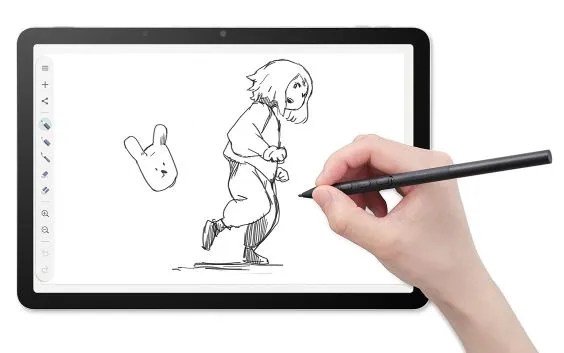
Since the advent of the internet, there has been a dedicated digital art community that’s all about creating through computing.
Wacom, a Japanese company founded in 1983, is considered one of the longstanding leaders in this sector. One of the oldest producers of graphics tablets in the world, Wacom has spent the last few years iterating on its Movinkpad series — a specialized Android tablet that creators can use to spin up digital art at the click of a button or the swipe of a stylus.
I’m not a professional artist, or even a hobbyist. But I am a tech enthusiast and was interested to see how a digital art newbie like myself might use a device like the Movinkpad.
Wacom lent TechCrunch a Movinkpad 11, the first tablet in the series. The Movinkpad 11 is not Wacom’s latest release. That’s the Movinkpad Pro 14, which came out last fall and costs substantially more at $899 and offers a number of impressive upgrades, including an OLED screen with 3K resolution and broader color spectrum. But I wanted to start with the first in the series to get to know Movinkpad from its earliest iteration.
The upshot: The Movinkpad 11 easy to setup and a capable device that won’t break your budget. At $500, it’s a little too expensive for a casual user who isn’t specifically interested in digital art. But for those who have a passion for digital doodling and not a lot of cash to throw around, it’s a relatively mid-range price point — stuck somewhere between budget picks like the Huion Inspiroy H640P (only around $30) and a more high-end item like Wacom’s own Cintiq Pro 27 (which is a whopping $3,500), or an iPad (up to $1,100).
For those unfamiliar with the digital art community, you might wonder why anyone would ever want to use one of these? If you’re into making art, why not just stick to paper and pencil?
Digital art affords a distinct kind of creative experience that is impossible to replicate anywhere else, proponents argue. Its patrons include graphic designers, cartoonists, animators, and even video game designers. Some traditional artists use tablet art as a sketching and conceptualization method, and then transfer their drawings onto paper. Others do the opposite, sketching something on paper and transferring it to their tablet. Whatever you’re into, the right tablet can go a long way towards helping you realize your creative vision.
Specs and setup
The Movinkpad 11 is an 11.45-inch device that comes with 8 gigabytes of memory and 128 gigabytes of storage, and is battery-free, with a USB charger. It weighs just 1.3 pounds, so it’s relatively light-weight and easy to carry around with you wherever you go.
It also comes with the Pro Pen 3, a 6.3-inch stylus that is easy to use, and includes three separate side buttons. Those side-buttons can be programmed to your liking. Users can also swap out and customize the stylus nibs to their choosing (Wacom offers a whole variety of $15 replacement nib packs of varying qualities).
Personally I found the stylus to be lightweight, easy to use, and similar to wielding a fine tipped felt pen.
The tablet was relatively straightforward to set up, although you’ll need to create an initial pin number to log into it. I questioned the reason for this level of security, at least for my sketches. (If you’re worried someone is going to steal your digital drawings, then your device will be locked and protected). Setting up the pin is easy enough though. Just head to the device’s settings, then Security and Privacy. Then you can choose your unlock settings to either swipe or none.
Since it’s an Android device, the Movinkpad can also be synced to your Google account, which could make integrating your creative materials significantly easier.
Movinkpad also comes with its own free digital art software, Wacom Canvas. With Canvas, users have some basic tools that they can use to get their digital sketches up and running. There’s also a paid app, Clip Studio Paint, which offers a larger range of features and capabilities (you can buy a license for a one-time fee that varies by version).
Depending on which program you’re using, the style and functionality of your stylus nib can also be adjusted. Within Clip Studio Paint, for instance, you can choose between a pen, paintbrush, or sketching pencil, and within each of those categories, there are a multitude of options.
The Movinkpad has quite a long list of competitors — including the iPad, which has its own variety of art apps and a dedicated stylus, dubbed the Apple Pencil. However, the Movinkpad offers a more focused and elegant solution than many of those options, and it comes from a longtime player in the graphics tablet space.
If digital art is your thing (or even if it’s not), the Movinkpad 11 is quite a bit of fun. I played around with it for several hours over a recent weekend and managed to work up some pretty goofy drawings. While none of my sketches are destined to hang in the Louvre, it was definitely a fun way to pass an afternoon.
When you purchase through links in our articles, we may earn a small commission. This doesn’t affect our editorial independence.