

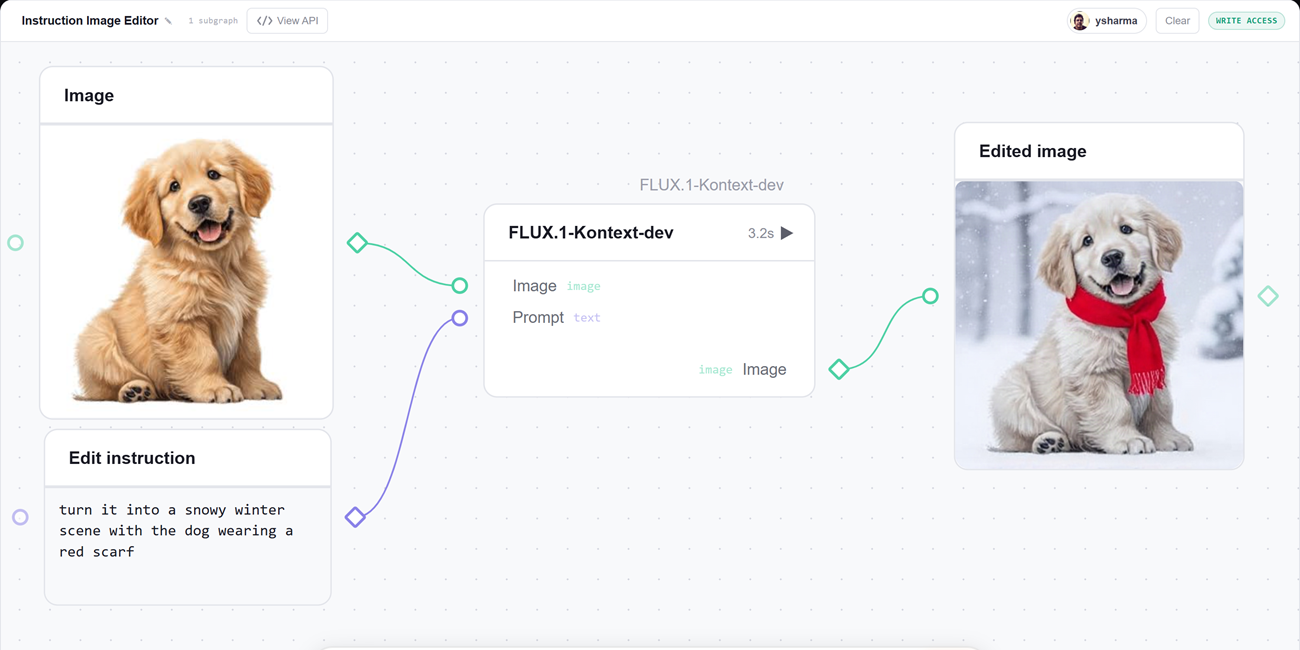
Most interesting AI apps are pipelines. You generate an image, then cut out its background if you want to, or edit it into something new. You write a script, then generate a voice for it, or swap the voice while keeping the script the same. We usually wire these steps together in Python, and the moment something looks off we go back to print-debugging to find which step produced the odd value.
gr.Workflow, built right into Gradio, makes the pipeline the interface. You describe your steps as a graph of typed nodes, and Gradio serves a drag-and-drop canvas where every node is runnable and every intermediate result is visible. The same graph is also a REST API and a one-command deploy to Hugging Face Spaces.
The best way to get the idea is to see a few workflows in action. Every app below is a live Huggingface Space you can open, run, and duplicate.
Edit an Image
Upload an image, type an edit (“turn it into a snowy winter scene”, “add sunglasses”, “make the car red”), and get the edited photo back. The whole app is a single node calling Qwen-Image-Edit on Hugging Face Inference Providers.
👉 Try the Image Editor Pipeline
Chain real models into a media studio
One graph, three pipelines. Start with a prompt and generate an image with FLUX, then pass it to a background-removal Gradio Space to turn it into a sticker. A topic becomes a voiceover through a text-to-speech Gradio Space, while the same topic becomes a catchy episode title through an LLM call.
That’s one canvas, two model calls through Hugging Face Inference Providers, and two calls to Gradio Spaces.
Since this is a workflow, each of the three outputs also gets its own REST endpoint: /sticker, /voiceover, and /episode_title. You can call any of them directly from code without opening the UI. See Call it from code below for a runnable example.
👉 Try the AI Media Studio
Fan-out image generation in parallel
Type in one idea, and it turns into a set of generated artwork all at once: a base image from FLUX, two AI re-imaginings of that image (a soft watercolor version and a neon cyberpunk take), and a gallery title written by an LLM.
Each image is generated directly from the prompt by a model node using Inference Providers, while the title comes from an fn node that calls an LLM. This is the fan-out pattern in action: one idea can feed multiple operators simultaneously, all generating in parallel.
👉 Try the Generative Art Lab
Profile a Hugging Face dataset
Type in a Hugging Face dataset ID, such as stanfordnlp/imdb or mteb/tweet_sentiment_extraction, and a single input fans out to four operator nodes that analyze the dataset live using the Datasets Server API.
You get an overview card, a preview of the first few rows, per-column statistics, and a distribution chart, all computed independently and in parallel. That’s the power of workflows!
👉 Try Data Detective
Run your own GPU model
Every node so far reaches out to Hugging Face. But an fn node is just Python, which means it can also run a model inside the Space on a GPU.
Decorate the bound function with @spaces.GPU and, when the node runs, ZeroGPU grabs a GPU for that call, runs the model, and releases it. We don’t always need to rely on Inference Providers or existing Gradio Spaces.
Check out this demo that animates a still image using Lightricks/LTX-Video loaded through Diffusers, running entirely through one node. gr.Workflow doesn’t need to know anything about your GPU setup. It simply calls the bound function.
👉 Try the ZeroGPU Animator
How it works, in a nutshell
Every workflow is a graph with three kinds of nodes: references (your inputs), operators (the steps that do work), and subjects (your outputs). An operator can be your own Python function, a model on Hugging Face Inference Providers, another Gradio Space, or a row from a Hub dataset. You connect them by dragging between typed ports, hit Run, and watch each result appear in place.
Call it from code
Every workflow you build is also an API, with no extra work. Each output becomes a REST endpoint named after its label, and you can call it from Python with the Gradio client. Here is a live, no-token example against the multi-endpoint demo Space, exactly as-is:
from gradio_client import Client

client = Client("ysharma/gr-workflow-multi-endpoint-API")

print(client.predict("hello there friend", api_name="/word_count"))
print(client.predict(20, api_name="/fahrenheit"))
Endpoints that call a model or a Space run under a Hugging Face token, so pass one when you create the client:
from gradio_client import Client, handle_file

client = Client("ysharma/gr-workflow-image-editor", token="hf_...")

edited = client.predict(
    handle_file("dog.jpg"),
    "turn it into a snowy winter scene",
    api_name="/edited_image",
)
Prefer plain HTTP? Every endpoint is reachable over curl too:
curl -s https://ysharma-gr-workflow-multi-endpoint-API.hf.space/gradio_api/call/word_count
  -H "Content-Type: application/json" -d '{"data": ["hello there friend"]}'
Build your own
The fastest way in is to open any demo above, click Duplicate, and start rewiring. From Python, it is as short as:
import gradio as gr

def your_function(text: str) -> str:
  pass

gr.Workflow(bind=[your_function]).launch()
For the full walkthrough, the operator kinds, the JSON schema, and reusable patterns, see the official gr.Workflow guide in the Gradio docs.
You can even build something as involved as AUTOMATIC1111 with gr.Workflow. Keep an eye out for our next post, where we walk through building it step by step. Here is a sneak peek 😉👇