


Close Menu
AI News TodayAI News Today

    Subscribe to Updates

    Get the latest creative news from FooBar about art, design and business.

    What's Hot

    As electric aspirations fade, Porsche sells its stake in Bugatti

    ‘Apex’ Review: Charlize Theron Netflix Thriller Avoids Rock Bottom, but Barely

    How to Improve Claude Code Performance with Automated Testing

    Facebook X (Twitter) Instagram
    • About Us
    • Contact Us
    Facebook X (Twitter) Instagram Pinterest Vimeo
    AI News TodayAI News Today
    • Home
    • Shop
    • AI News
    • AI Reviews
    • AI Tools
    • AI Tutorials
    • Chatbots
    • Free AI Tools
    AI News TodayAI News Today
    Home»Free AI Tools»How to get started with Codex
    Free AI Tools

    How to get started with Codex

    By No Comments2 Mins Read
    Share Facebook Twitter Pinterest LinkedIn Tumblr Reddit Telegram Email
    How to get started with Codex
    Share
    Facebook Twitter LinkedIn Pinterest Email

    Once you open Codex, create your first thread. A thread is like a chat in ChatGPT: a space where you go back and forth with Codex to accomplish a task.

    Codex keeps your projects and conversation history in the left sidebar, while the main workspace shows your current thread and the chat where you collaborate with Codex.

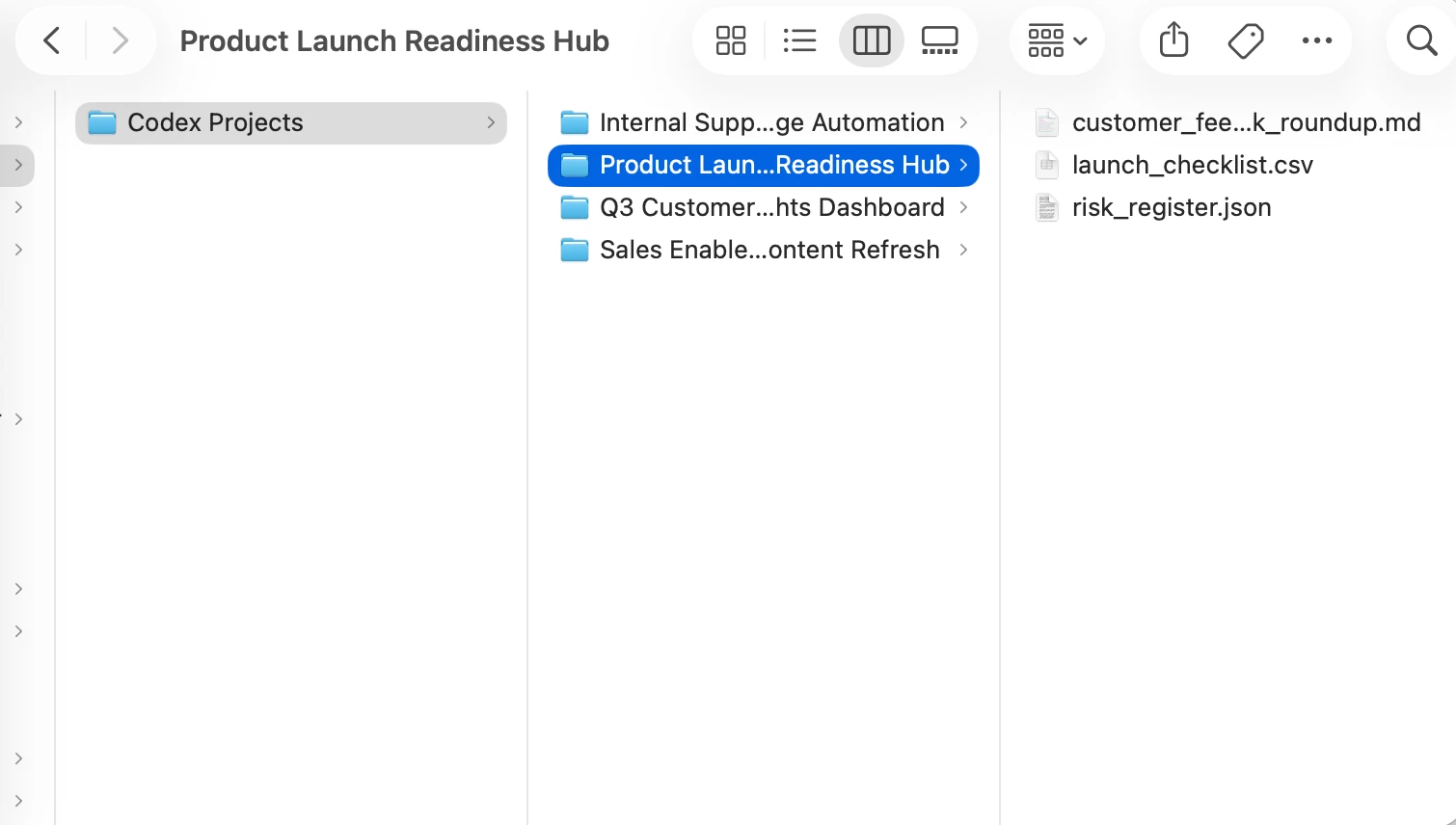
    You can create a standalone thread, but most of the time you’ll want to work inside a project. A project is connected to a folder on your computer:
    Codex folder image

    Tip: To keep things simple, create a folder on your computer named Codex. Inside that Codex folder, you can have a separate folder for each project.

    If you want Codex to work with specific files for a project, just drag them into the folder. If not, you can leave the folder empty and use it as the place where Codex creates new files for that project.

    Pick a first task that is simple and useful. For example, you might ask Codex to organize notes, clean up a small dataset, or compare two drafts of a document.

    First task in Codex

    Start with the default recommended Codex model, and increase reasoning for harder tasks.

    If you’re working in a project, you may see the term “Work locally” below the input box. This means “Codex can only work in that folder I designated, using the tools that I choose.” You’ll also see a dropdown menu asking whether you want to change permissions. We recommend sticking with Default permissions in a local environment when you’re getting started with Codex. Codex does not automatically get access to everything on your computer.

    Full permissions give Codex more room to act, which can be helpful for advanced tasks, but you should only use them when you understand what Codex is doing and you’ve checked with an admin.

    As you get more comfortable, you can give Codex bigger tasks. Start small, review what it does, and build trust one task at a time.

    Codex started
    Share. Facebook Twitter Pinterest LinkedIn Tumblr Email
    Previous ArticleA pelican for GPT-5.5 via the semi-official Codex backdoor API
    Next Article Today’s NYT Connections Hints, Answers for April 24 #1048
    • Website

    Related Posts

    Free AI Tools

    OpenAI’s ‘Spud’ dethrones Claude on the frontier

    Free AI Tools

    How to Use Transformers.js in a Chrome Extension

    AI Tutorials

    What is Codex? | OpenAI

    Add A Comment
    Leave A Reply Cancel Reply

    Top Posts

    As electric aspirations fade, Porsche sells its stake in Bugatti

    0 Views

    ‘Apex’ Review: Charlize Theron Netflix Thriller Avoids Rock Bottom, but Barely

    0 Views

    How to Improve Claude Code Performance with Automated Testing

    0 Views
    Stay In Touch
    • Facebook
    • YouTube
    • TikTok
    • WhatsApp
    • Twitter
    • Instagram
    Latest Reviews
    AI Tutorials

    Quantization from the ground up

    AI Tools

    David Sacks is done as AI czar — here’s what he’s doing instead

    AI Reviews

    Judge sides with Anthropic to temporarily block the Pentagon’s ban

    Subscribe to Updates

    Get the latest tech news from FooBar about tech, design and biz.

    Most Popular

    As electric aspirations fade, Porsche sells its stake in Bugatti

    0 Views

    ‘Apex’ Review: Charlize Theron Netflix Thriller Avoids Rock Bottom, but Barely

    0 Views

    How to Improve Claude Code Performance with Automated Testing

    0 Views
    Our Picks

    Quantization from the ground up

    David Sacks is done as AI czar — here’s what he’s doing instead

    Judge sides with Anthropic to temporarily block the Pentagon’s ban

    Subscribe to Updates

    Get the latest creative news from FooBar about art, design and business.

    Facebook X (Twitter) Instagram Pinterest
    • About Us
    • Contact Us
    • Terms & Conditions
    • Privacy Policy
    • Disclaimer

    © 2026 ainewstoday.co. All rights reserved. Designed by DD.

    Type above and press Enter to search. Press Esc to cancel.