


A new benchmark called VisionQ asks AI models to judge computer vision images on one named quality, such as how sharp an edge is. The authors tested 20 AI models acting as judges. The best one was right 63.1 percent of the time, which is a little under two times out of three.
Random guessing would be right 32.2 percent of the time, which is about one in three. So the best model is clearly better than guessing, but it still misses more than a third of the time. That gap is the reason for my article. If the best AI judge makes this many mistakes, you should test your own judge before trusting it.
These scores matter outside the lab too, because people already ask AI assistants to look at photos and answer. Suppose you take two photos of a medicine box to make sure the whole label is visible, and ask an AI assistant how much to take. Then you upload the same photos in the opposite order and ask again. If the answer changes, you need to know whether the label was hard to read or the image order affected the result.
I tested whether image order could affect a model’s answers. I wanted to know if the answer changes when I swap which picture the model sees first. If the model only looks at the pictures, swapping them should not change which one it picks.
In one part of my test, I showed Claude two pictures and asked which had fewer compression artifacts. Compression artifacts are the blocky smudges you get when a picture is squeezed into a tiny file. I asked this 24 times.
Claude picked the second picture in 23 of them, whatever the pictures were. In 12 of those, the second picture was the smudgy copy, so Claude picked the worse image and got it wrong. In the other 11, the second picture was the clean one, so its pick was right 11 times, by luck.
That result came from my own test images, so it may not hold for every kind of picture. It does not show how Claude would read a medicine label. For anything that matters to your health, check the label itself or ask a pharmacist.
When you ask “which image is better,” does the model judge the detail you care about, or does it pick the image that looks nicer overall? And does naming the detail in your question fix it?
I built a much smaller test of my own to find out. The images are original, so I could show them here. I made each pair by changing one thing in a picture, so I know which image should win. I did not reproduce VisionQ, so my numbers are not comparable to its scores.
I saved every answer and logged them all to Weights & Biases (W&B), a tool that records experiments. The W&B Report has the charts and tables.
By the end, you will have a short script that checks three things about your own image judge. Does it look at the detail you ask about? Does it pick by which image comes first or second? Does it make up an answer?
What is an AI image judge?
An AI image judge is a vision model that you show two images and ask a question about them. You might ask which photo is sharper, or which product picture is better. Teams use judges to check image generators and to sort large piles of pictures without a person looking at each one.
Suppose you ask two friends which restaurant has better service. One compares how quickly the waiters bring food and respond to requests. The other talks about the decorations. The second friend has answered a different question. An AI image judge can make the same mistake, focusing on a visible detail that doesn’t answer your question and then giving a confident answer.
How was the test built?
I made 12 original images with an AI image generator, such as a cafe sign, a chalkboard menu, a harbor, and a desert road. None has a logo, a face, or a person. For each image I built five pairs, and each pair differs from the original in one known way.
Four pairs are plain. One image is the original, and the other is blurred, covered in grain, heavily compressed so that blocky smudges appear, or darkened. The original is always the right answer for the detail that was changed, such as which image is sharper.
The fifth pair is a trap. One image has dull colors but is sharp. The other has vivid colors but is blurry. If a judge prefers pretty images, it should pick the vivid blurry one when asked which image is better. That gives 60 pairs.
The judge sees the two images as image A, the first one shown, and image B, the second, and answers with a letter. Each pair gets three questions. The first asks which image is better. The second names the detail, such as which image is sharper. The third asks which image is tilted more, even though neither image was tilted differently, and allows the answer SAME, which means no difference.
Every question runs twice, once with each image shown first. That checks whether a judge picks by what the image shows or by where it sits, first or second. The three judges are GPT-4o from OpenAI, Claude Sonnet 5 from Anthropic (called Claude from here on), and Gemini 3.1 Flash Lite from Google (called Gemini from here on). Each judge answered 360 questions, which is 60 pairs, 3 questions each, in 2 orders. So the test asked 1,080 questions in total.
How can you run the test on your own images?
Save the script below as judge_test.py in a new folder. It needs Python 3.9 or later, the packages numpy and pillow, and an OpenAI API key, which is the code that lets the script use OpenAI’s service. Put a few PNG images that you have the rights to in a folder called images, inside that same folder.
The script builds the four plain pairs for each image, asks the three questions in both orders, and prints four scores. The four scores are how often the judge picked the right image when asked which is better, and when asked about a named detail. They also show how often it gave the same letter in both orders, and how often it made up an answer on the tilt question. It tests one judge, GPT-4o, so it is a smaller version of what I ran. The full experiment also used Claude, Gemini, and the trap pairs, which this script leaves out.
Open a terminal in that folder and run these three commands. The first installs the two packages. The second sets your key. The third runs the test on the images folder.
This is the output I got when I ran it on two of my images, the cafe sign and the harbor. It is a tiny run with 48 questions, so treat the percentages as a check that the script works, not as results. The full experiment below uses all 12 images.
What did the judges get right?
Almost everything that I built into the pairs. On the plain pairs, GPT-4o picked the correct image on 97.9 percent of the “better” questions and on every named question. Gemini was right every time on both kinds of question. Claude scored 92.7 percent and 86.5 percent.
Every number is a percent. Higher is better, except for the last three rows, where lower is better. The first two rows each come from 96 questions on the plain pairs, and the trap rows each come from 24 questions. The tilt row comes from 120 questions. The same letter row compares the two orders for each pair, for both question types that have a right answer.
|
Measure (percent) |
GPT-4o |
Claude Sonnet 5 |
Gemini 3.1 Flash Lite |
|---|---|---|---|
|
“Which is better” correct, plain pairs |
97.9 |
92.7 |
100.0 |
|
Named detail correct, plain pairs |
100.0 |
86.5 |
100.0 |
|
Named detail correct, trap pairs |
100.0 |
100.0 |
100.0 |
|
Picked the vivid blurry image on the trap pairs |
0.0 |
0.0 |
0.0 |
|
Gave the same letter when the images were swapped |
0.0 |
15.0 |
0.0 |
|
Picked an image when the tilt did not differ |
72.5 |
17.5 |
28.3 |
The trap did not work. Not one judge preferred the vivid blurry image, even when the question only asked which image is better. For this kind of controlled difference, naming the detail did not change the answers. The judges already looked at the right thing.
I expected the opposite, and I want to be clear about that. I built the trap to catch a habit of preferring the prettier image, and it found none. This test says nothing about harder cases, such as two real photos that differ in many ways at once.
Why did one judge pick an image when nothing differed?
For each image pair, I asked each judge which image was tilted more. I chose tilt because none of my changes tilts a picture, so neither image was more tilted. The correct answer was SAME.
GPT-4o still picked one image in 87 of its 120 replies, which come from 60 pairs in 2 orders. That is 72.5 percent. Claude picked one in 21 replies, and Gemini did so in 34. In those replies, the models chose A or B when the images did not differ in the detail they were asked to judge.
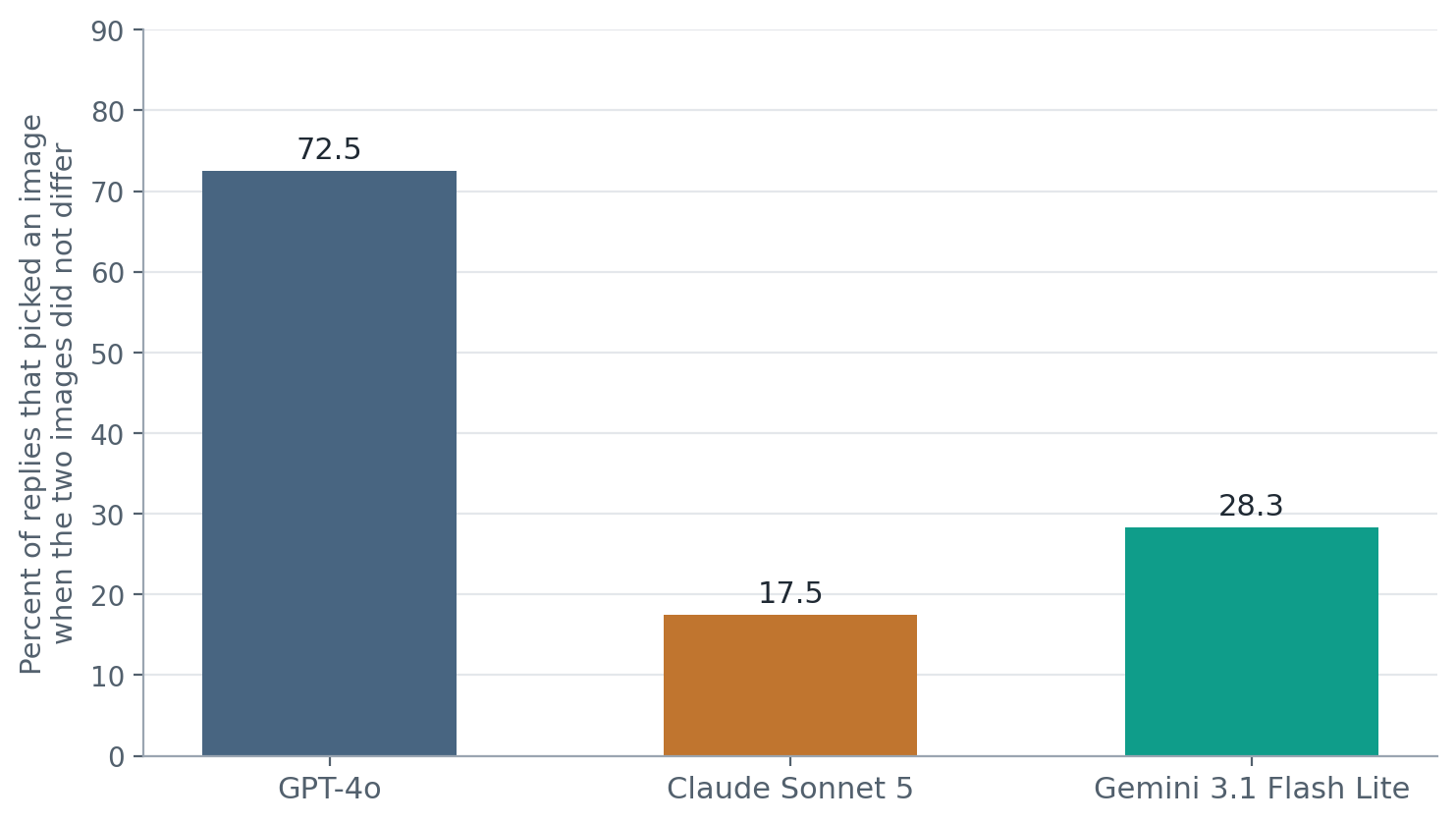
On the 12 compression pairs, GPT-4o picked an image in all 24 replies. Sometimes it wrote a full sentence, such as “Image A is tilted more.” The invented answers still sound sure of themselves, which makes this problem easy to miss.
Here is a question for you. In these pairs, one image was blurrier, grainier, or darker, even though the tilt was the same. If a judge picks one of them anyway, should that count as wrong? I allowed SAME only on this question, and your answer decides how bad GPT-4o’s number looks.
Why did Claude fail the compression question?
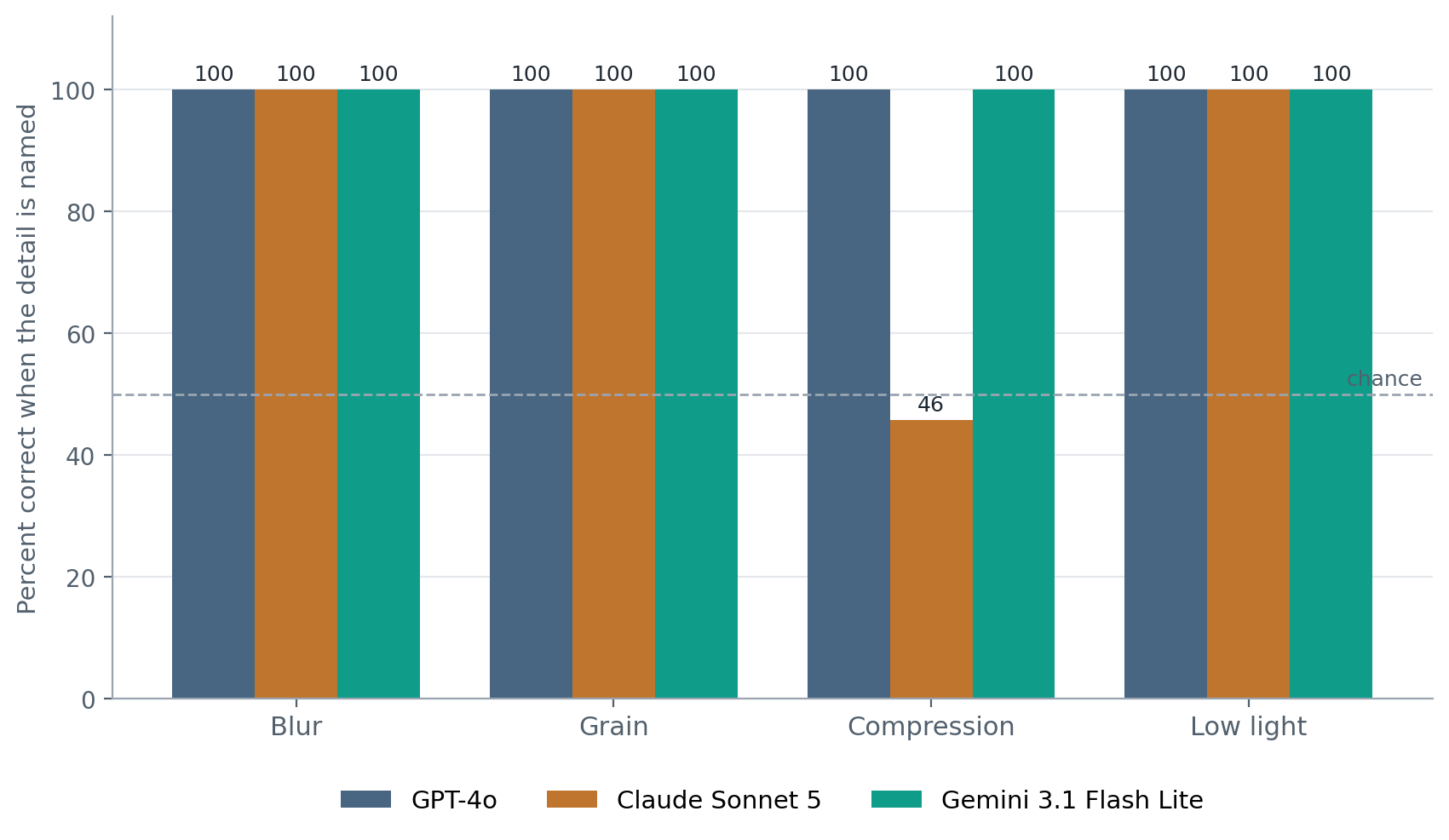
Claude got every blur, grain, and low light question right. On compression, it was right in only 11 of 24 questions. That is about what you would get by flipping a coin. The problem was not that Claude could not see the images.
Asked which image had fewer compression artifacts, Claude answered B, the second image, in 23 of the 24 replies. It did that whether the clean or the compressed copy was shown second. So Claude was not judging compression on that question. It was leaning toward the second image.
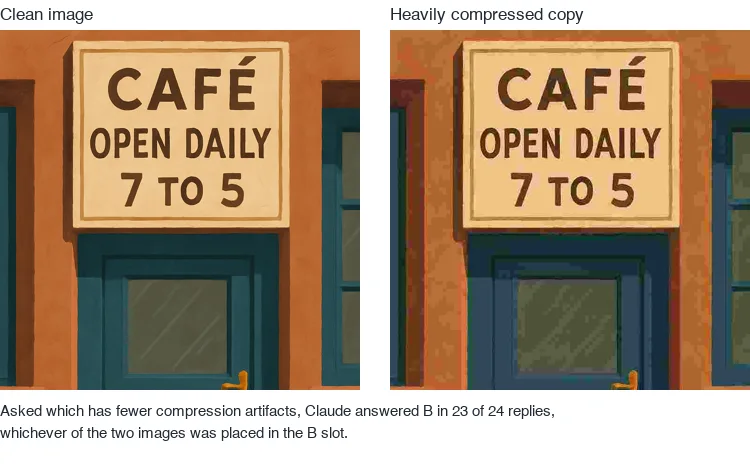
This is why asking in both orders matters. With only one order, Claude would have looked almost always wrong or almost always right, depending on which image came first. When the clean image came first, it was right 0 times out of 12. When the clean image came second, it was right 11 times out of 12. Only the second order showed that the answer followed the position and not the picture.
How do the runs show up in Weights & Biases?
In W&B, each recorded test is called a run. The W&B Report has one run per judge and a comparison table. Each judge’s run also holds every reply, so you can filter for the 23 Claude replies that answered B.
The logging happened after all 1,080 questions were answered, from the saved files, so it records what happened and did not change it. The logging script is optional, and the test above works without a W&B account.
Did my test agree with VisionQ?
I went in expecting two things. VisionQ showed that even the best AI judge is right only 63.1 percent of the time, so I expected judges to be unreliable. And I expected them to pick the prettier picture when the question was about something else, such as sharpness.
My test partly agreed and partly did not. On my simple pairs, the judges did far better than VisionQ’s best score. GPT-4o and Gemini were right every time when the detail was named, and Claude was right 86.5 percent of the time. None of them preferred the prettier picture. This does not contradict VisionQ, because my differences were easy and made by me, and VisionQ uses real figures from research papers.
What I did not expect was two other problems. GPT-4o picked an image in 72.5 percent of replies when the two images did not differ in tilt, and it sounded sure each time. Claude answered B, the second image, in 23 of 24 replies about compression, whichever image was there. So the judges did not fail where I looked, and they failed in two places I had not looked. That is the reason to test your own judge in your own way.
What does this test leave out?
-
Small and artificial. There are 60 pairs from 12 images made by an AI image generator, and each pair differs by one controlled change. Real photos differ in many ways at once, and judges may do worse there.
-
Gemini is the smaller model. Google’s main model ran out of free quota during the test, so Gemini here means 3.1 Flash Lite. It is smaller and cheaper than the other two, so its scores say less about Google’s best model.
-
Randomness setting. GPT-4o and Gemini ran with the randomness setting, called temperature, at 0, which keeps their answers as steady as possible. Claude does not accept that setting, so it ran at its default.
-
The SAME option. Only the tilt question allowed SAME. Offering it on every question would change the numbers.
-
One wording per question. I used one prompt, the exact words sent to the judge, for each question. A different wording could change a judge’s habits, especially Claude’s habit on compression.
-
Not VisionQ. I did not run VisionQ’s images, so I cannot say how these judges would score on it.
-
A fixed moment. These are the models available on the day of the test.
What should you take away?
-
Check image order on a sample. Ask the same question with the images swapped. If the answer keeps following the first or second position, the judge may be responding to position instead of the image. In my test, Claude chose the second image in 23 of 24 replies to the compression question.
-
Check whether the judge can say it cannot tell. Use a pair that is the same on the quality you ask about, and allow the answer SAME. In my test, neither image was more tilted, but GPT-4o still picked one in 72.5 percent of those replies. This is a warning from this test, not proof that it will make up answers on every real task.
-
Test for the habit that matters to your task. I expected the judges to choose a vivid, blurry image over a sharp, dull one. None did in my generated image pairs. That result does not show how they will judge real photos, so test examples from your own work.
The visual trap I set did not fool the judges. None chose the colorful, blurry image. Claude fell into a different trap. It kept choosing whichever image came second. That is why it is useful to test both image orders.
Use these checks on a sample before relying on an AI judge to sort product photos, compare generated images, or make another decision based on image quality. My results come from 60 simple pairs made from 12 generated images, so they show what to test, not how all image judges behave.
What should you try next?
Run the script on ten images from your own work. Make pairs that test the quality you care about, show each pair in both orders, and include a pair that is the same on that quality. Check whether the judge follows the image, notices when there is no difference, and avoids a habit that could affect your task.
Selected sources
-
Vu Dinh Xuan, Duc-Hai Nguyen, and colleagues. VisionQ: VLM-as-a-Judge Taxonomy, Dataset and Benchmark for Qualitative Analysis in Computer Vision. arXiv, September 30, 2026. Source for the 20 judges, the 63.1 percent best score, and the 32.2 percent chance level. Licensed CC BY 4.0, which allows reuse with credit.
-
ReML-AI. VisionQ repository. Code under MIT, annotations under CC BY 4.0, and figure crops limited to non commercial research use. No VisionQ images appear in this article.
-
Weights & Biases. Track experiments. W&B documentation, for logging the runs and building the report.