


Close Menu
AI News TodayAI News Today

    Subscribe to Updates

    Get the latest creative news from FooBar about art, design and business.

    What's Hot

    Human-in-the-Loop Without Killing Throughput | Towards Data Science

    Open-weight AI companies are the Valley’s hottest acquisition targets

    Save hundreds on a TCL mini-LED TV with quantum dots and high refresh rate

    Facebook X (Twitter) Instagram
    • About Us
    • Contact Us
    Facebook X (Twitter) Instagram Pinterest Vimeo
    AI News TodayAI News Today
    • Home
    • AI News
    • AI Reviews
    • AI Tools
    • AI Tutorials
    • Chatbots
    • Free AI Tools
    • Artificial Intelligence
    AI News TodayAI News Today
    Home»AI Tools»From One Agent to a Team: Understanding Codex Subagents
    AI Tools

    From One Agent to a Team: Understanding Codex Subagents

    By No Comments5 Mins Read
    Share Facebook Twitter Pinterest LinkedIn Tumblr Reddit Telegram Email
    From One Agent to a Team: Understanding Codex Subagents
    Share
    Facebook Twitter LinkedIn Pinterest Email

    When we ask Codex to complete a task, we usually think of it as a single agent.

    But if some tasks are complex enough and involve several distinct types of work, Codex will try to divide the problem into smaller tasks and spawn separate agents to work on them.

    These delegated agents are called subagents.

    Each subagent works in its own thread and focuses on only one part of the original task. At the same time, the main agent coordinates their work and produces the final response by aggregating the subagents’ results.

    As practitioners, this naturally leads to this question:

    How can we use subagents deliberately for our own problems?

    In this post, we’ll explore Codex subagents through a hands-on case study. Along the way, we’ll see how to define and delegate work to specialist agents, inspect their individual threads, and let the main agent combine their findings into a final result.

    ···

    1. Case Study: Planning a Trip with Specialist Agents

    Here, we consider a travel planning task.

    Suppose we want to plan a four-day solo trip from Zurich. We have a total budget of 1,200 Swiss Francs. Our potential destinations include Lisbon, Prague, and Copenhagen, and we care about convenient travel, museums, and local food.

    For this task, we prepare three specialist agents:

    • Travel logistics agent

    • Budget analyst

    • Experience researcher

    Each specialist will evaluate all three destinations from its own perspective. The main agent will then collect their findings, compare the tradeoffs, and recommend one final destination.

    1.1 Defining the Specialist Agents

    We start by defining our specialist agents.

    Codex allows us to define custom agents for a specific project. We can do this by adding TOML files under .codex/agents/:

    .codex/├── config.toml└── agents/    ├── travel-logistics.toml    ├── budget-analyst.toml    └── experience-researcher.toml

    Each agent definition requires three fields:

    • name: how Codex identifies the agent.

    • description: what this agent is.

    • developer_instructions: how the agent should behave.

    Here is the definition for the travel logistics agent:

    name = "travel_logistics"description = "Travel specialist for comparing routes and journey convenience across candidate destinations."developer_instructions = """Evaluate every destination from a travel-logistics perspective.Return concise, source-backed findings to the main agent."""

    For the budget analyst:

    name = "budget_analyst"description = "Budget specialist for comparing the likely trip cost across candidate destinations."developer_instructions = """Evaluate every destination from a trip-budget perspective.Return concise, source-backed findings to the main agent."""

    And the experience researcher:

    name = "experience_researcher"description = "Destination specialist for comparing how well each option fits the traveler's stated interests."developer_instructions = """Evaluate every destination against the traveler's stated interests.Return concise, source-backed findings to the main agent."""

    A custom agent can also specify its own model, reasoning effort, sandbox configuration, tools, and skills. If we do not override those settings here, the three specialists will inherit them from the main Codex session.

    Additionally, we add a small project-level configuration in .codex/config.toml:

    [agents]max_concurrent_threads_per_session = 3

    This allows up to three subagent threads to run concurrently.

    1.2 Running the Subagent Workflow

    Now that the three specialists are available, we can give the main agent our specific task:

    I am planning a four-day solo leisure trip from Zurich from October 15 toOctober 18, 2026. My total budget is CHF 1,200.Compare Lisbon, Prague, and Copenhagen. I care about convenient travel,museums, and local food.Use the `travel_logistics`, `budget_analyst`, and `experience_researcher`agents in parallel. Each agent should evaluate all three destinations from itsspecialty. Wait for all three agents, then recommend one destination andexplain the main tradeoffs with source links.

    In the prompt, we explicitly asked the main agent to use our defined specialist agents when solving the task.

    To run the case study, we can start Codex from the project directory with web search enabled:

    Note that we only need to enable web search for the main session. The three subagents inherit this capability when Codex spawns them.

    Then, we can submit the prompt:

    Figure 1. Launch Codex and submit the prompt. (Image by author)

    We see that Codex started the three specialist agents in parallel:
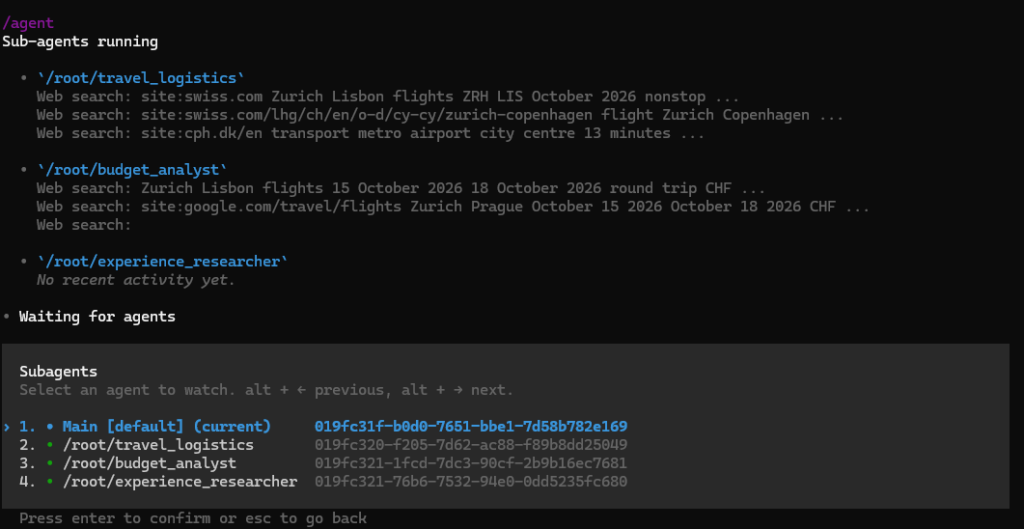
    Figure 2. Codex spawned three specialist agents. (Image by author)

    We can inspect their progress directly from the CLI using:

    This opens the agent-thread view, as each specialist has its own context, tool activity, and eventual result:
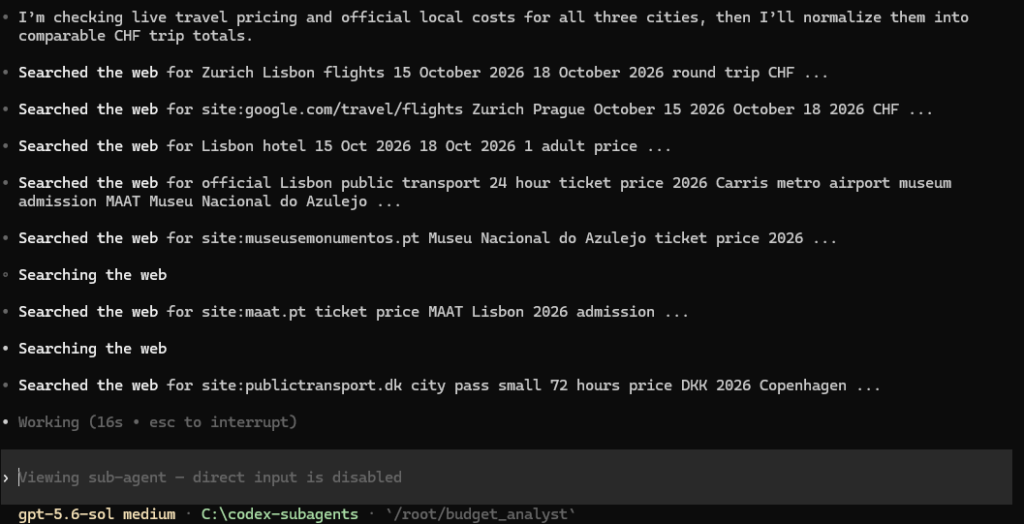
    Figure 3. We can inspect individual agents’ activities. (Image by author)

    Once all three agents finish, their findings are returned to the main agent for synthesis.
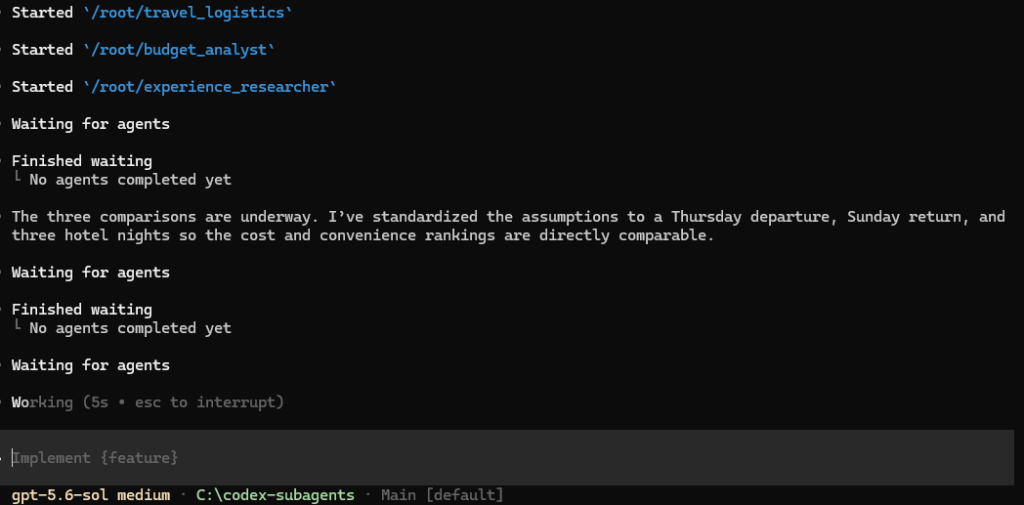
    Figure 4. Main agent supervises the whole process. (Image by author)

    1.3 Inspecting the Results

    Now we can check what they produced.

    I can see that each subagent returned a recommendation from its own perspective. Very interesting, they did not arrive at the same conclusion: the travel logistics subagent suggests Copenhagen, the budget subagent recommends Prague, while the experience subagent says Lisbon is the best choice.

    The main agent collected individual responses and recommended Lisbon as the best balance across travel convenience, cost, museums, and local food.

    So, we can see that the main agent indeed compared the subagents’ findings against the original requirements and made an overall judgment, instead of simply repeating one answer or concatenating three reports.

    ···

    2. When the Subagent Pattern Is Useful

    The subagent pattern is useful when a task contains several different types of work that can be completed independently and then combined. A main agent is orchestrating the workflow, and once individual subagents have completed their tasks, it can combine their findings and produce the final answer.

    In our case study, we requested the three subagents directly in the prompt. This is the simplest approach for a one-off task, but it is of course not the only way to invoke the pattern.

    We can also specify this pattern in a dedicated AGENTS.md, if we want Codex to follow this strategy throughout a project. Additionally, if the workflow addresses a recurrent task, we can package the instructions in a SKILL.md. Codex can then follow the skill instruction and delegate subagents accordingly.

    Just keep in mind: the agent files (i.e., .codex/agents/*.tom) still define who the subagents are, while the prompt, AGENTS.md, or skills define when and how they should be used.

    agent Codex Subagents Team Understanding
    Share. Facebook Twitter Pinterest LinkedIn Tumblr Email
    Previous ArticleApple One and Apple TV subscription prices increase by up to 20 percent
    Next Article Save hundreds on a TCL mini-LED TV with quantum dots and high refresh rate
    • Website

    Related Posts

    AI Tools

    Human-in-the-Loop Without Killing Throughput | Towards Data Science

    AI Tools

    Amazon Code Whisperer: The AI Programming Assistant Built for AWS

    AI Tools

    Connecting My LangGraph AI Agent to Postgres

    Add A Comment
    Leave A Reply Cancel Reply

    Top Posts

    Human-in-the-Loop Without Killing Throughput | Towards Data Science

    0 Views

    Open-weight AI companies are the Valley’s hottest acquisition targets

    0 Views

    Save hundreds on a TCL mini-LED TV with quantum dots and high refresh rate

    0 Views
    Stay In Touch
    • Facebook
    • YouTube
    • TikTok
    • WhatsApp
    • Twitter
    • Instagram
    Latest Reviews
    AI Tutorials

    Quantization from the ground up

    AI Tools

    David Sacks is done as AI czar — here’s what he’s doing instead

    AI Reviews

    Judge sides with Anthropic to temporarily block the Pentagon’s ban

    Subscribe to Updates

    Get the latest tech news from FooBar about tech, design and biz.

    Most Popular

    Human-in-the-Loop Without Killing Throughput | Towards Data Science

    0 Views

    Open-weight AI companies are the Valley’s hottest acquisition targets

    0 Views

    Save hundreds on a TCL mini-LED TV with quantum dots and high refresh rate

    0 Views
    Our Picks

    Quantization from the ground up

    David Sacks is done as AI czar — here’s what he’s doing instead

    Judge sides with Anthropic to temporarily block the Pentagon’s ban

    Subscribe to Updates

    Get the latest creative news from FooBar about art, design and business.

    Facebook X (Twitter) Instagram Pinterest
    • About Us
    • Contact Us
    • Terms & Conditions
    • Privacy Policy
    • Disclaimer

    © 2026 ainewstoday.co. All rights reserved. Designed by DD.

    Type above and press Enter to search. Press Esc to cancel.