


What is JEV, and where and why you need it
Imagine you are building a robot to sort mail. You give it a set of simple rules: if the envelope is small, put it in the “letters” bin; if the envelope is large, put it in the “packages” bin. This is how traditional computer programming works. It relies on exact, rigid rules that humans write, usually in the form of “if-then” statements. However, the world is messy, and a lot of information does not fit neatly into these rigid rules. What happens when the robot receives a postcard, a strangely shaped padded envelope, or a letter that got crumpled in transit? The strict “if-then” rules fail because they cannot understand the context or nuance of the object.
To solve this problem of messy information, programmers started using large language models, like the ones that power popular chatbots. These models are incredibly smart and can understand complex language, nuance, and intent. Instead of a rigid rule, you can simply ask the model, “What kind of mail is this?” and it will provide a thoughtful answer. But there is a catch: these large models operate like a human having a slow, deliberate thought process. If you ask the chatbot about the mail, it might reply, “Based on the dimensions and the presence of a stamp, I believe this item is a letter. Therefore, you should place it in the letters bin.” This type of slow, reasoned thinking is fantastic for writing essays or solving complex problems, but it is a terrible way to quickly sort thousands of pieces of mail. The robot has to wait for the whole paragraph to be generated, read it, and then try to extract the actual decision from the middle of a sentence. This process is slow, unpredictable, and prone to breaking if the model changes its phrasing even slightly.
This brings us to a fundamental divide in how AI can think, similar to how human brains work. Psychologist Daniel Kahneman described two systems of human thought: System 1 and System 2. System 2 is the slow, deliberate, reasoning part of the brain you use to solve a math problem or write a complex essay. This is exactly how most modern chatbots operate; they generate text step-by-step to arrive at a conclusion. System 1, on the other hand, is fast, automatic, and intuitive. It is the part of your brain that instantly recognizes a friend’s face or knows that a stove is hot. Until very recently, AI struggled to have a true System 1 process. Developers were forced to use slow, chatty System 2 models for everything, even simple, split-second decisions. Kahneman wrote this picture of human thinking in Thinking, Fast and Slow (2011). Here it is an analogy: one kind of program writes its answer out slowly, and another kind judges in a single step.
This is where Jev comes in. Jev is an AI model specifically designed to act as a System 1 engine for computer programs. Instead of generating paragraphs of text, Jev is built to look at a piece of messy information and instantly return a clean, structured decision. It takes the intelligence and understanding of a large language model but strips away the conversational aspect. Instead of saying, “I believe this is a letter,” Jev simply outputs a direct, machine-readable command like [CATEGORY: LETTER, CONFIDENCE: 98%]. Because it does not have to generate conversational fluff, it makes decisions incredibly quickly.
The main advantage of Jev is that it allows developers to build “smart if-statements.” It acts as a bridge between the rigid, fast world of traditional programming and the smart, messy world of AI. In your daily life as a developer, you need this kind of fast decision-making everywhere. Imagine a customer support system that receives a new message. Before deciding which slow, expensive AI agent to wake up to handle the request, you need to quickly determine if the message is an urgent technical problem, a billing question, or just spam. You need a fast, deterministic switch to route the information to the right place. You cannot afford to wait for a chatbot to ponder the question; you need a System 1 decision engine to instantly classify and route the data. Jev provides that reliable, high-speed routing, making automated systems much faster, cheaper, and less prone to breaking when handling real-world information.
The architecture of JEV
To understand how Jev makes these lightning-fast decisions, we first need to look under the hood of those traditional, chatty AI models. At their core, popular AI chatbots are essentially highly advanced autocomplete systems. For those who are unfamiliar with transformer architecture: when you give them a prompt, they do not actually “think” about a complete answer all at once. Instead, they look at your sentence, calculate the most likely next word (in form of tokens), and print it out. Then, they look at your original sentence plus that new word, and calculate the next word after that. This step-by-step guessing game is called “autoregressive generation,” and it happens on a continuous loop until the AI finally guesses a stopping word. While this looping process is brilliant for writing a poem or a computer program, it creates a massive speed limit. If you just want the AI to tell you if an email is spam, it still has to spin that guessing loop again and again just to piece together the sentence, “This email appears to be spam.”
Diagram of autoregressive generation next to a single forward pass that emits a category and a confidence.
A chatbot guesses the next word again and again. Jev reads the text once and returns a decision.
Since this continuous loop is the bottleneck, creating a fast System 1 engine requires completely changing how the model delivers its final answer. To do this, engineers look at an AI model as having two distinct parts: a “backbone” and a “head.” The backbone is the massive, underlying network that actually understands human language, context, and nuance. It has read millions of books and websites to learn how words relate to each other. On top of this backbone sits the head, which is the specific part responsible for taking all that deep understanding and translating it into a final output. In a standard chatbot, the head is specifically designed to play that slow word-guessing game. But the beauty of modern AI architecture is that these heads are interchangeable.
To transform a slow, chatbot type of AI into a fast Jev engine, developers perform a kind of digital brain surgery: they remove the word-guessing head entirely. The deep language understanding in the backbone remains completely untouched, meaning the AI still comprehends all the messy nuances of the human text it reads. However, instead of attaching a head that generates words one by one, engineers attach a “classification head.” This new head is built for a completely different job. Instead of looping continuously to string a sentence together, the classification head is designed to look at the AI’s understanding of the text and instantly push out a mathematical score across a few predefined categories, such as “True,” “False,” or “Spam.”
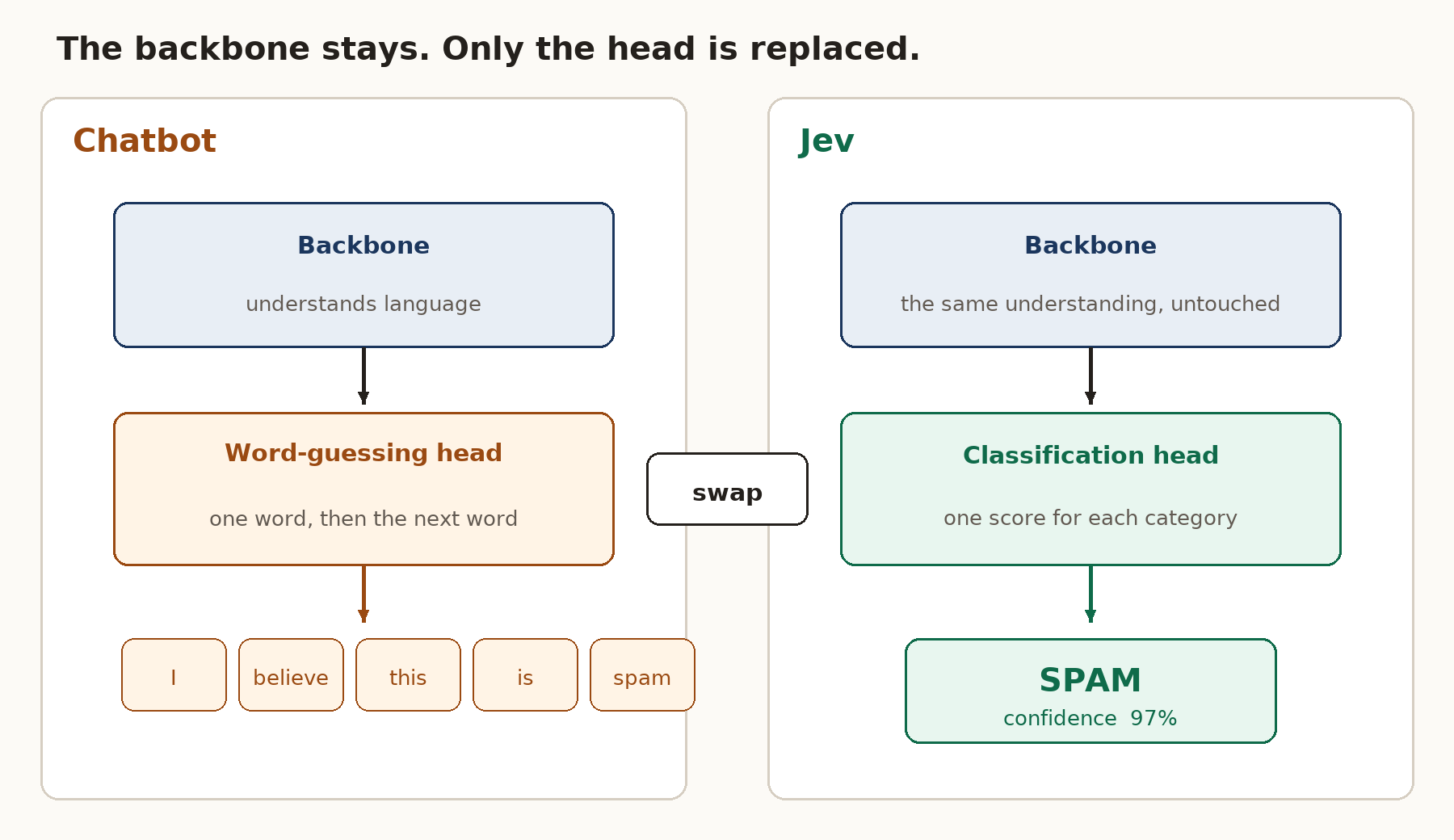
Diagram of the head swap. The language backbone is unchanged. The word-guessing head is replaced by a classification head.
The backbone is the same on both sides. The chatbot head guesses words. The Jev head returns one score per category.
By swapping the head, the entire physical operation of the AI changes from a slow loop to a single, lightning-fast pass. When you feed a piece of text into this newly constructed Jev model, the backbone processes the context all at once. Then, the new classification head acts like a funnel, forcing that rich understanding directly into a final decision without ever generating a single word. Because the computer only has to run through its network exactly one time, rather than looping over and over for every word, the decision is made in a fraction of a second. This architectural shift from a looping word-guesser to a single-pass evaluator is the secret to Jev’s speed. It turns a conversational thinker into a highly efficient, reliable switch that traditional software can depend on instantly.
Implement a custom JEV from open-weight models
Understanding this physical head swap is the first step toward building your own System 1 engine at home. To begin this construction, you need an open-source backbone to serve as your foundation. For those who do not know, a model named Qwen is an excellent candidate for this job. Created as a family of open-source AI models, Qwen comes in very small, lightweight sizes that can easily run on a normal computer rather than a massive data center. Since you want your decision engine to be incredibly fast and local, starting with a compact version of Qwen provides the perfect balance of deep language understanding and speedy performance. The one used here is Qwen2.5-Coder-1.5B-Instruct. It is small, and it already understands code, which matters for the demonstration at the end.
The project that follows is three small scripts: model.py, train.py, and check_names.py. They need a few ordinary Python packages.
Loading Qwen is the download. A tokenizer turns your text into the small pieces the model knows how to read. AutoModel asks for the backbone alone. The downloaded bundle still contains the word-guessing head. This call simply does not pick it up. The first run fetches the files from Hugging Face. Later runs reuse the copy already on your machine.
Once you have downloaded your compact Qwen model, you must perform the digital brain surgery mentioned earlier. In the world of programming, models like Qwen are downloaded as a bundle of code and mathematical weights. By default, this bundle includes the word-guessing head, which is usually labeled in the code as a language modeling tool. You must write a script to load only the underlying backbone, leaving that slow word-guessing head behind. In its place, you attach a new, empty piece of code designed strictly for classification. This new classification head acts as a blank slate, ready to output exact mathematical scores for categories like “Yes,” “No,” or “Neutral.”
Here is that blank slate. The backbone is locked: requires_grad = False means those numbers are not allowed to change. self.score is the new head. It has two scores, because this tutorial uses two categories, match and mismatch. The width of the head matches the width of the backbone’s understanding, so the two pieces can connect.
forward is the single pass. The backbone reads the whole snippet from left to right. By the last real word, it has seen everything, so the head looks only at that spot and pushes out its two scores. torch.no_grad() tells the computer not to keep notes for changing the backbone. Only the small head is allowed to learn. No word is written out.
Although the backbone already understands human language perfectly, this newly attached head is entirely untrained. It does not yet know how to connect the AI’s deep understanding to your specific categories. To bridge this gap, you must provide the model with a clear set of examples, which programmers call a training dataset. If you want your custom Jev to route emails, you will show it thousands of examples of text paired with the correct category, such as pointing out which messages are spam and which are urgent. During this training process, the massive backbone remains mostly frozen and unchanged, while only the small, new classification head learns how to map the information into your exact rules.
A mailbox router might need thousands of rows. The shape of the lesson is the same with a small table, so this tutorial uses a few dozen short Python functions. The label is match when the name agrees with the body, and mismatch when it does not. The same name appears both ways, so the head has to read the body. It cannot cheat by treating the word add as always wrong.
Those rows live in data/names.csv. One command teaches the head and saves only that small piece to artifacts/jev_head.pt. The backbone stays where Hugging Face put it.
The heart of train.py is short. Compare the head’s two scores with the true label, then take a small step that updates the head alone.
model.score.parameters() is the short list of numbers allowed to move. The backbone is not on that list. When the run finishes, the script prints how many numbers were trainable. You should see a few thousand, against the billion-plus that belong to Qwen and stayed frozen.
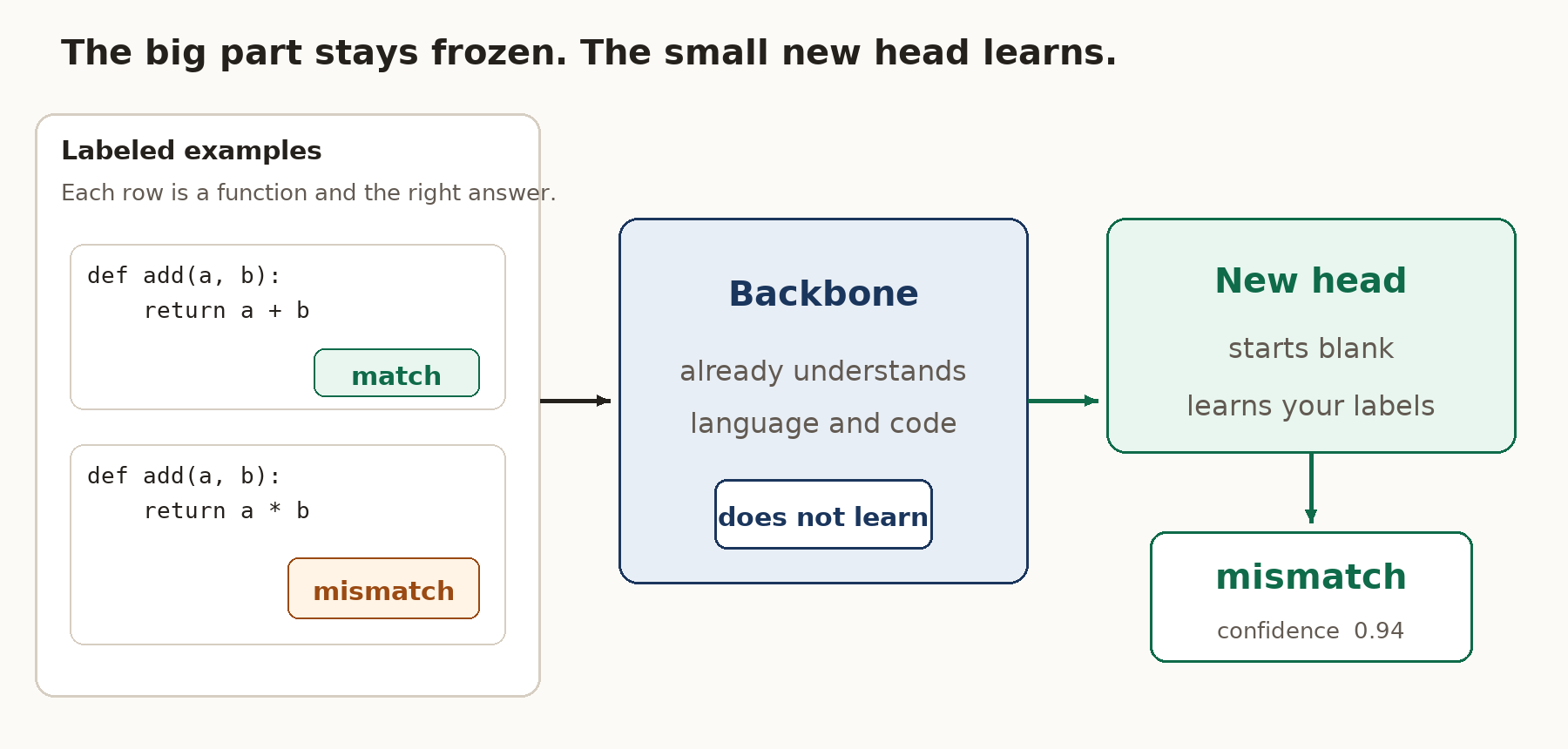
Training diagram. Example functions carry the right answers. The Qwen backbone stays frozen. Only the new classification head is updated.
The examples carry the right answers. The backbone does not learn. The new head does, and it answers with a label and a confidence.
After this training is complete, there is one final step required to make the model truly useful for daily tasks. Since AI models consume a massive amount of computer memory, running even a compact Qwen model continuously in the background can slow down your entire machine. To solve this problem, developers use a mathematical trick called quantization to shrink the physical size of the model. Quantization is like taking a massive, high-resolution photograph and compressing it into a smaller file size; it might lose a microscopic amount of detail, yet it still clearly shows the picture while taking up a fraction of the storage space. By compressing your new, custom-built Jev engine, you ensure it can sit quietly in your computer’s memory, instantly ready to route and decide without ever slowing down your other important software.
quantize.py is that step. It packs the large linear layers of the backbone down to 8-bit integers and prints how many gigabytes you had before and after. This particular packing runs on the CPU, starting from the ordinary 32-bit copy of the backbone. In one run that copy fell from 6.17 GB to 0.93 GB, and def add(a, b): return a * b still came back mismatch. The name check in the next section still loads the ordinary backbone, so the table there stays easy to match on your own machine.
A useful example demonstration for your daily use
Imagine you have just finished a small Python file. It is full of little helpers: add, subtract, is_even, maximum, and others like them. You wrote them quickly. A few of the names do not tell the truth about the body underneath them.
add multiplies. is_even checks for an odd number. maximum returns the smaller of the two numbers. The file is still valid Python. Nothing is spelled wrong. There is no ordinary if-then rule for this, because the rule would have to understand what the name means and what the body does.
The whole file is sample_module.py. It has 27 functions. Most of them are honest. subtract really subtracts. is_odd really checks for odd numbers. Mixed in with those are the dishonest ones, plus one ordinary leftover, so you can see what a normal editor notices:
Open that file in VS Code with the Python extension turned on, and look at the Problems list. The list can see the unused import at the top of the file, and it can see unused_note, the scratch line that nothing ever reads. It does not list add, is_even, or maximum. Those names disagree with their bodies, and the editor has no check for that.
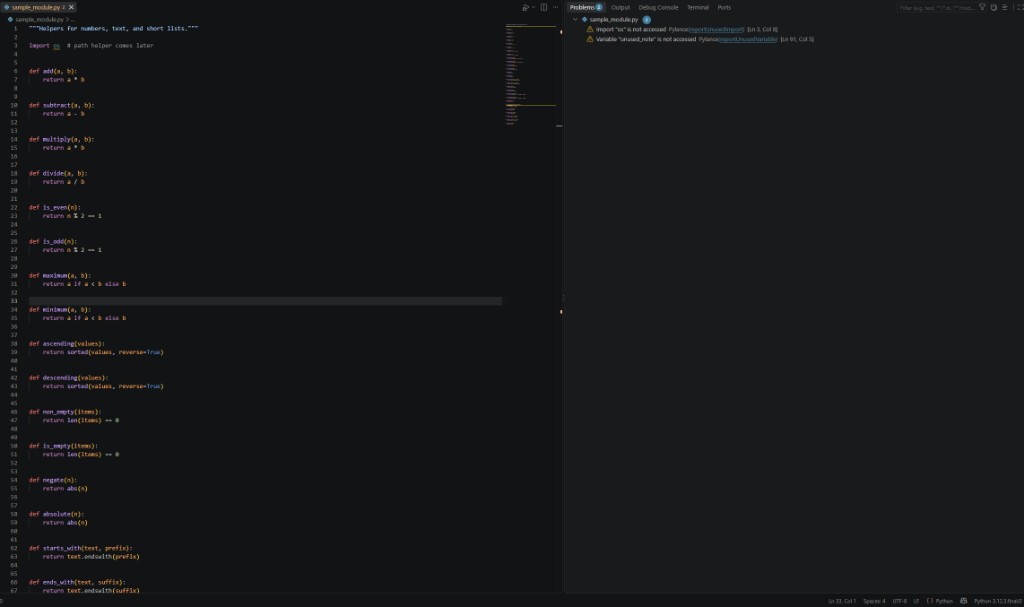
The Problems list names the unused import and unused_note. It does not name add, is_even, or maximum.
check_names.py is the smart if-statement. It splits the file into functions, gives each one to the trained head, and prints a label with a confidence. It never writes a sentence. It only reads functions written at the top of the file. A function hiding inside another function, or a method sitting on a class, is left alone.
A few of the lines look like this. The full run flags 10 of the 27 functions.
rectangle_area comes back as a match, even though the editor complains about the scratch note. That is the split between the two tools. The editor enforces rules you can write down, such as “this name is never used.” Jev answers a messier question: does this name mean what this body does?
You can use the same command on a module you just finished.
The program’s exit status is the switch a larger tool can listen to. Status 1 means at least one name did not agree with its body. Status 0 means the head agreed with every function it read. Put that command in the check that runs before a commit, and the file is judged in one pass before you share it. Training happens once. After artifacts/jev_head.pt exists, checking a file only uses the saved head.
···
To access the complete code for this tutorial, including the training table, the demo file, and the scripts that load Qwen and train the head, visit https://github.com/AnubhabBanerjee/Qwen-jev.